Product / Build
Product: AIDA64 (Portable)
Version / build: 8.20.8100
OS: Microsoft Windows 11 Pro | OS Version: 10.0.26200 N/A Build 26200
Summary
AIDA64 can crash with an EAccessViolation if the user starts Help → Check for updates and then closes the NetUpdate/update window (X) before the operation completes.
Steps to Reproduce (100% reproducible)
Launch AIDA64 Portable.
Go to … (ellipsis) → Help → Check for updates.
While the NetUpdate dialog shows “Connecting to NetUpdate Server – Processing…”, click the X to close the update window before it completes.
AIDA64 throws an application error and terminates.
Actual Result
AIDA64 crashes and exits.
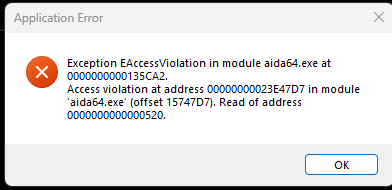
Error dialog shows:
Application Error
Exception EAccessViolation in module aida64.exe at 0000000000135CA2.
Access violation at address 000000000023E47D7 in module ‘aida64.exe’ (offset 15747D7).
Read of address 0000000000000520.
(Screenshot attached.)
Expected Result
Closing the NetUpdate/update window should either:
cancel the update-check safely, or
allow the update-check to continue without referencing UI resources,
and AIDA64 should not crash.
Notes / Observations
Network connectivity to the update server is fine at the transport layer:
Resolve-DnsName update.aida64.com returns 104.248.16.228
Test-NetConnection 104.248.16.228 -Port 443 succeeds
This crash is specifically triggered by closing the NetUpdate window mid-operation, suggesting a UI-lifetime / callback issue (e.g., worker thread continuing to post progress/status to a window/object after it has been destroyed).
Suggested Fix (hypothesis)
When the NetUpdate dialog is closed, the update-check should:
set a cancellation flag and stop the worker cleanly, and/or
detach UI callbacks (verify window handle/object validity before posting updates),
to prevent access to freed UI/state.
Attachments
Screenshot of crash dialog (EAccessViolation).