bukshta
-
Posts
4 -
Joined
-
Last visited
Content Type
Profiles
Forums
Events
Everything posted by bukshta
-
I see. Thanks.
-
Hello. Any feedback?
-
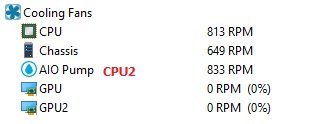
Thank you very much. But may be it would be better to rename AIO Pump to CPU2 as in structure I mentioned above (as in similar software)? If not tnan better to place AIO Pump on the second place after CPU and Chassis will be on the third place.
-
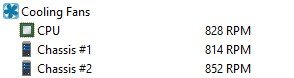
I have got new motherboard ASRock B850I Lightning WiFi and faced whith wrong CPU and Case fans RPM sensors displayed information. Now I have next structure and how it has to be: CPU ---> has to be CPU2 (the first case fan connected into AIO Pump Fan Connector) Chassis #1 ---> has to be CPU (CPU fan connected into CPU Fan Connector) Chassis #2 ---> has to be Chassis (the second case fan connected into Chassis Fan Connector) In other monitor softwear all fans sensors are displayed correctly. I hope for your help. yhank you in advance. isasensordump.txt