


Matt-One
-
Posts
16 -
Joined
-
Last visited
Matt-One's Achievements






-
Great!! Thank you Fiery.
-
No, i don't see it as a secondary monitor. I think the original software is a bit easier and more intuitive to use for creating and editing themes. However, AIDA offers more customization options and more settings for the values you can display from your sensors. For example, with AIDA you can choose whether to display network speed in MB or KB, whereas the original software doesn't seem to offer that option (or maybe I just haven't found the setting). Keep in mind, though, that I'm new to AIDA and I'm still learning how to use it, so I can't really make many more comparisons yet.
-
You can now find the firmware on waveshare website. Take the correct firmware inch. 7inch-USB-Monitor - Waveshare Wiki EDIT, If you're having issues with the software displaying correctly on your monitor, these are the steps I followed: I installed the firmware on the SD card. At first, I experienced a few minor issues. When I started my PC, I would see the Waveshare logo followed by the "Loading" message. Sometimes the white theme with the astronaut would appear, and other times I would see the screen with the instructions for enabling the display in AIDA. The display also restarted itself many times. I tried switching between the USB-C cable and the 9-pin cable. I was also able to access the display using waveshare pcmonitor software, where I deleted the astronaut theme that was installed. I'm not sure if the installed theme was causing the problem. After deleting it, I now only see the Waveshare logo during startup, and the display is now working correctly with AIDA. My monitor is the 7inch connected with the 9pin cable on the motherboard.
-
same reply to me... we have to wait
-
I’m waiting for the firmware; when I receive it, I’ll get back to you with my comments
-
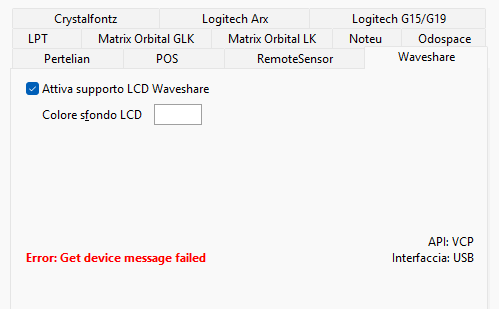
First of all, I'd like to sincerely thank the AIDA64 team for the time, effort, and support you've dedicated to implementing my monitor's brand into the software. I really appreciate your willingness to look into this and make the necessary changes. As you suggested, I'll contact the monitor manufacturer and ask if they can provide me with the latest firmware version. Once I receive it, I'll update the monitor and test everything as soon as possible. I'll report back with the results. Should I connect the monitor via the USB-C port, or should I use the USB cable connected to the motherboard? Does it make any difference for AIDA64, or will either connection work the same? At the moment I'm still getting this error, but I believe it's probably related to the monitor's firmware, since my unit is about a year old. I'm testing it on a the free version of the software because i'm new to it, (but i will but i think this is the only option i need to activate in order to let the software work. I'm currently using the trial version of AIDA64, i'm new to it, i think this is the only option to turn of in order to make the monitor work. I'll definitely be purchasing a license to support the time and effort you've put into this. I think for my use and with this monitor, the extreme version works, right?
-
Hello, any news about waveshare monitors? Thank you
-
thank you so much. I can't wait to see it
-
Hi AIDA team, any news for waveshare support? Thank you.
-
Thank you for the good news
-
Answer sent.
-
Hi Fiery, any news about the Waveshare monitor? 😅 Thank you
-
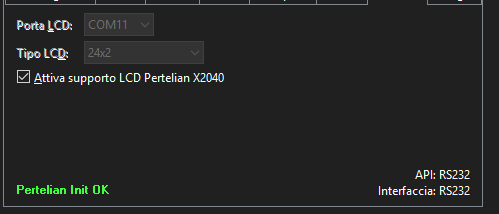
thank you, it would be great because i think Aida is better in terms of monitoring, i never used Aida but if i can do other Dump or something to help support this monitor just let me know if i can help I also tried the Pertelian LCD how suggested to the user before, but the screen seem to be off, or i don't know how to see the theme on the monitor :
-
Hi everyone, Waveshare USB monitor 7" dump here, i think it's the one on COM11, i don't know why i can't see the Manufacturer. 7inch-USB-Monitor - Waveshare Wiki I connected it with the 4pin to 9pin cable directly on the motherboard, but there is also an usb c port. any way to make it work with AIDA? Thank you. usbdump.txt
-
Hello, i'm new here, i know a bit the software but i ner used it on secondary monitor. I bought some months ago a 5" monitor, that one with the proprietary software, but it brokes and i want to get a new one. Can you suggest me please a 7" USB monitor? I would like to put it into the case of my PC and connect it to the 9pin port of the motherboard. Are there monitors with these specifications that work with aida? I found one monitor on aliexpress but i don't know if i can put link here. Thank you so much