GaHile
-
Posts
57 -
Joined
-
Last visited
-
Days Won
19
GaHile's Achievements





-
 Hey hey hey! 😄 It’s a little too quiet in here… Come on, guys - let’s make some noise! 🔥📣 @Loyd Thank you so much for your continuous support. It truly means a lot! 🙏 I hope you’ve had a chance to test the Sensors Order in SynQ Manager and verify that it’s being saved in the same order as the sensors are added, including when any movement/changes are made up/down. @BHSY Thank you for all the testing, feedback, and amazing ideas that keep the ball rolling! 🚀 I really appreciate your support, guidance, and all the effort you’re putting in to keep this moving forward. @Surjeet No “thank you” for you haha! 😂 As you already know, you’ve been making everything possible behind the scenes since Day One. LOL! 🙌 @Everyone - Now I want to hear from all of you! 👀 What would you like to see next in SynQPanel? What new features, ideas, or possibilities should we explore? Let me kick things off with my first point: 1. Open up Add-ons! I’m going to work on making Add-ons open so anyone can build and add their own add-ons to SynQPanel. The possibilities are endless! 🔥 Thanks again, everyone, for the feedback and support. It genuinely helps us uncover real-world use cases, identify edge cases, and keep making the experience better for everyone. 🙏 Now… don’t be shy - let’s hear those ideas! 😄
 -
Yes, that’s normal for now, so please don’t worry. 😊 We’ll continue improving this in future updates. Regarding the transparent background, did you experience the same issue when running without OpenGL? If so, I can dig deeper into it in my test lab and see what we can do to improve it. 👍 Thanks again for the feedback - it really helps us identify these edge cases and make the experience better. 🙏
-
Its out now: https://github.com/sursingh-hub/SynQPanel/releases/tag/v1.0.5 I will make Add-ons open for everyone in the next update. Currently, they are closed as I want SynQPanel to be flawless and stable. I hope you understand!
-
Please elaborate more and I will look into it!
-
Please let me know what kind of icons are they. I mean format: PNG16, 32 .ico etc.
-
@BHSY @PatrickP @Surjeet @Loyd: Please check and now panel manager order will remain intact when you move sensors up and down in the list. Earlier, only items were getting added as the last item. Please check and share your feedback! Hi Everyone! I am excited to announce 🎤 that 🎉SynQPanel v1.0.5 is now available.🎉 • Fixed Duplicate Layers & Z-Order on AIDA Imports: Prevented imported sensors from generating duplicate text layers. Sensors now draw their own labels, keeping your layer list clean and preserving the exact front-to-back visual layout (Z-order) from AIDA (Now if you move sensors in Manager, its position will be saved and remains intact) • Fixed System Macros Overwriting ($CPUMODEL, etc.): Prevented hardware macros from being permanently overwritten with your PC's actual specs when saving. The visual panel will now dynamically show your real hardware names, while safely preserving the raw macro tags in the save file so profiles can be easily shared • Fixed Missing Right-Alignment: SynQPanel now correctly reads and applies Right-Align formatting from imported AIDA text and sensors, and updates the UI toggle buttons to match • The "Butter" Glide Dynamics approach: Add buttery gauge physics (removes crossfade ghosting) • Separate Icons for Sensors and Add-ons: Easy Distinguish • Bug Fixes & Improvements: 📢 Recommended update for all users. Thank you to the AIDA team and community for feedback, suggestions and logs that helped refine this release. 🙏 The update is available on GitHub here: ENJOY 🎉 https://github.com/sursingh-hub/SynQPanel/releases/tag/v1.0.5 Feedback and suggestions are always welcome. 🙏 Thank you again for the support! 🙏
-
🚀 Hey Guys! I'm back! 😎 First of all, thank you so much for all your love, support, and warm wishes. It truly means a lot! ❤️ Just give me a couple of days, and we'll be ready to rock and roll again! 🔥 I'll be taking some time to go through all your messages and answer everyone's questions one by one, so hang in there! As for the delay... my graphics card decided to call it quits! 😅 And with GPU prices being all over the place right now, it's been quite an adventure. But no worries-we're not letting that slow us or our show down! The spirit is high, the comeback is on, and the best is yet to come! 💪🎉 See you all very soon! ❤️
-
After Flip Clock, I am excited to share something experimental: The "Butter" Glide Dynamics approach: Add buttery gauge physics (removes crossfade ghosting) to your custom gauges and they will feel sliding. Please see and share your thoughts if you feel any difference: ❤️ This lovely panel was shared by @BHSY 😍 Screen Recording 2026-03-17 172945.mp4 @Loyd I have now fixed the issue where new sensors/items were added to the bottom of the list and changing there position up was not getting saved.
-
Thank you so much for your kind and encouraging words! Your support truly means a lot 🙏 Please find the answers to your questions below: 1. Vertical Bars Yes, vertical bars are available. Simply decrease the width and increase the height, and the bars will automatically adjust to a vertical orientation. Example: 2. Fix Screen Option Could you please try enabling the Fix Screen option and let me know if it works on your end? Your feedback will help us confirm everything is functioning as expected. In addition, I’ll also check whether we can include a reset button (or hotkey) to quickly restore the application to its default state. Please feel free to reach out if you need any further assistance - we’re always happy to help! 😊 Thank you!


-
Thank you! I will try to reproduce the issue and see if anything can be done here Looking absolutely amazing! The clean panel design and the way SynQPanel has been used really stand out. We’ll take care of the remaining issues step by step… slowly but surely. It’s truly encouraging to see the download numbers growing and people being curious enough to try something new. That kind of support means a lot ❤️ 🙏
-
Thank you! I will look into it 👍 Hope you are not using or enabled OpenGPL Rendering for the panel.
-
@BHSY @Loyd Hi Everyone! I am excited to announce 🎤 that 🎉SynQPanel v1.0.4 is now available.🎉 ❤️ So many New Things ❤️ Flip Clock Enhancements – Full Flap (Please note that you one need images 0 to 9 with names 0 to 9 only to have the full new style full flap single digit clock) Dual Rendering Styles Added Single Digit mode alongside classic Split-Flap Split-Flap: Full-width image sets (00–59) for traditional airport-style displays Single Digit: Independent digit animation using 0–9 assets Synchronized Digit Logic Tens and ones flip in perfect sync during rollover (e.g., 19 → 20) Preserves realistic mechanical behavior Visual Improvements 3D lighting and dynamic shading based on flip angle Real-time hinge and ambient depth shadows Smooth ease-in-out animation curves (replaces linear motion) UI & Customization & Options Live interactive preview Smart auto-sizing for both single- and double-width assets Adjustable animation speed (Minutes / Hours) Shadow intensity and 3D lighting strength controls Redesigned, space-efficient properties panel Import Validation Automatic image-set validation (0–9 vs 00–59) based on selected mode Prevents incomplete or mismatched configurations System & Stability Improvements Core Hardening Improved XML parsing to safely handle malformed or partial config files Hardened shared-memory IPC for improved long-running stability Export Fix Fixed .sqx export modifying or omitting spzip configuration Sensor & Weather Fixes CPU Fan: Prevented unexpected source switching Days of the Week: Corrected incorrect day image display 7-Day Forecast: Added extended forecast support Hourly Weather: Added hourly temperature and rain probability Bug Fixes & Improvements: SynQPanel now waits for AIDA64 if it launches first and auto-connects when AIDA64 starts (no restart required) “Startup Delay” now correctly saves and updates the Windows Logon Task Wattage sensors retain decimal precision after .sqx import Fixed missing hourly weather icons and incorrect time display after re-importing deleted profiles Custom sensor unit spacing now mirrors AIDA64 formatting exactly (°C, °F, %) Fonts without explicit styling now default to Regular/Normal instead of Thin/Hairline TimeFlow absolute sensors now auto zero-pad to two digits (e.g., 05) 📢 Recommended update for all users. Thank you to the AIDA team and community for feedback, suggestions and logs that helped refine this release. 🙏 The update is available on GitHub here: ENJOY 🎉 https://github.com/sursingh-hub/SynQPanel/releases/tag/v1.0.4 Feedback and suggestions are always welcome. 🙏 Thank you again for the support! 🙏
-
Thank you so much for your kind words and support - it truly means a lot. I’m really glad the animated sensor panel adds value for you. Especially when you mention it as a “savior” - genuinely motivates us to keep improving every day. Your support is deeply appreciated. 🙏 Regarding the video flickering: this is usually related to performance limits rather than a strict resolution or bitrate cap. Larger videos (higher resolution/bitrate) naturally consume more GPU/CPU resources, which can cause random flickering. You may try the following steps: Please check Settings > Performance > Target Frame Rate and try increasing it to see if it improves the smoothness. Consider slightly reducing the video resolution or bitrate and test again. Keep in mind that each screen has its own refresh rate and hardware limitations. If the display refresh rate is lower, or if many sensors, images, and animated elements are active simultaneously, it can affect playback smoothness and cause flickering. In short, the more resources the panel uses (multiple sensors, high-resolution assets, animations, large videos), the heavier the load becomes - and this can sometimes impact video stability. We are continuously optimizing the app and removing bugs one by one, and feedback like yours helps us improve further. If possible, please share your panel resolution, display refresh rate, and video specs - I’ll be happy to look into it further. Are you facing such issues with all the panels or specific ones?
-
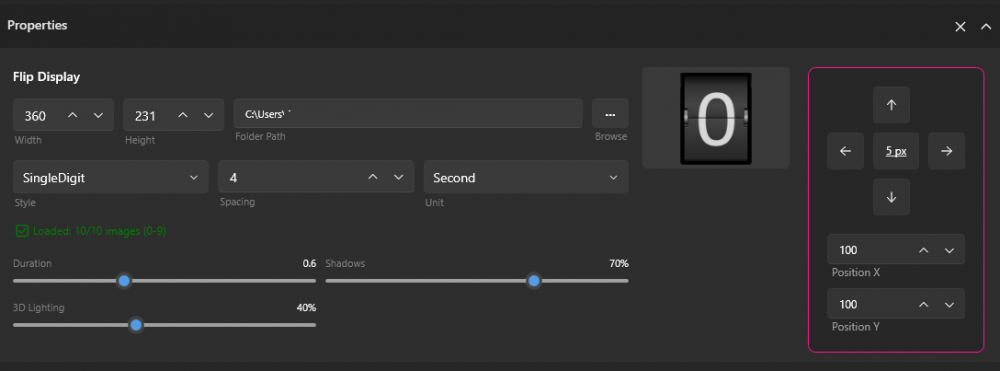
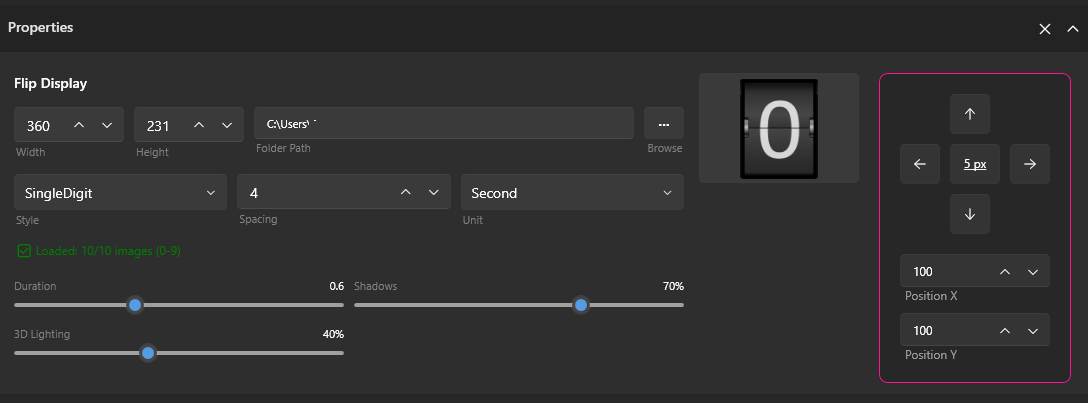
Your images are looking amazing and perfect! Something is off as the preview display should show 00 but its showing 0 only. Please delete the flip sensors and start from the scratch. Please use a different name folder for these images and once selected, the preview should show 00 I tried to reproduce the issue; however, did not face any such issue. Something is bothering to get correct two digit numbers for flip
-
It sounds like you're referring to SynQPanel. Just to clarify, at this moment, the color can't be changed. Could you let me know where you're trying to adjust the color? That'll help me better understand the situation. For now, you'll need to create images numbered 00 to 59 and name them accordingly. Here's the format: However, good news! In the upcoming build, you won’t even need to create all 00-59 images. Simply prepare images numbered 0-9, and SynQPanel will automatically handle the rest for you! 🎉