I'm seeing the same thing on all four of my Samsung SSD's. There are two options in the sensor panel for the SSD's, but it's only the two identical numbers to choose from. So it seems AIDA64 is not actually picking the 2 temperatures out of the 3 that are not identical.
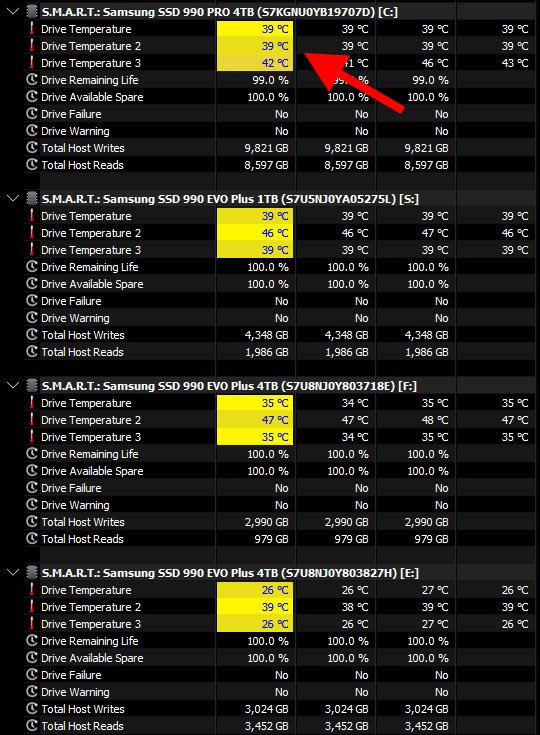
In this screen shot I've highlighted the sensor readings from HWiNFO. The two temperature options you get in AIDA64 are the 1st and 3rd options shown in HWiNFO. I was able to verify this on my 'C' drive as you can see in this case the third number is actually different. When selecting the second (#2) sensor from AIDA64 it's actually showing the 42° of the third sensor in HWiNFO.
It would be great to be able to see what's typically the hottest reading from my SSD's. According to Gemini, the second number is the controller temp:
Gemini - "HWiNFO typically displays three distinct temperature sensors for Samsung NVMe SSDs (like the 970/980/990 Pro) to monitor different components: Drive Temperature (NAND/General), Drive Temperature 2 (Controller), and sometimes a 3rd sensor (often related to another component or a specific NAND zone). The controller (usually Temp 2) generally runs much hotter than the NAND flash."