FatBoyNL
-
Posts
85 -
Joined
Content Type
Profiles
Forums
Events
Everything posted by FatBoyNL
-

What are GPU1 and GPU2 in HW monitoring if it already has an iGPU?
FatBoyNL replied to calyp50's topic in Hardware monitoring
The "iGPU" temp in the Sensor section seems to be originating from a different temp sensor source on the iGPU/CPU. Which is a good thing. But to solve your 'GPU problem' in AIDA64, just completely disable the iGPU in UEFI BIOS if you can. There is absolutely no reason to use it when you already have a (discrete) dGPU 😈 -
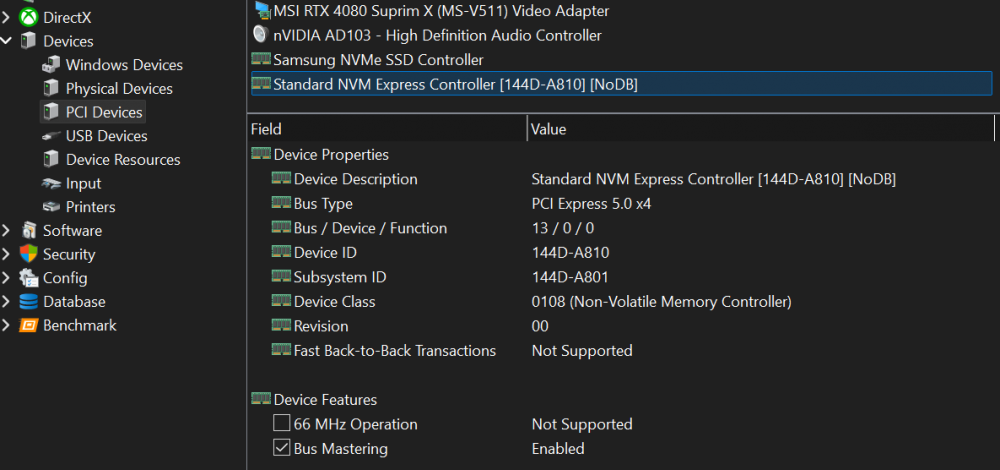
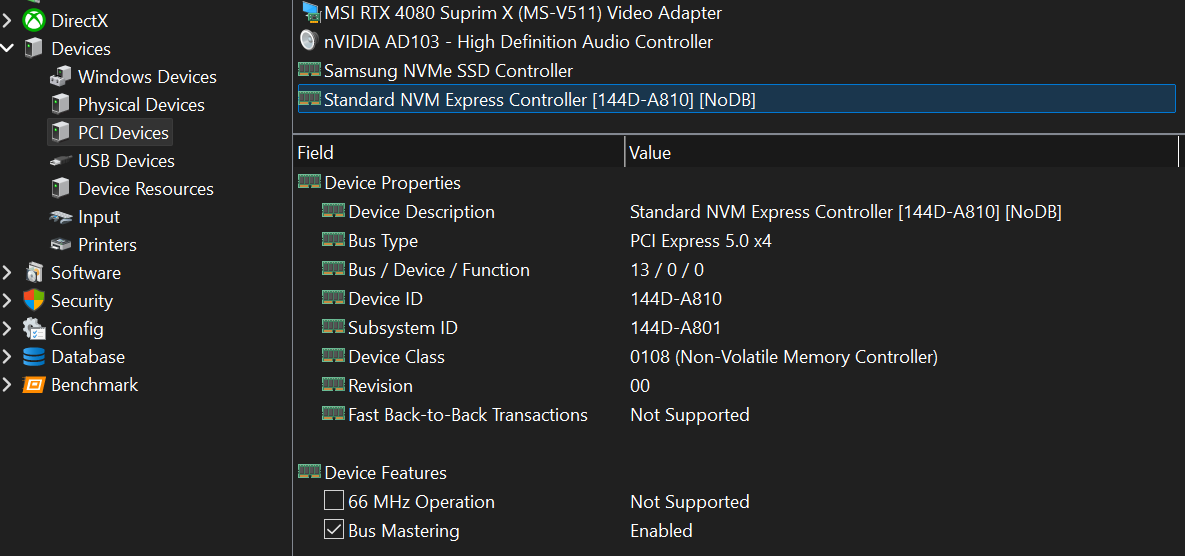
Hi, My new Samsung SSD 9100 Pro seems to be missing some entries yet in the hardware database. Under "Motherboard > Chipset" and "Devices > PCI Devices", a "Standard NVM Express Controller [144D-A810][NoDB]" is listed. The NVMe controller of my older Samsung SSD 990 Pro is listed correctly as a "Samsung NVMe SSD Controller" though. I attached some screenshots for reference below. EDIT: @Fiery By the way, what would be the appropriate forums section for reporting things like this in the future? Thanks! EDIT 2: I'd like to add a suggestion about using different names for the different types of the "Samsung NVMe SSD Controller". Would it be possible to add a suffix in AIDA64 (e.g. "Samsung NVMe SSD Controller (PCIe 5.0)" and "Samsung NVMe SSD Controller (PCIe 4.0)" or something like that) as to be able to easily see the difference between these Samsung NVMe SSD Controllers without selecting them?

-
Your system is unstable & you tuned your RAM 'really really bad' on top of that. Your resulting performance @6200MT/s is even lower than stock settings would give @6000MT/s... Just use Buildzoid's timings, up FCLK to 2100 or so and be done with it. Good luck.
-
This problem still persists in the last v7.60.7311 Beta, regardless a possible solution in it's release notes: Is it just an issue with this mobo, or are all AM5 users seeing nonsense values like these voltages in AIDA64? Besides these (to be corrected) VDDIO and Vmisc values, it would be nice to be able to properly monitor CLDO VDDP voltage as well 😜
-
Thanks. Regarding the Summary page, it's just not possible to adjust the column 'value' on the right hand side in order to get rid of the scroll bar. There is no slider/divider(?) on the header there. It's the exact same issue which already has been solved for the OC page as you can see few posts above. EDIT: found it myself 'in the end'... My bad 🤐
-
<content removed>
-
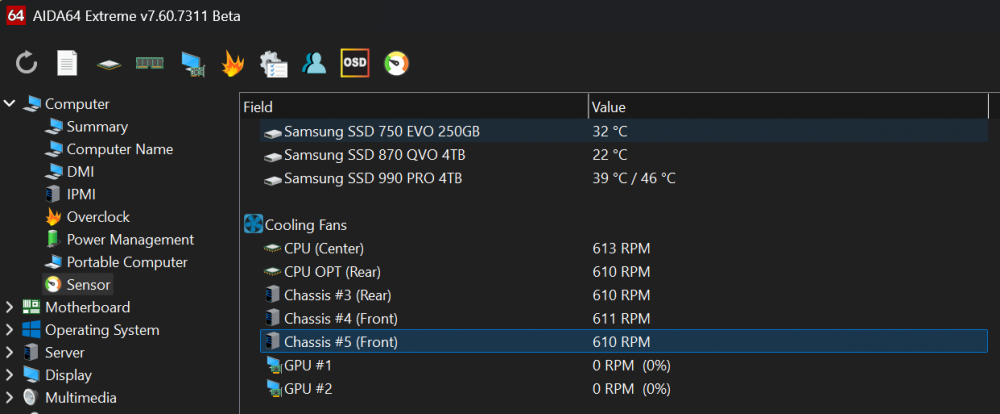
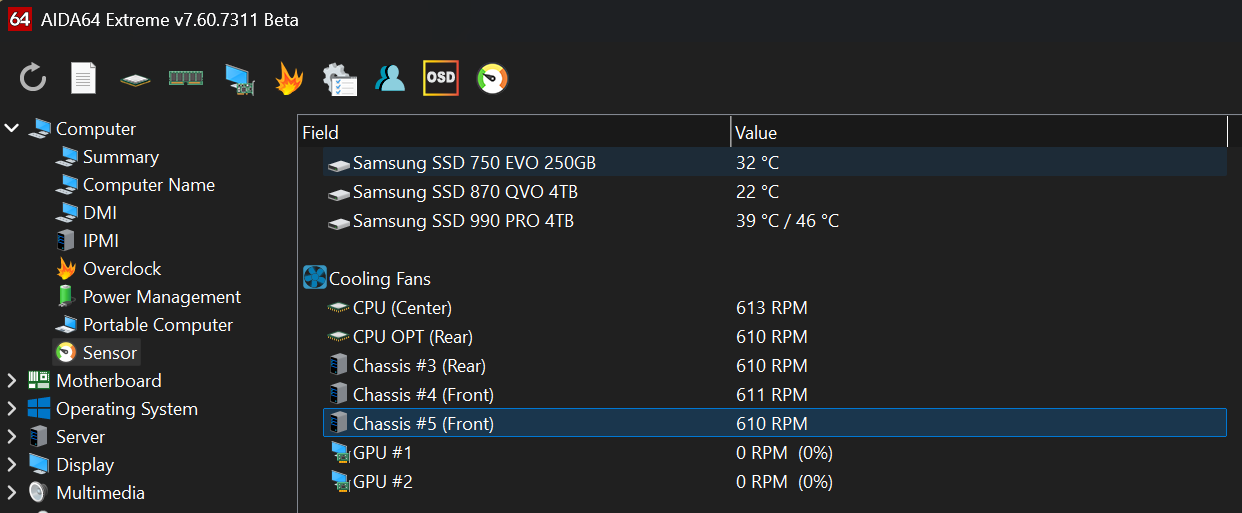
I'm happy to confirm that his specific fan icon issue finally has been fixed in v7.60.7311 Beta: Great work, thanks!
-
<content removed>
-
<content removed>
-
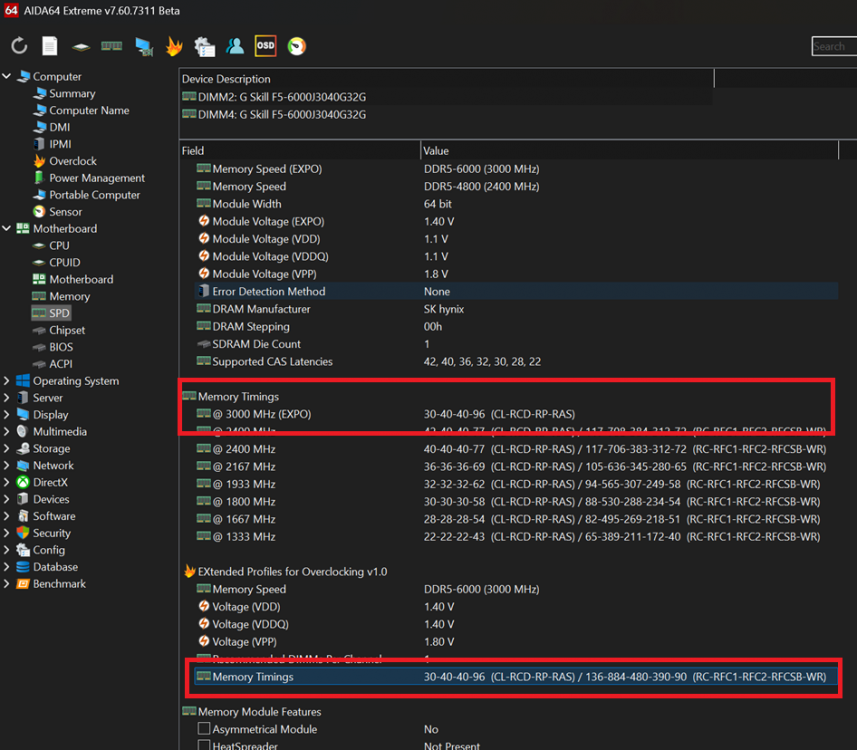
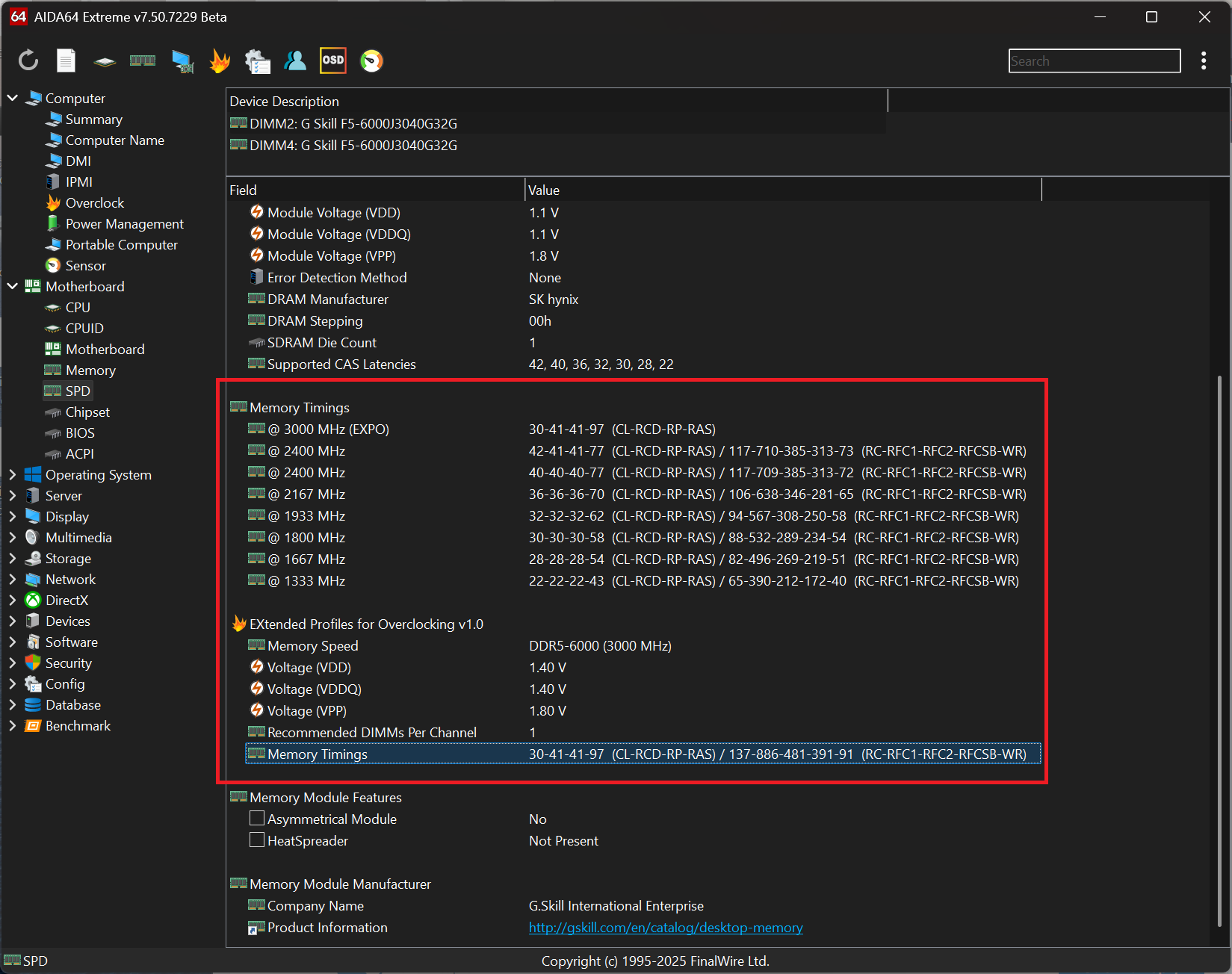
Thanks. The issue has been largely resolved, but I found another small inconsistency on the SPD page: The memory timings for the EXPO profile in the top red rectangle seem to be missing the (RC-RFC1-RFC2-RFCSB-WR) additional timings, while the bottom red rectangle lists them correctly. It's just a minor issue though. P.S. While nitpicking, I also noticed another horizontal scrollbar on the Computer > Summary page which probably doesn't need to be there.
-
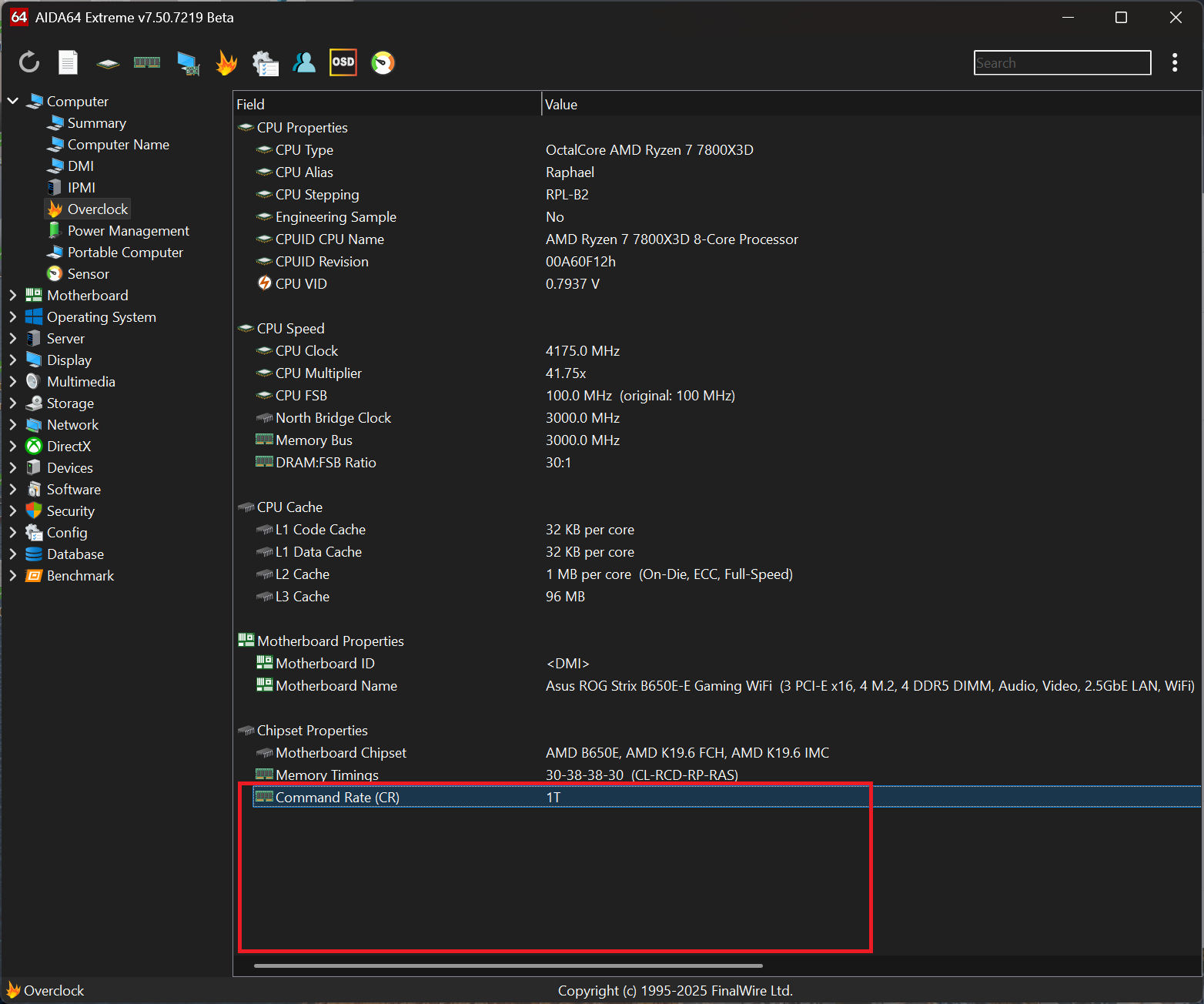
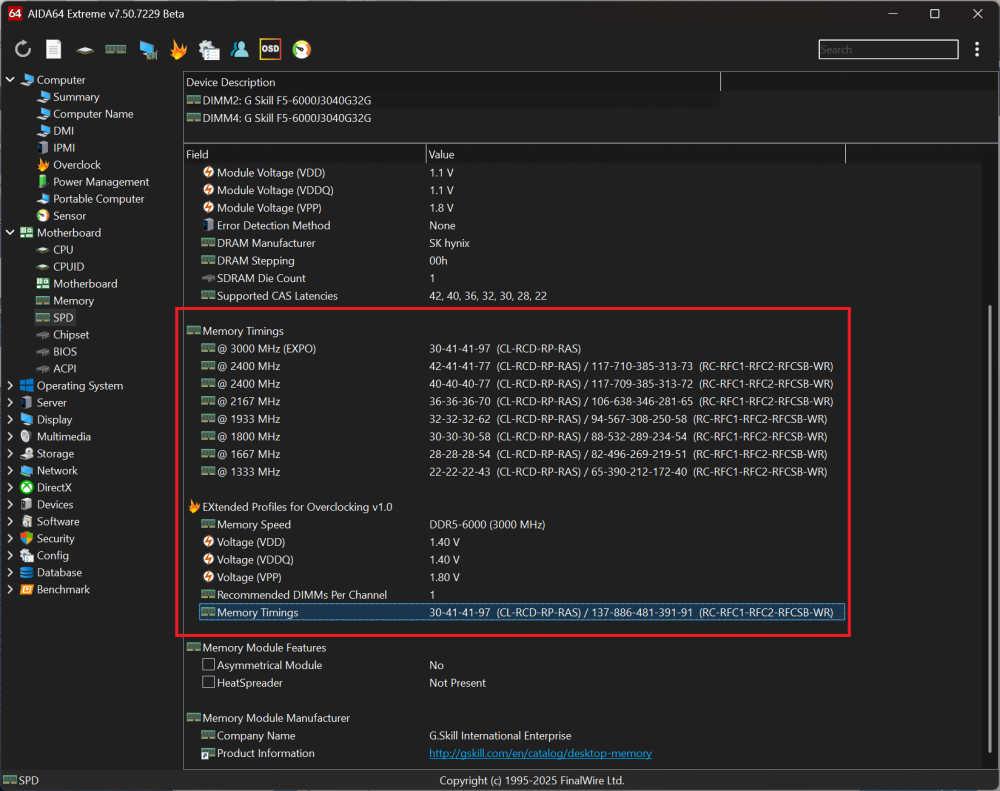
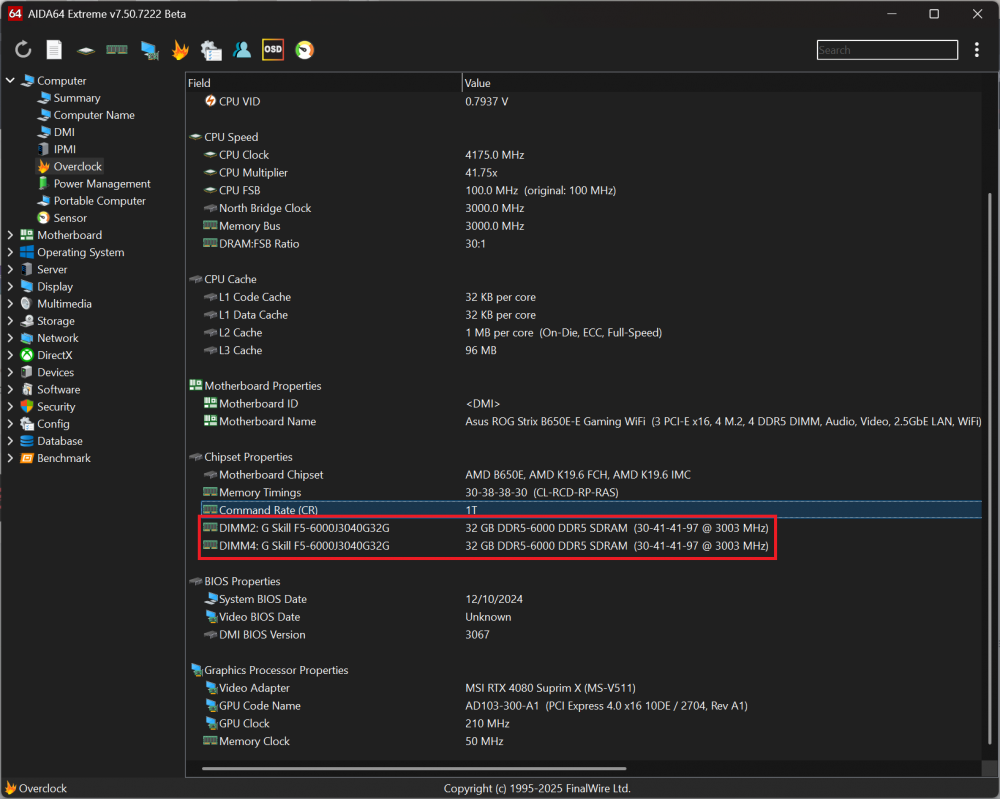
Thanks again. Clock frequencies are now being reported correctly, afaik. But the EXPO and some other JEDEC timings shown in AIDA64 are still a bit of a mess though. The EXPO settings for my RAM are 30-40-40-96 @3000MHz- like in the CPU-Z picture. But AIDA64 still shows 30-41-41-97 in the Computer > Overclock page. Some or most of the Memory timings shown under Motherboard > SPD are also not correct - compared to CPU-Z and others. But I don't check the SPD page often, as it should only provide some fixed info for (lower) frequencies. Tbh, I just looked there as you mentioned that particular page in the release notes for this latest beta version.
-
UEFI BIOS shows exactly 3000 MHz. CPU-Z also shows the correct EXPO values on the SPD tab. I don't think the value should be calculated in AIDA64 though, as SPD info is fixed information.
.png.720e5f0892b9e9da163731d8b2c314d4.png)
-
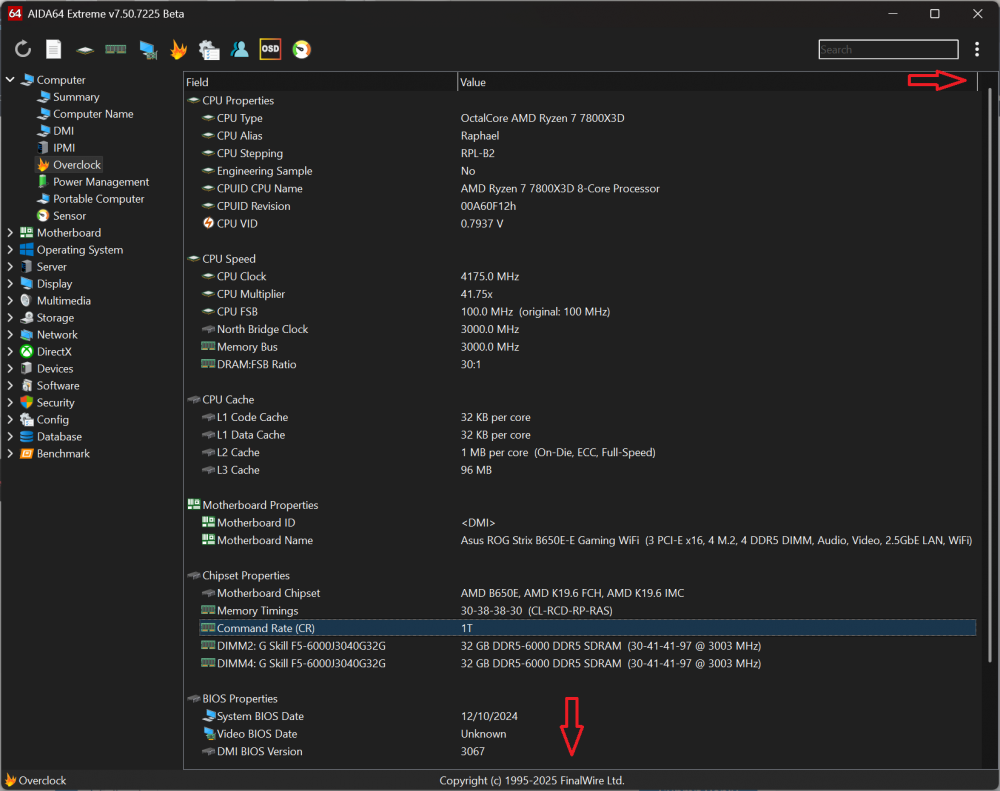
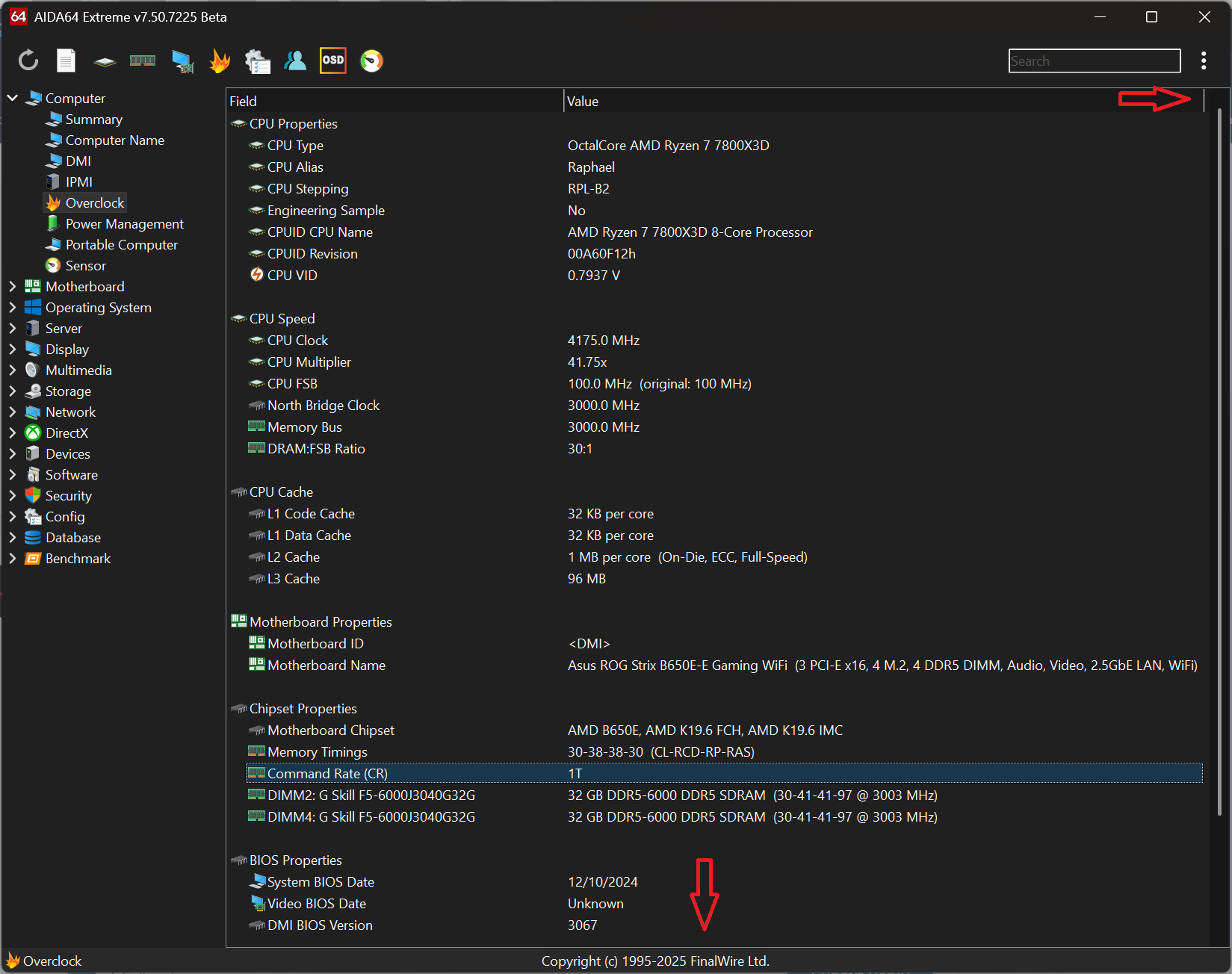
The horizontal scrollbar formatting issue on the OC page has been solved in v7.50.7225 beta👍
-
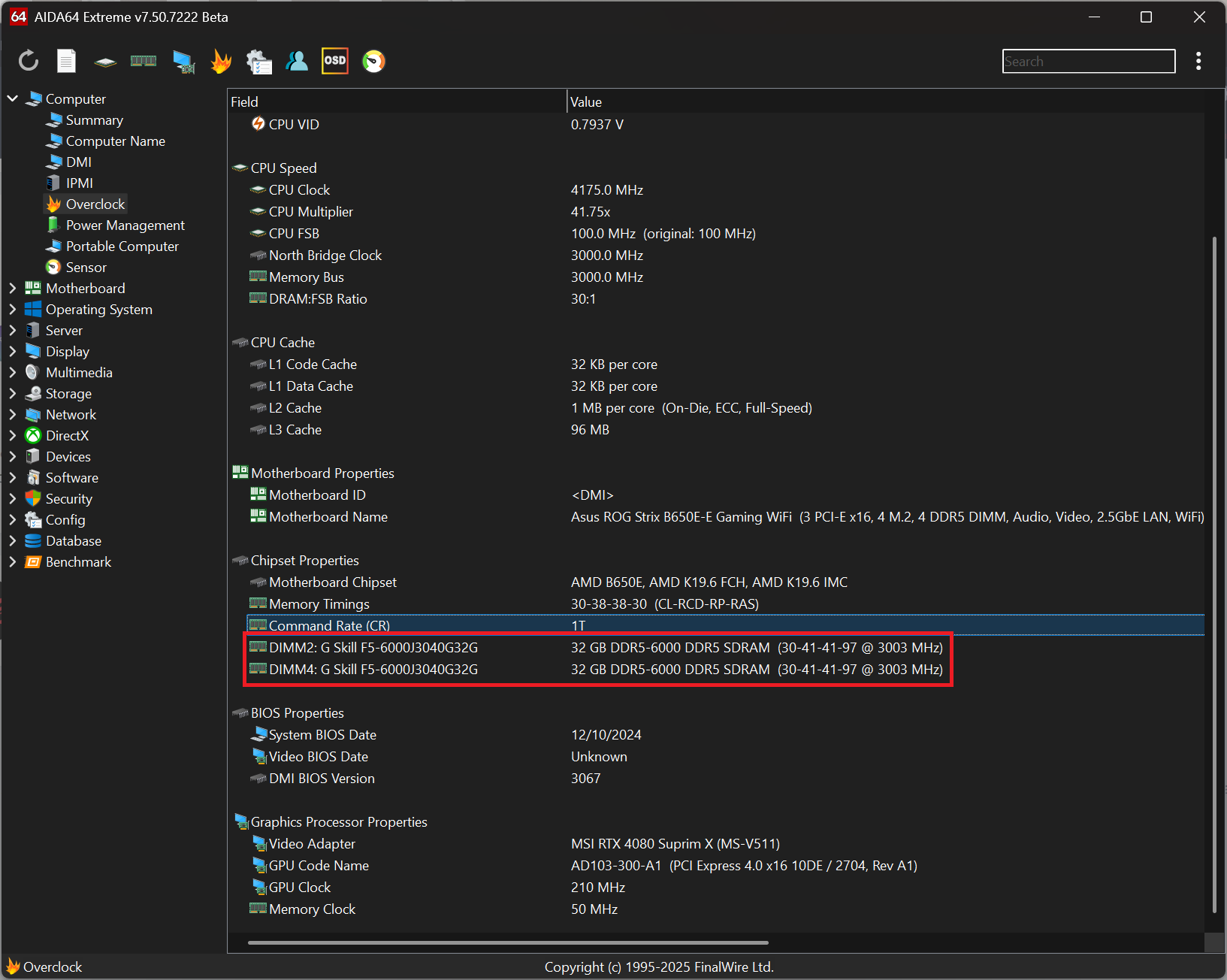
Thank you, Fiery. The missing Overclock information has been restored in Beta v7.50.7222 👍 One remark, though. I noticed that the memory properties now only show the highest 'EXPO timings' between brackets (and not the timings for several other EXPO speeds like 2400MHz and lower). The thing is that it reports 3003MHz (and higher timings) than the actual EXPO profile of my RAM (3000MHz 30-40-40-96). It's just a minor issue, but maybe it's a better idea not showing an EXPO profile between brackets in that field. Since it's not showing current timings in use anyway, I mean. EDIT: there seems to be a formatting issue on this Overclock page btw: I can't get rid of the horizontal scroll bar by resizing the value column in this case, but I think I'm able to resize all columns in all (or most?) other screens/tabs - except for this one. EDIT 2: this formatting thing is not a new issue I think, but it just became more apparent when most EXPO timings were not listed anymore.
-
And this is the SMBus Dump (Full) of v7.50.7200 (for reference):
-
This is the SMBus Dump (Full) of v7.50.7219
-
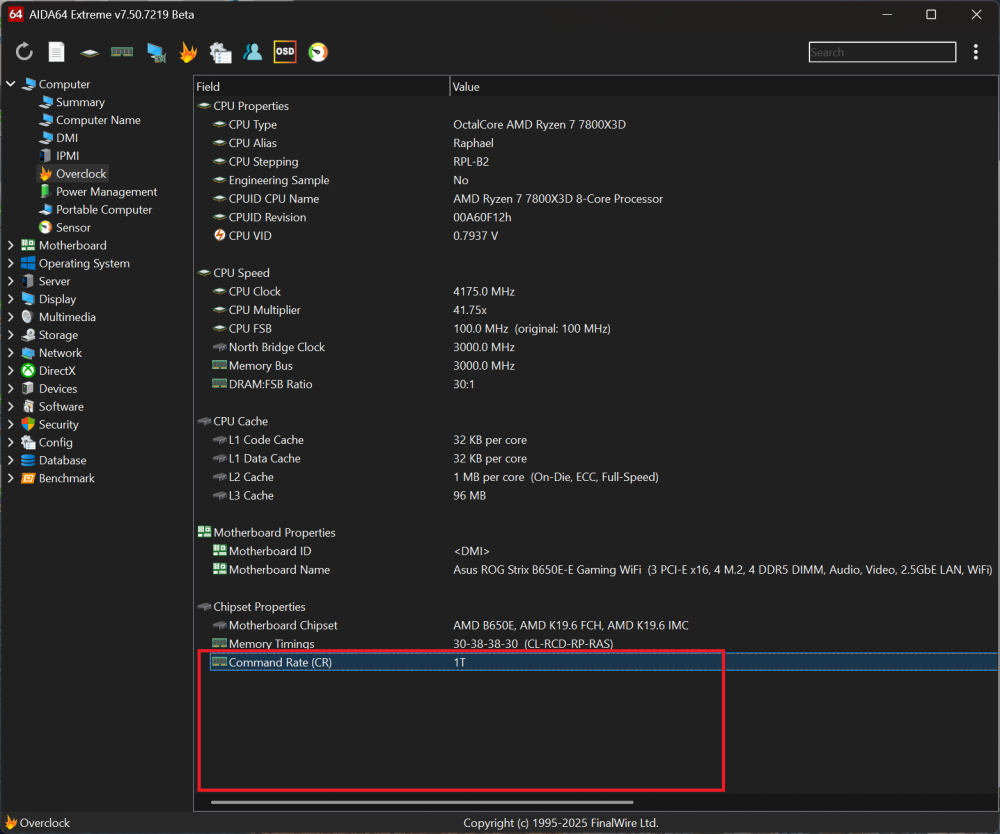
The last 2 betas (v7.50.7215 and v7.50.7219) are currently missing some info under the Computer - Overclock tab: Memory Modules & SPD info are missing Bios Properties are missing Graphics Processor Properties are missing Please see attached screenshots for details.
.thumb.png.4bff3a5c650a357fe508f60f2d2fc9c5.png)
-
Unfortunately, the last few (beta) updates didn't solve this issue 😢
-
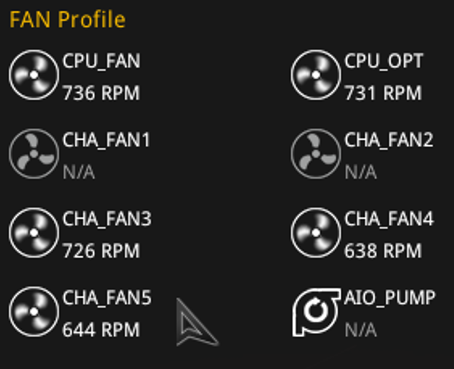
The BIOS name of the affected fan is "CHA_FAN5" btw - my bad 😉
-
HWinfo64 also shows this CHA_5 fan in BIOS as a Water Pump fan. Is this supposed to be fixed by ASUS? The ASUS Bios just shows CHA_5.

-
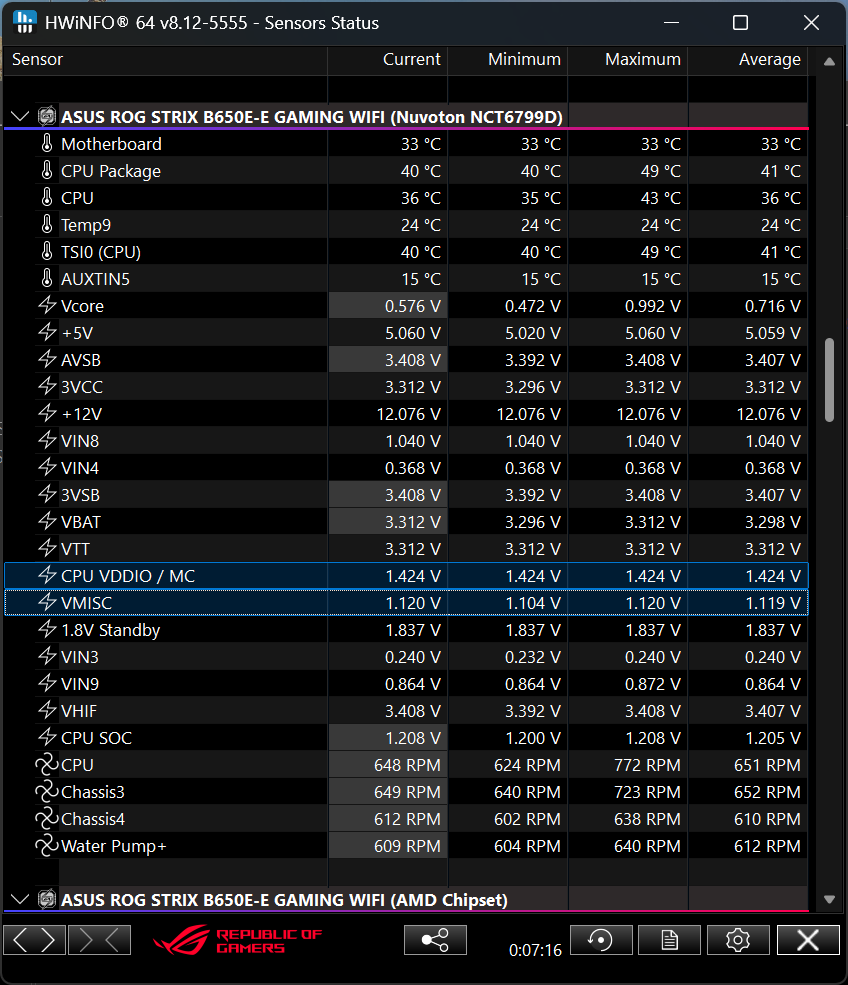
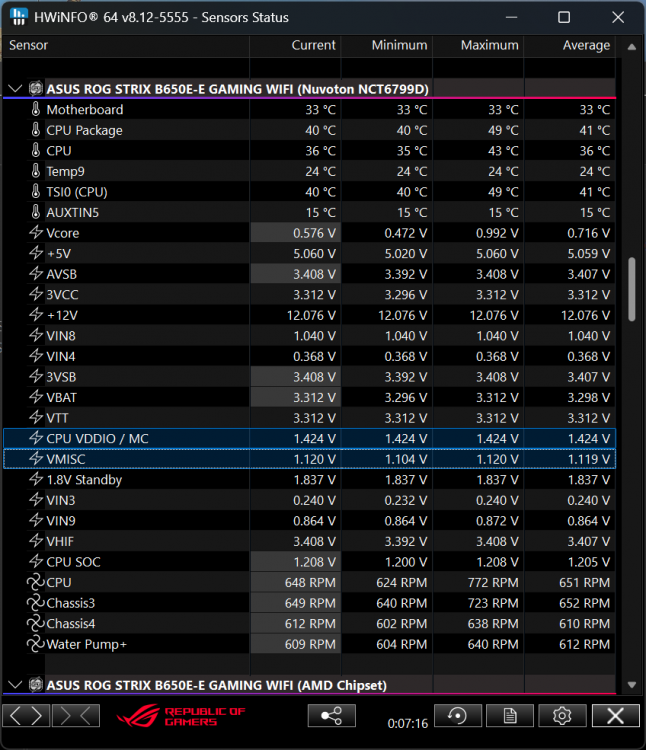
Just installed HWinfo64 in order to look into this issue. HWinfo64 seems to confirm my findings and shows the correct voltage values by default:
-
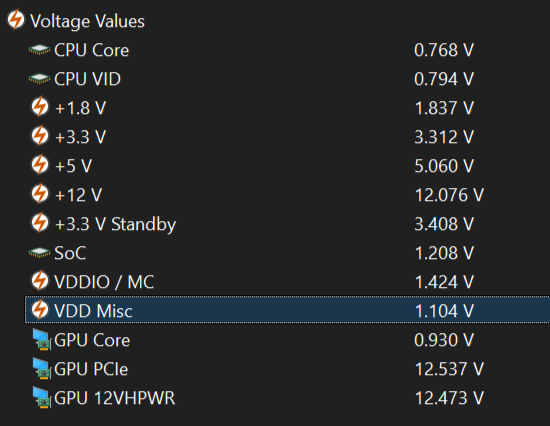
As a workaround, I decided to add two Correction Items for "VDDIO" and "VDD Misc" by using a 2:1 ratio on both. This is showing the corrected values: Notes: - Purely cosmetic: Renamed (default) "VDDIO" to "VDDIO / MC" to be in-line with (ASUS) BIOS voltage monitor tab. - VDD Misc is fluctuating between 1.104~1.120V, which corresponds with (ASUS) BIOS readings for VDD Misc. - EDIT: Also lowered SoC Voltage from 1.22 to 1.20 in between screenshots btw.
-
Can't you just make Display 1 the Main/Primary Display in display settings? (and then make changes and/or even switch back)
-
What happens when you swap Display 1 and Display 2 around in Windows display properties? I mean, setting "Display 2" to be "Display 1" (and vice versa). Does that give you any different results in AIDA64?
-
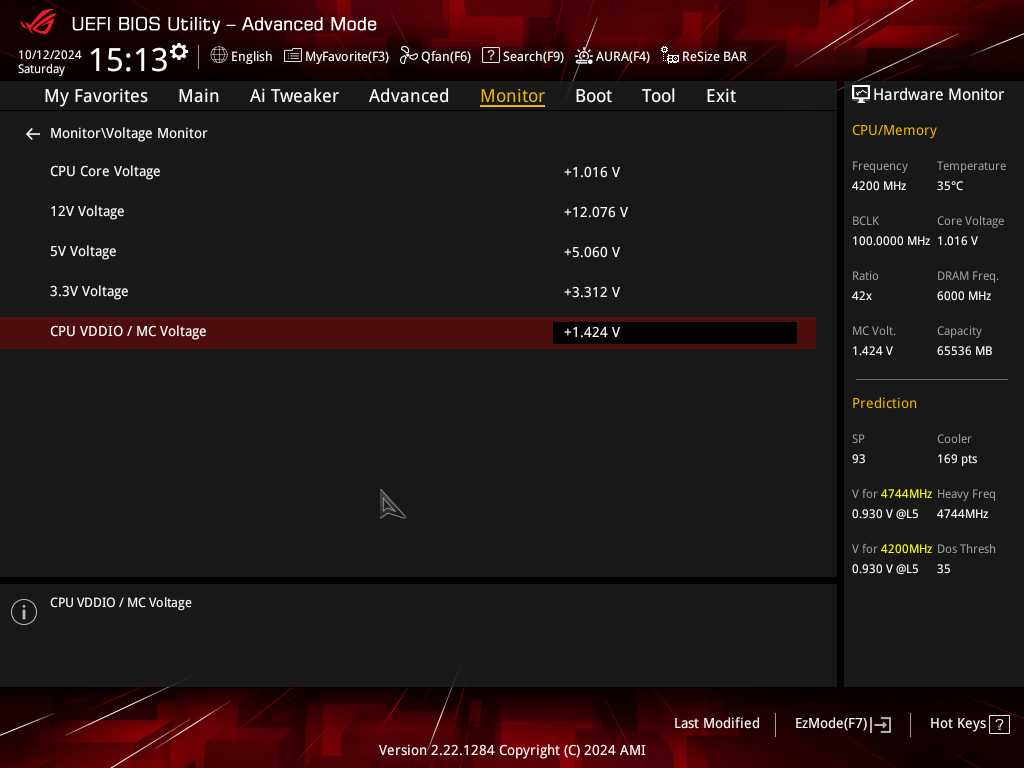
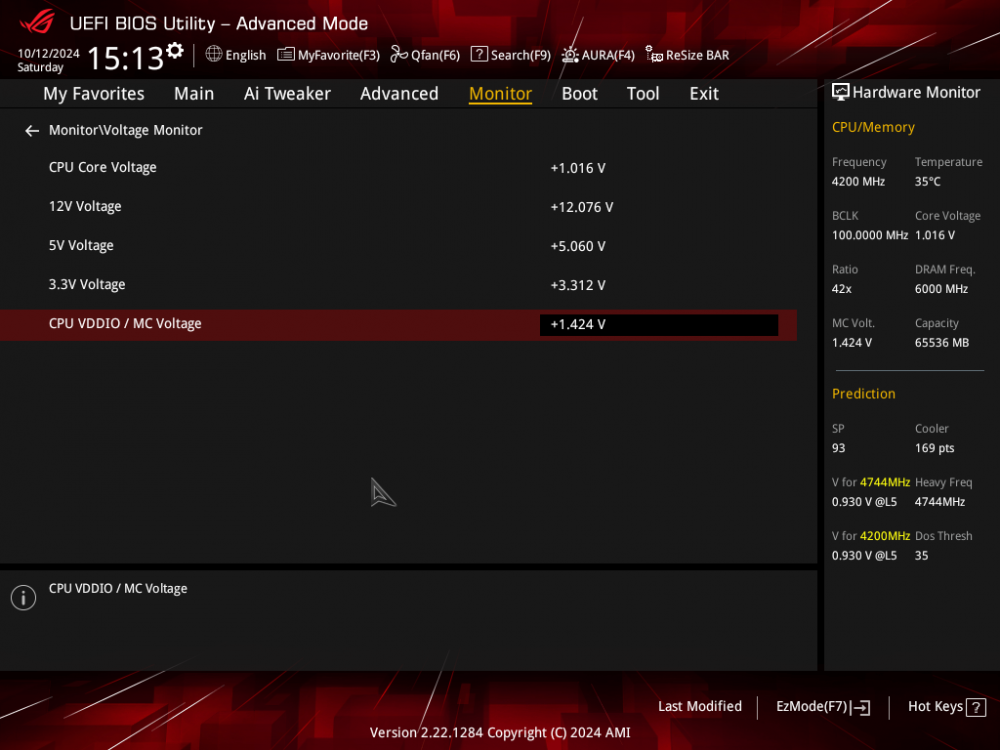
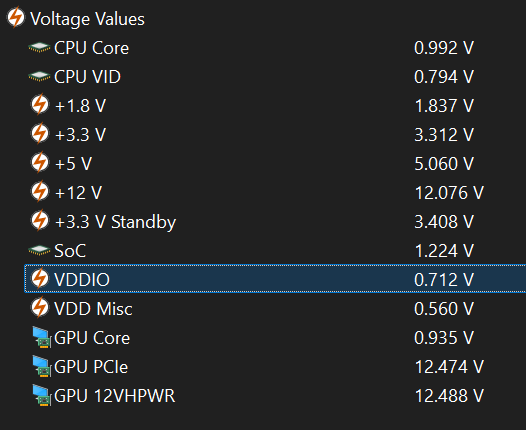
My ASUS B650E-E Gaming WiFi shows a "CPU VDDIO / MC Voltage" of 1.424V in BIOS > Monitoring section. In AIDA64, a single "VDDIO" voltage value of 0.712V is shown under Computer > Sensor - Voltage values. The VDDIO value reported by AIDA64 is exactly half of the VDDIO value in BIOS, which I don't think to be a coincidence (but I could be very wrong though). So my question is: what exactly is "VDDIO" voltage supposed to represent in AIDA64? BTW I was actually searching for a way to display memory and memory controller voltage values in AIDA64. This seems to be my best bet though. Attached both BIOS & AIDA64 pics for reference. EDIT 1: Just confirmed my alleged assumption on this 'VDDIO - halved voltage' issue by disabling EXPO in BIOS: "CPU VDDIO / MC Voltage", which gives 1.100V in BIOS, but which results in a "VDDIO" voltage output of just ~0.560V in AIDA64. EDIT 2: It seems that "VDD Misc" voltage is also being misreported in AIDA64. It shows 0.552-0.560V in AIDA64, but is reported as 1.100V in BIOS (same value for EXPO ON or OFF btw).


.png.8e3f36fc55d7eb675f6fd9a90b00e091.png)