GaHile
-
Posts
50 -
Joined
-
Last visited
-
Days Won
18
Content Type
Profiles
Forums
Events
Everything posted by GaHile
-
 After Flip Clock, I am excited to share something experimental: The "Butter" Glide Dynamics approach: Add buttery gauge physics (removes crossfade ghosting) to your custom gauges and they will feel sliding. Please see and share your thoughts if you feel any difference: ❤️ This lovely panel was shared by @BHSY 😍 Screen Recording 2026-03-17 172945.mp4 @Loyd I have now fixed the issue where new sensors/items were added to the bottom of the list and changing there position up was not getting saved.
 -
Thank you so much for your kind and encouraging words! Your support truly means a lot 🙏 Please find the answers to your questions below: 1. Vertical Bars Yes, vertical bars are available. Simply decrease the width and increase the height, and the bars will automatically adjust to a vertical orientation. Example: 2. Fix Screen Option Could you please try enabling the Fix Screen option and let me know if it works on your end? Your feedback will help us confirm everything is functioning as expected. In addition, I’ll also check whether we can include a reset button (or hotkey) to quickly restore the application to its default state. Please feel free to reach out if you need any further assistance - we’re always happy to help! 😊 Thank you!


-
Thank you! I will try to reproduce the issue and see if anything can be done here Looking absolutely amazing! The clean panel design and the way SynQPanel has been used really stand out. We’ll take care of the remaining issues step by step… slowly but surely. It’s truly encouraging to see the download numbers growing and people being curious enough to try something new. That kind of support means a lot ❤️ 🙏
-
Thank you! I will look into it 👍 Hope you are not using or enabled OpenGPL Rendering for the panel.
-
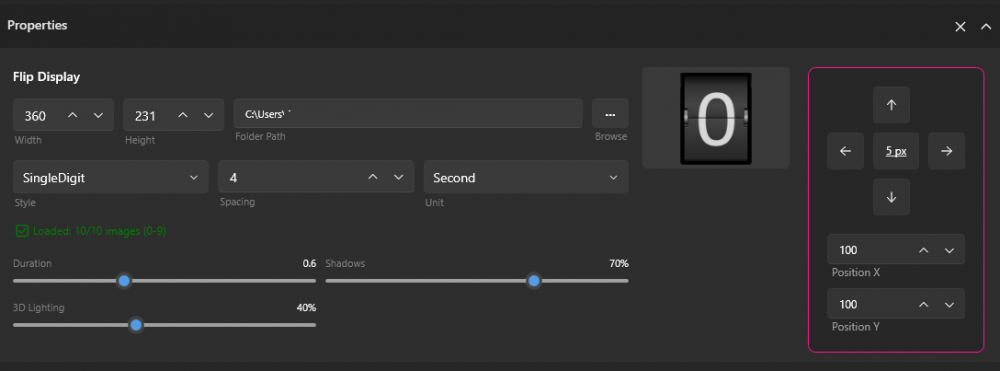
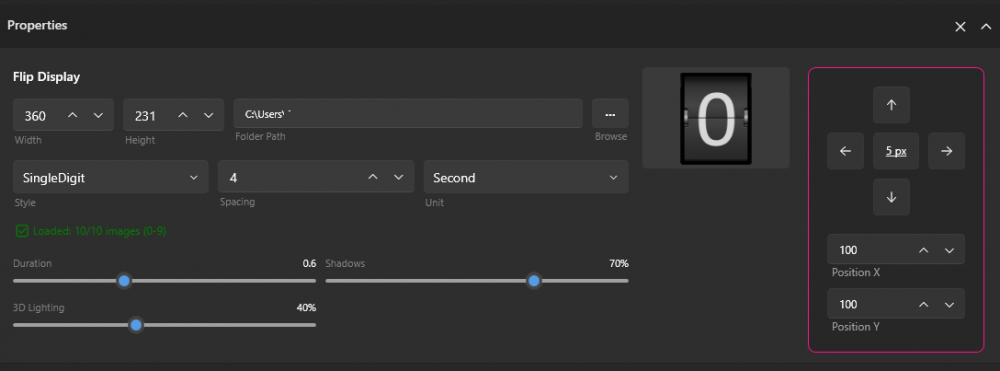
@BHSY @Loyd Hi Everyone! I am excited to announce 🎤 that 🎉SynQPanel v1.0.4 is now available.🎉 ❤️ So many New Things ❤️ Flip Clock Enhancements – Full Flap (Please note that you one need images 0 to 9 with names 0 to 9 only to have the full new style full flap single digit clock) Dual Rendering Styles Added Single Digit mode alongside classic Split-Flap Split-Flap: Full-width image sets (00–59) for traditional airport-style displays Single Digit: Independent digit animation using 0–9 assets Synchronized Digit Logic Tens and ones flip in perfect sync during rollover (e.g., 19 → 20) Preserves realistic mechanical behavior Visual Improvements 3D lighting and dynamic shading based on flip angle Real-time hinge and ambient depth shadows Smooth ease-in-out animation curves (replaces linear motion) UI & Customization & Options Live interactive preview Smart auto-sizing for both single- and double-width assets Adjustable animation speed (Minutes / Hours) Shadow intensity and 3D lighting strength controls Redesigned, space-efficient properties panel Import Validation Automatic image-set validation (0–9 vs 00–59) based on selected mode Prevents incomplete or mismatched configurations System & Stability Improvements Core Hardening Improved XML parsing to safely handle malformed or partial config files Hardened shared-memory IPC for improved long-running stability Export Fix Fixed .sqx export modifying or omitting spzip configuration Sensor & Weather Fixes CPU Fan: Prevented unexpected source switching Days of the Week: Corrected incorrect day image display 7-Day Forecast: Added extended forecast support Hourly Weather: Added hourly temperature and rain probability Bug Fixes & Improvements: SynQPanel now waits for AIDA64 if it launches first and auto-connects when AIDA64 starts (no restart required) “Startup Delay” now correctly saves and updates the Windows Logon Task Wattage sensors retain decimal precision after .sqx import Fixed missing hourly weather icons and incorrect time display after re-importing deleted profiles Custom sensor unit spacing now mirrors AIDA64 formatting exactly (°C, °F, %) Fonts without explicit styling now default to Regular/Normal instead of Thin/Hairline TimeFlow absolute sensors now auto zero-pad to two digits (e.g., 05) 📢 Recommended update for all users. Thank you to the AIDA team and community for feedback, suggestions and logs that helped refine this release. 🙏 The update is available on GitHub here: ENJOY 🎉 https://github.com/sursingh-hub/SynQPanel/releases/tag/v1.0.4 Feedback and suggestions are always welcome. 🙏 Thank you again for the support! 🙏
-
Thank you so much for your kind words and support - it truly means a lot. I’m really glad the animated sensor panel adds value for you. Especially when you mention it as a “savior” - genuinely motivates us to keep improving every day. Your support is deeply appreciated. 🙏 Regarding the video flickering: this is usually related to performance limits rather than a strict resolution or bitrate cap. Larger videos (higher resolution/bitrate) naturally consume more GPU/CPU resources, which can cause random flickering. You may try the following steps: Please check Settings > Performance > Target Frame Rate and try increasing it to see if it improves the smoothness. Consider slightly reducing the video resolution or bitrate and test again. Keep in mind that each screen has its own refresh rate and hardware limitations. If the display refresh rate is lower, or if many sensors, images, and animated elements are active simultaneously, it can affect playback smoothness and cause flickering. In short, the more resources the panel uses (multiple sensors, high-resolution assets, animations, large videos), the heavier the load becomes - and this can sometimes impact video stability. We are continuously optimizing the app and removing bugs one by one, and feedback like yours helps us improve further. If possible, please share your panel resolution, display refresh rate, and video specs - I’ll be happy to look into it further. Are you facing such issues with all the panels or specific ones?
-
Your images are looking amazing and perfect! Something is off as the preview display should show 00 but its showing 0 only. Please delete the flip sensors and start from the scratch. Please use a different name folder for these images and once selected, the preview should show 00 I tried to reproduce the issue; however, did not face any such issue. Something is bothering to get correct two digit numbers for flip
-
It sounds like you're referring to SynQPanel. Just to clarify, at this moment, the color can't be changed. Could you let me know where you're trying to adjust the color? That'll help me better understand the situation. For now, you'll need to create images numbered 00 to 59 and name them accordingly. Here's the format: However, good news! In the upcoming build, you won’t even need to create all 00-59 images. Simply prepare images numbered 0-9, and SynQPanel will automatically handle the rest for you! 🎉

-
Hi everyone (Thank you @BHSY), I’d like to share something recently discovered while troubleshooting a system issue. The Primary IP Address and External IP Address sensors appeared to cause instability with shared memory for most of the users. After disabling/unchecking these two sensors in the shared memory settings, everything returned to normal and the sensor statistics began responding correctly again. This may not affect most users, but it might be worth temporarily unchecking these two sensors to see if it helps. Just sharing this in case it saves someone some troubleshooting time. 🙂
-
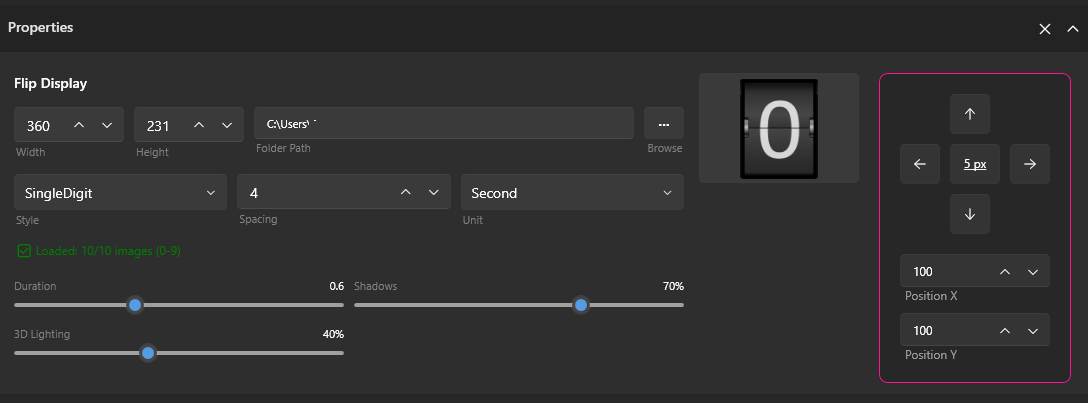
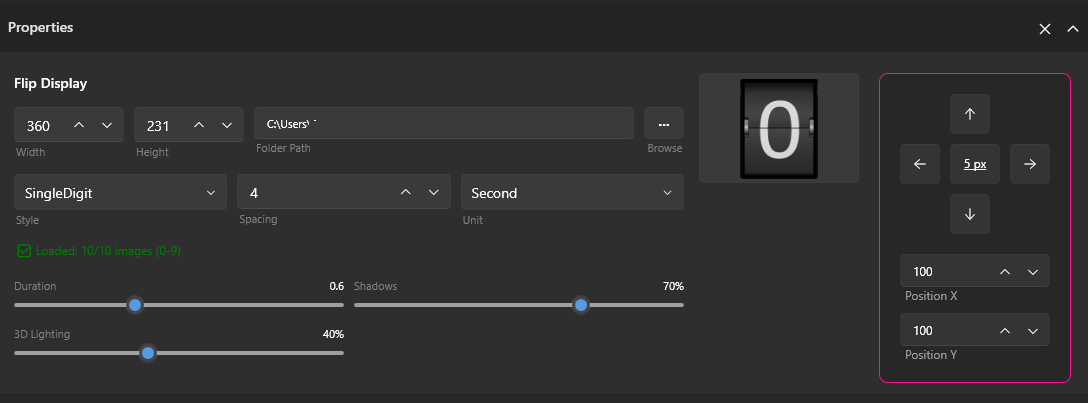
@Surjeet @BHSY @Loyd Hello Everyone, I’m beyond excited to share that FlipClock is evolving beautifully - and it’s getting better every single day! 🚀✨ We’ve been working with passion to make it smoother, smarter, and more powerful than ever before. Here’s what’s coming next and currently being tested: Full Flip Animation - now fully possible and more satisfying than ever. Flexible Display Options - choose between full digits or single-digit flip style. Effortless Setup - just provide the numbers 0-9 for single-digit mode, and let SynQPanel handle the magic for you. Complete Customization Control - fine-tune spacing, adjust flip duration, add dynamic shadows, and even enhance it with stunning 3D lighting effects: Every detail has been crafted to bring your displays to life with energy and elegance. Now, get ready to see the magic in motion - Below are both styles in action: Which one did you like? Screen Recording 2026-02-12 234103.mp4
-
Thanks for testing it out! Flip will continue to evolve over time. It may look effortless, but getting here took real work (you know that ) -and this is only the beginning.
-
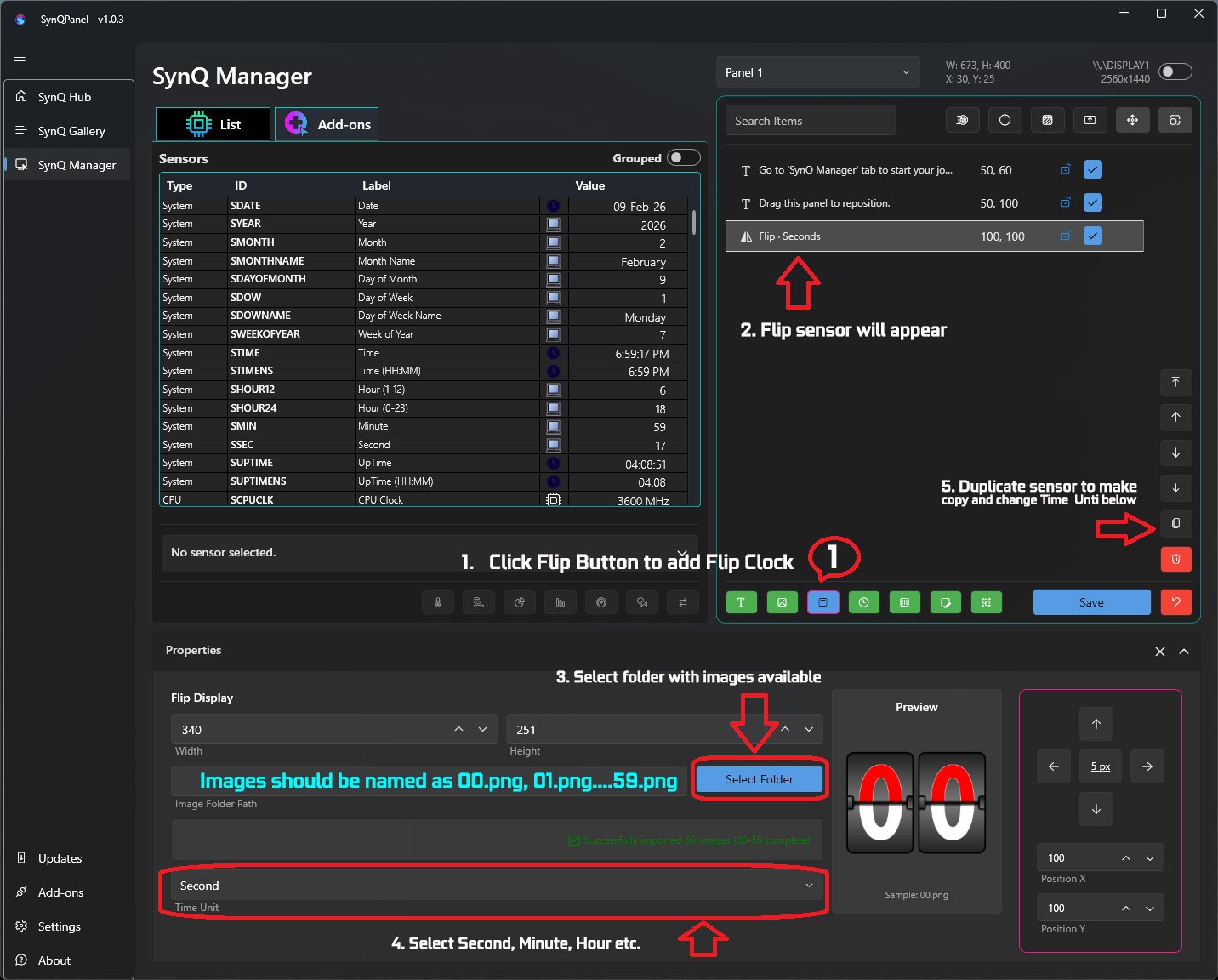
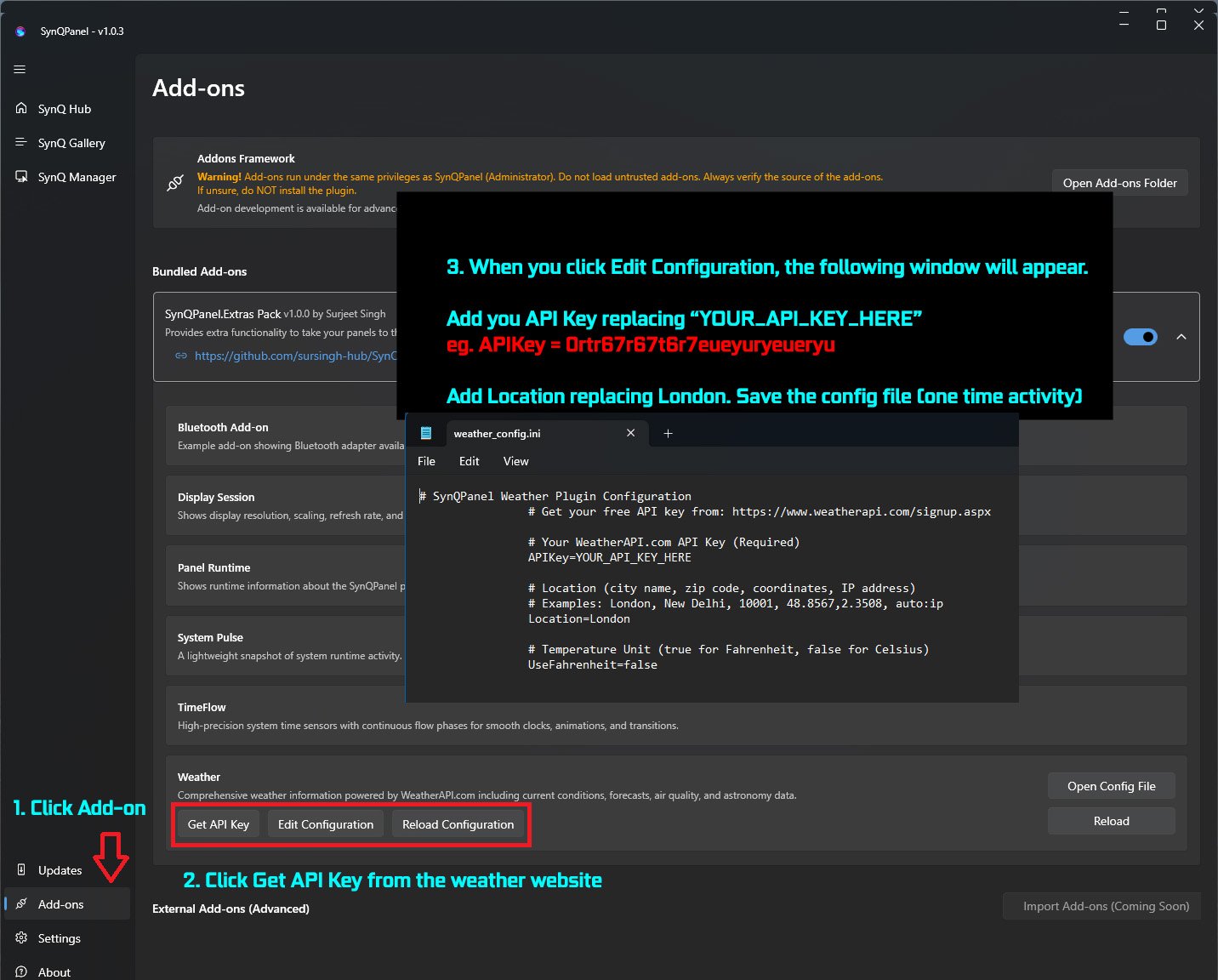
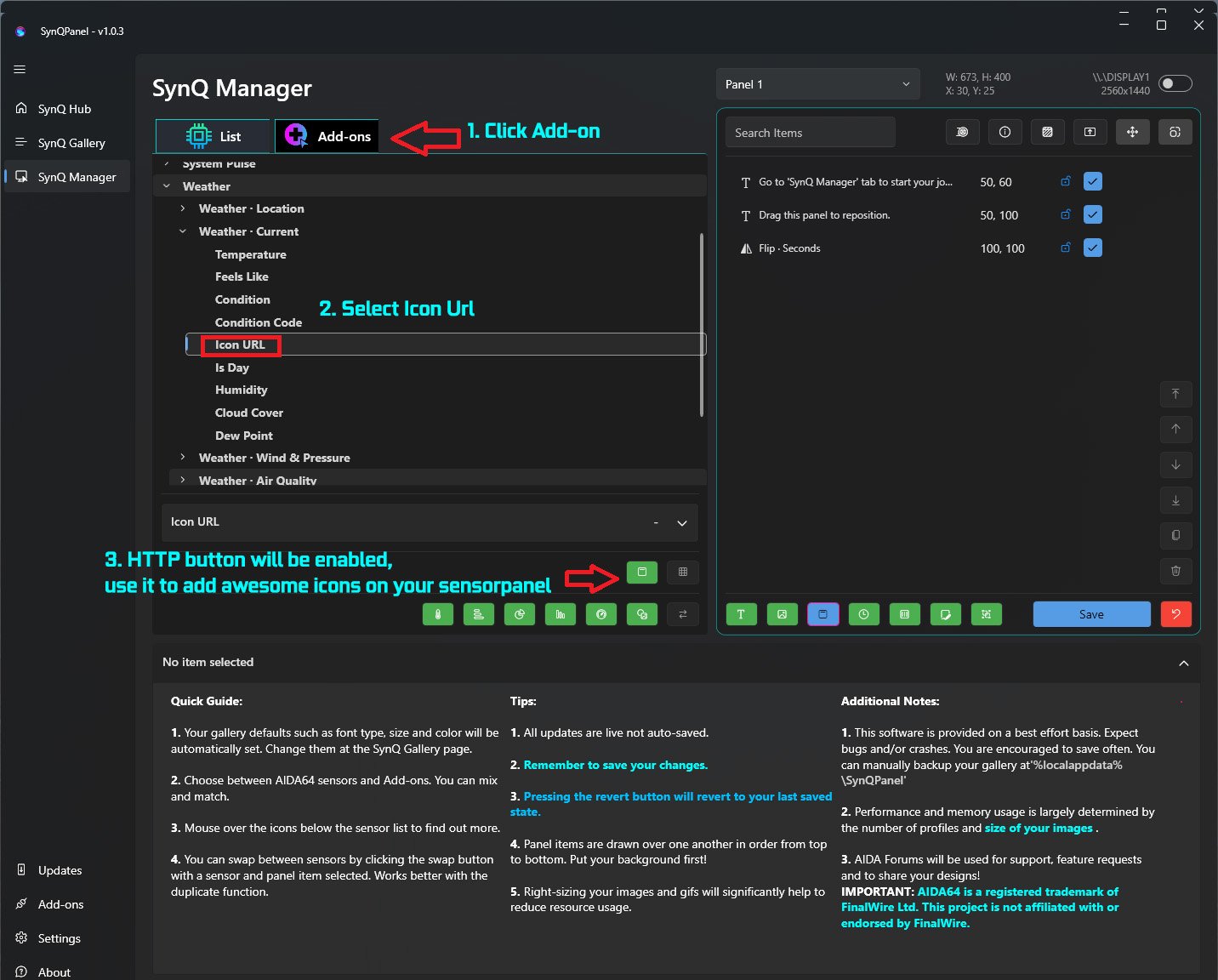
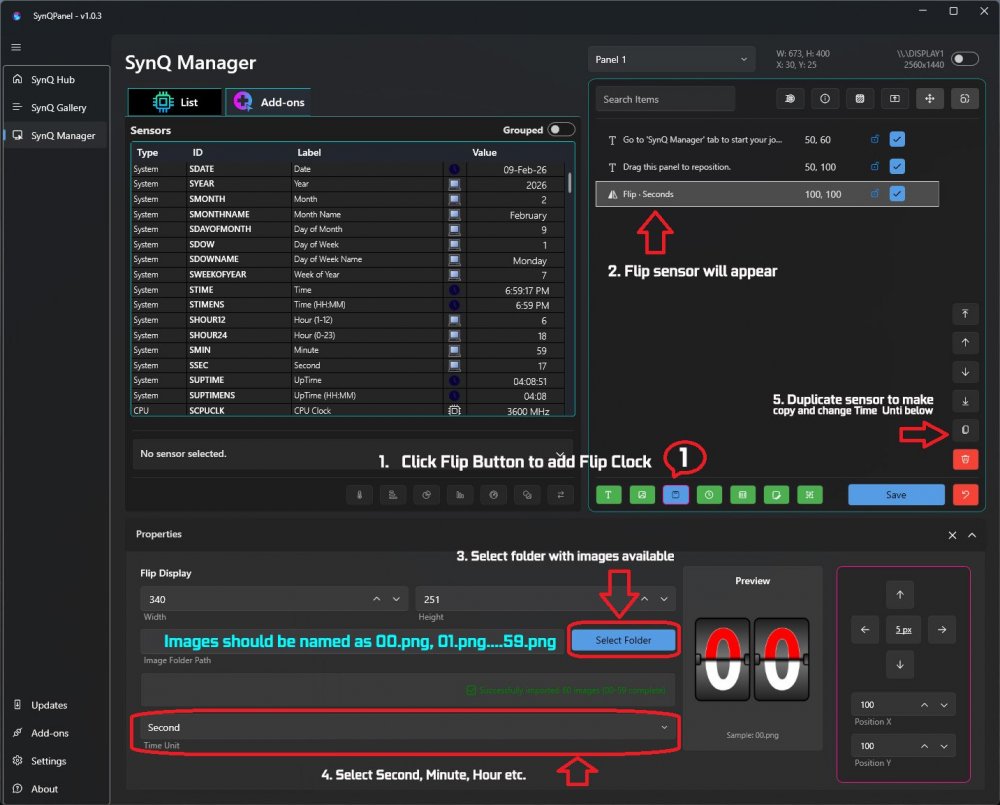
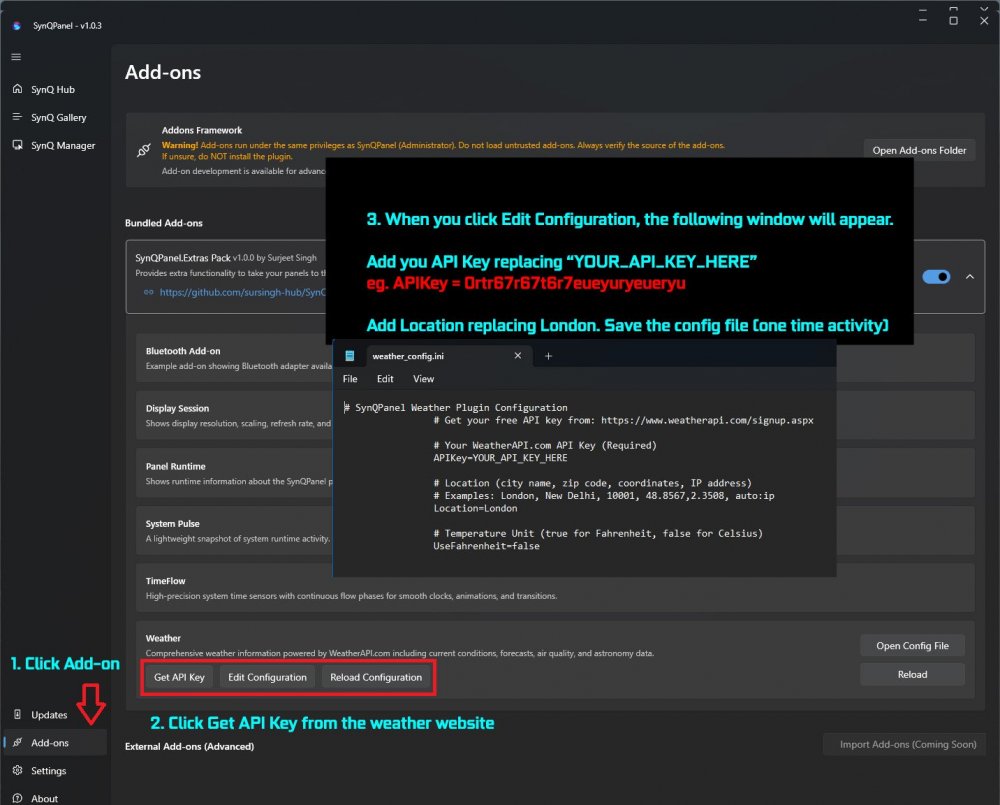
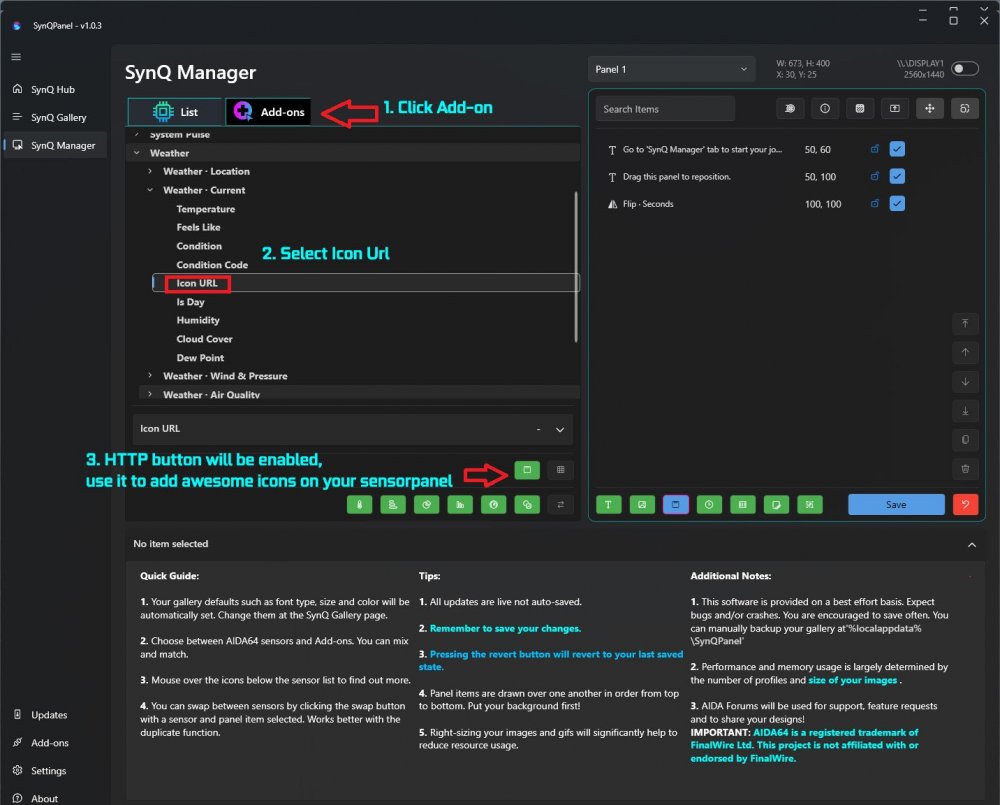
@BHSY @Loyd Hi Everyone! I am excited to announce 🎤 that 🎉SynQPanel v1.0.3 is now available.🎉 ❤️ So many New Things ❤️ Runtime Data Storage & Stability Added configurable runtime data folders for assets, logs, and cache, while keeping profiles and settings in AppData for safer upgrades and backups Improved XML parsing robustness to better handle malformed or partial files without crashing Hardened shared-memory handling to reduce the risk of corruption-related crashes and improve long‑running stability Added New add-ons: TimePulse: Introduced the TimePulse add-on to drive time-based triggers and visual pulses for panels Enables creating more dynamic, rhythm-based visual elements that react to seconds, minutes, or custom time intervals Weather: Added a Weather add-on powered by WeatherAPI.com, exposing current conditions, detailed daily forecasts, air quality, and astronomy data Added multiple icon URL sensors (current, today, tomorrow, hourly) to build rich weather widgets with live condition icons on the sensorpanel Added Flip Clock: Implemented a standalone Flip Clock mode that runs independently and renders smooth flipping digit animations without relying on external data sources Provides smooth flipping digit animations suitable for use as a primary time widget or background clock Improvements and fixes: Improved HTTP image caching so plugin-provided icon URLs stay in memory reliably without premature eviction or disposed-image errors Refined plugin sensor UI so the \"Add Http image\" action is only enabled for URL-based sensors, including the new weather icon sensors Fixed CPU fan selection issue that was switching to a different sensor source General minor stability and UX improvements across plugins and the rendering pipeline 📢 Recommended update for all users. Thank you to the AIDA team and community for feedback, suggestions and logs that helped refine this release. 🙏 The update is available on GitHub here: https://github.com/sursingh-hub/SynQPanel/releases/tag/v1.0.3 Feedback and suggestions are always welcome. 🙏 Thank you again for the support! 🙏 I am not a designer but I tried something below> Please use the steps and let me know if you have any questions: Flip Clock: Please use images named from 00 to 59.png only Weather Settings: Adding amazing looking icons for weather/time conditions etc. that will change automatically:
-
Thank you @BHSY, I am glad you liked the results. Thank you @Loyd for your encouragement!! ----------------------------------------------------- This is still WIP and will launch in the next update after good testing Thank you!
-
Thank you for addressing this publicly - I genuinely appreciate you stepping in and responding to the speculation directly. You’re absolutely right: SynQPanel started as an adaptation of InfoPanel, which is GPL and open-source. I also want to acknowledge and thank you again for the insight and advice you shared before launch. Your openness, guidance, and lack of objection at the time were appreciated then and still are now. From the beginning, SynQPanel was never intended to replace InfoPanel or compete with it feature-for-feature. The goal has always been much narrower: to focus specifically on the AIDA64 user base, remove broader hardware stacks (HWiNFO, Libre, LCD support, etc.), and explore a more tightly scoped, AIDA-centric workflow. That focus is a deliberate design choice-not an attempt to re-create InfoPanel under a different name. I also agree with you on attribution. I’ll make this clearer in the project documentation so users understand the lineage and speculation can be put to rest. Transparency benefits everyone. On contributing back: where fixes or improvements are generic and useful to InfoPanel’s broader audience, I agree that upstreaming them makes sense and aligns with the spirit of open source. And for clarity to AIDA lovable users following this thread: SynQPanel is intentionally not designed to support InfoPanel formats, LCD, USB hardware, or act as a drop-in replacement. The scope is narrower by design, and that’s intentional. THIS WILL REMAIN Forever!! Thank you again for engaging constructively - and for the work you’ve done on InfoPanel over the years. A lot of people here, myself included, have benefited from it.
-
Hey guys! I poured my heart and soul into building this-late nights, nonstop effort, and a whole lot of belief. I didn’t disappear… I was just deep in the grind 😄 No GIFs. No animations. No extra fluff. No knowledge is required!! Just drop in your numbers as simple, static images (PNGs), and let SynQPanel work its magic. ✨ This is still a work in progress, still being tested-but what’s coming is something I’m genuinely proud of, and I can’t wait for you to experience it. Special Thanks and shout out to @BHSY and @Surjeet for giving this idea and helping me on this: Screen Recording 2026-01-30 090245.mp4
-
Thank you for reaching out! Currently, our focus is to work with AIDA's shared memory only and make application stable. If there is any API or Plugin support for WigiDash: we are open to test and experiment that!! P.S. Hardware, USB, Screens etc. are supported inside AIDA only.
-
Thank you for the detailed follow-up - this is extremely helpful 👍 Based on the logs you shared, I can now say with confidence what’s happening. I have sent you a direct message to keep you informed with more details! What I’m doing next I’m already working on improvements to make SynQPanel more defensive in this exact situation, including: Stronger validation before XML parsing Safer early-abort paths when corruption is detected Ensuring malformed shared-memory reads can never reach rendering code This will be part of an upcoming update. Thank you again for taking the time to report this and share logs. This kind of feedback is invaluable, especially while SynQPanel is still growing. 🙏
-
Thank you for reporting this, and I’m really glad to hear you’re enjoying SynQPanel ❤️ I’m sorry it failed on you - that kind of crash is frustrating, and I appreciate you taking the time to share the details. The exception you’re seeing (System.AccessViolationException) usually means the app tried to access memory that was no longer valid. In SynQPanel’s case, this is almost always related to native interop, such as: AIDA64 shared memory access SkiaSharp / graphics rendering Sensor data becoming unavailable or changing unexpectedly while being read It’s not a .NET logic error and it’s not something caused by normal usage. To help narrow this down, could you please let me know (or send via PM if you prefer): What was happening just before the crash? (e.g. opening a profile, switching panels, resizing, minimizing to tray, closing the app, etc.) Without that change: Is the app working properly? Was AIDA64 running at the time, and if so: Version of AIDA64 Whether shared memory was enabled When exactly error occurred (Installing, launching etc.)? If possible, please check this folder after the crash and let me know if a latest log exists: %LOCALAPPDATA%\SynQPanel\ i.e. C:\Users\<USERNAME>\AppData\Local\SynQPanel\logs Latest Log Files can be very helpful. I’m actively improving stability around shared memory access and rendering, and reports like this are extremely valuable - especially this early, while the user base is still small. Thanks again for your support and patience. I’ll do my best to get this fully understood and addressed.
-
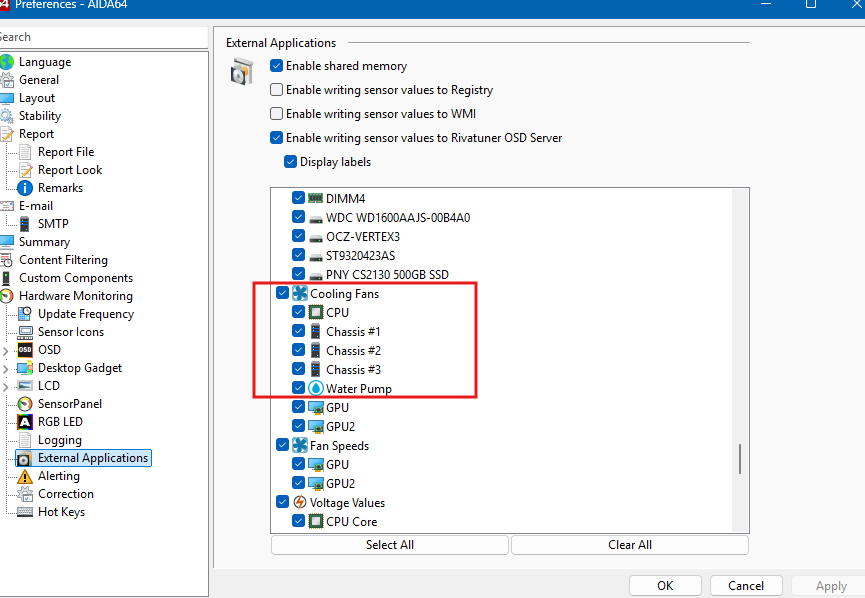
Thank you for the screenshot - that helps a lot 👍 Since the sensor is clearly visible in AIDA64, the next important thing to check is whether it’s exposed to external applications via shared memory, as SynQPanel can only read sensors that AIDA explicitly publishes. Could you please check the following in AIDA64: Go to Preferences → External Applications Open the Shared Memory section Make sure the CPU fan / flow sensor is enabled and checked there If possible, please share a screenshot of that Shared Memory list A couple of additional things worth checking: Start order matters Please make sure AIDA64 is fully running first, then start SynQPanel. SynQPanel reads the sensor map at startup, so if AIDA isn’t ready yet, some sensors may not be picked up. Sensor name differences Sometimes fans or pumps still appear under their original header name (for example CPU_FAN, FAN #8, PUMP, or Flow) even if they were renamed later in AIDA. It’s worth checking if it shows up under a slightly different name in SynQPanel. If it still doesn’t appear after checking the Shared Memory list, feel free to send me a PM and I’ll guide you on what logs or details are useful so we can diagnose this properly and improve detection for cases like this. Thank you again for reporting it - feedback like this really helps improve SynQPanel 👍
-
That’s completely fair, and I genuinely appreciate you taking the time to explain your perspective. You’re right - from a user’s point of view, rebuilding a complex layout from scratch is a real time investment, and not everyone has the hours (or patience) to do that again. I fully understand why, today, that makes sticking with InfoPanel the practical choice for you. On the UI similarity: yes, SynQPanel will feel familiar - and that’s intentional. The goal was zero learning friction for AIDA users, not to reinvent UI patterns just for the sake of looking different. Under the hood though, SynQPanel is being shaped around AIDA-only workflows, tighter control over gauges, labels, fonts, and long-term stability rather than broad multi-source support. You’re also absolutely right that layout import from other panel systems would lower the barrier to entry. It’s a valid request, and it’s on my radar - but I also want to be transparent: SynQPanel currently has a very small user base, and development is focused first on getting the AIDA experience rock-solid before expanding migration tooling. Right now my aim is to stabilize this application and it has lots known issues which we will definitely resolve together. That kind of feature only really becomes viable once there’s enough momentum and feedback to justify the complexity. If you decide to just keep an eye on things for now, that’s totally fine - I respect you, no pressure at all. But if at any point you do try SynQPanel, even casually, feedback from experienced users like you genuinely helps shape where it goes next. Early-stage projects live or die by that kind of input. I really mean it, it wasnt easy to build something like this and I hope you understand and trust me! Thank you again for being honest, and for keeping the conversation constructive. Hopefully SynQPanel earns another look from you down the road. Cheers 🍻
-
Hey, thank you for checking out SynQPanel - really appreciate it! 🙏 At the moment, this forum is the primary place for discussion and support. There isn’t a Discord server yet. That said, feedback like yours helps shape what comes next, so a Discord is definitely something I’m considering once the user base grows a bit more and things stabilize. At the moment, SynQPanel is intentionally focused only on AIDA64 users. The goal is to keep SynQPanel lean, trimmed, stable, and deeply integrated with AIDA. We did not aim big at this point Because of that: There is no direct other Panel template import SynQPanel does not read other Panel / Libre / HWiNFO formats The supported import path is AIDA sensorpanel files (.sp2 / .spzip / etc.) only If your other Panel setup is based on an AIDA sensorpanel (which many are), you can import that AIDA panel into SynQPanel and continue working from there. Once imported, SynQPanel will map with your AIDA sensors using AIDA64 amazing Shared Memory concept, lets you adjust layout, gauges, labels, fonts, and other properties in a more flexible way. Thank you again for the interest and for taking the time to ask. Feedback from experienced panel users is incredibly valuable and directly influences where SynQPanel goes next ❤️ 🙏 (we need you as we are just starting this journey!!) 🙏 Cheers!
-
@Loyd @BHSY Hi Everyone! I am excited to announce 🎤 that 🎉SynQPanel v1.0.2 is now available.🎉 This release focuses on stability fixes and improved gauge handling. Fixed - Font Bold/Italic not applying correctly - Close to Tray and Diagnostics settings not persisting after restart - UI showing internal .sp2 filename instead of the original .spzip name Improved - Additions - Gauge label, font family, size, bold and italic are now correctly imported from AIDA - Gauge label settings can now be fully adjusted inside SynQPanel 📢 Recommended update for all users. Thank you to the AIDA team and community for feedback and logs that helped refine this release. 🙏 The update is available on GitHub here: https://github.com/sursingh-hub/SynQPanel/releases/tag/v1.0.2 Feedback and suggestions are always welcome. 🙏 Thank you again for the support! 🙏
-
Thank you for testing and sharing feedback!! Currently, $LABEL values can’t be fetched directly via Shared Memory, as only sensor values are exposed. To ensure a smooth and reliable experience, I’ve implemented a safe workaround that fetches these values and converts each $LABEL into its corresponding readable text label. I’ve personally tested this on my system using the following available labels, and they’re working as expected: $CPUMODEL $GPU1MODEL $GPU2MODEL $CHIPSET $MOBOMODEL $OSPRODUCT $DXVER $HOSTNAME $DNSHOSTNAME $LOCALIP $USERNAME Since system configurations can vary, if you’re using or have any additional labels, please feel free to share them-I’ll be more than happy to incorporate and test those as well 😊 Also, do let me know if you notice any issues with the above displays. You’re absolutely right about the imported name showing as a date. That name actually comes from the .sp2 file stored inside the .spzip package. The .spzip file is essentially a container that includes all SensorPanel assets-such as images-along with the .sp2 file, which holds everything from layout and positioning to size and configuration details. The filename is used so changes can be written back to the correct file when you hit Save. That said, I’ll explore whether we can display the spzip name instead, to make this clearer and more intuitive 💡 Thank you for testing and sharing feedback!! 😍 Regarding the font issue, could you please let me know exactly where you’re facing the problem? I wasn’t able to reproduce it on my end-fonts appear to be working fine here. That said, something might still be off, and I’m absolutely here to track it down and fix it for you 🙂 I’m really glad to hear that the right-click actions and the close-to-tray feature are working perfectly and exactly as you expected 🎉 Thank you so much for adding this feature - it’s genuinely useful and a great enhancement! Your observation about $LABEL behavior is spot-on 👍 There are no issues with newly created panels; however, existing panels behave differently at the moment. At present, $LABELS are converted into hard-coded text labels inside SynQPanel. This approach was intentionally chosen as a first step-to verify compatibility across different systems and ensure values are fetched correctly. If this makes sense!! To answer your question honestly: If you switch to a new CPU (or similar hardware change), the $LABEL won’t automatically update right now, since it has already been converted into a static text label. But please don’t worry-I am here and I’ve got your back 😄 I will explore whether $LABELS can be stored as sensors instead, so they dynamically update whenever system hardware changes. That’s the ideal behavior, and I’ll definitely test and validate this for you to make sure it works seamlessly 💪 Let me know if there’s anything else you’d like me to check or improve-I’m always happy to help!
-
@BHSY @Loyd and Hi Everyone, I am excited to announce 🎤 that 🎉SynQPanel v1.0.1 is now available.🎉 This update fixes shared memory truncation issues, improves diagnostics, adds SensorPanel right-click actions, close-to-tray support (Enable in Settings), and implements AIDA-style $LABEL macro resolution (e.g. $CPUMODEL, $GPU1MODEL). Thank you to the AIDA team and community for feedback and logs that helped refine this release. 🙏 The update is available on GitHub here: https://github.com/sursingh-hub/SynQPanel/releases/tag/v1.0.1 Feedback and suggestions are always welcome. 🙏 Thank you again for the support! 🙏
-
Hi @Loyd, Thank you for flagging this. You’re absolutely right - during the code update, I accidentally impacted the Replace and Duplicate button logic. My sincere apologies for the inconvenience caused!! 😢 I’ve now reproduced and identified the issue and am already working on the fix. I’ll resolve this on priority and share the updated executable with you very shortly. Thank you for your patience and understanding! I really appreciate that you found this at an early stage 🙏🫡 Regarding Default Font Behavior: Let me check what we can safely include !!