
GaHile
-
Posts
57 -
Joined
-
Last visited
-
Days Won
19
Content Type
Profiles
Forums
Events
Everything posted by GaHile
-
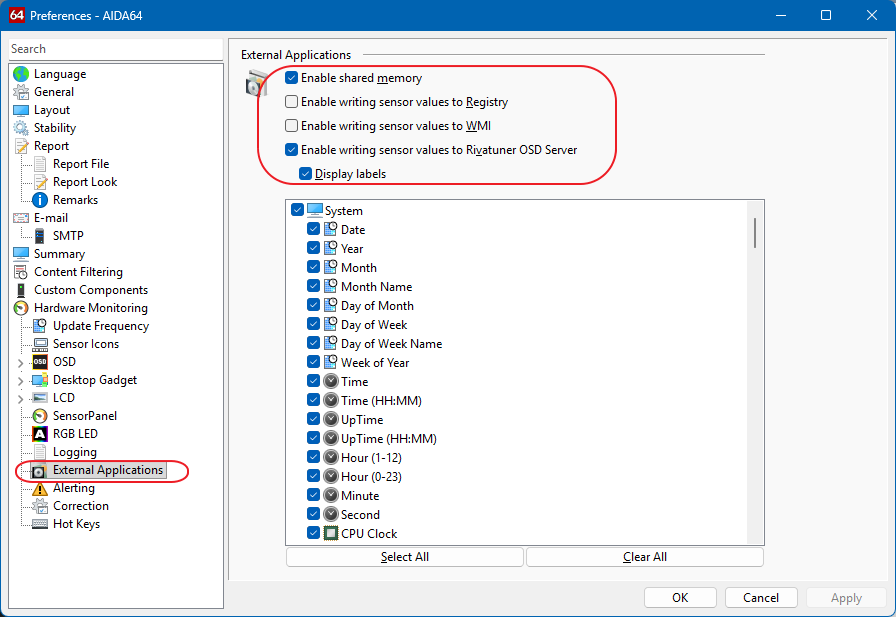
 Thank you for the screenshot - that helps a lot 👍 Since the sensor is clearly visible in AIDA64, the next important thing to check is whether it’s exposed to external applications via shared memory, as SynQPanel can only read sensors that AIDA explicitly publishes. Could you please check the following in AIDA64: Go to Preferences → External Applications Open the Shared Memory section Make sure the CPU fan / flow sensor is enabled and checked there If possible, please share a screenshot of that Shared Memory list A couple of additional things worth checking: Start order matters Please make sure AIDA64 is fully running first, then start SynQPanel. SynQPanel reads the sensor map at startup, so if AIDA isn’t ready yet, some sensors may not be picked up. Sensor name differences Sometimes fans or pumps still appear under their original header name (for example CPU_FAN, FAN #8, PUMP, or Flow) even if they were renamed later in AIDA. It’s worth checking if it shows up under a slightly different name in SynQPanel. If it still doesn’t appear after checking the Shared Memory list, feel free to send me a PM and I’ll guide you on what logs or details are useful so we can diagnose this properly and improve detection for cases like this. Thank you again for reporting it - feedback like this really helps improve SynQPanel 👍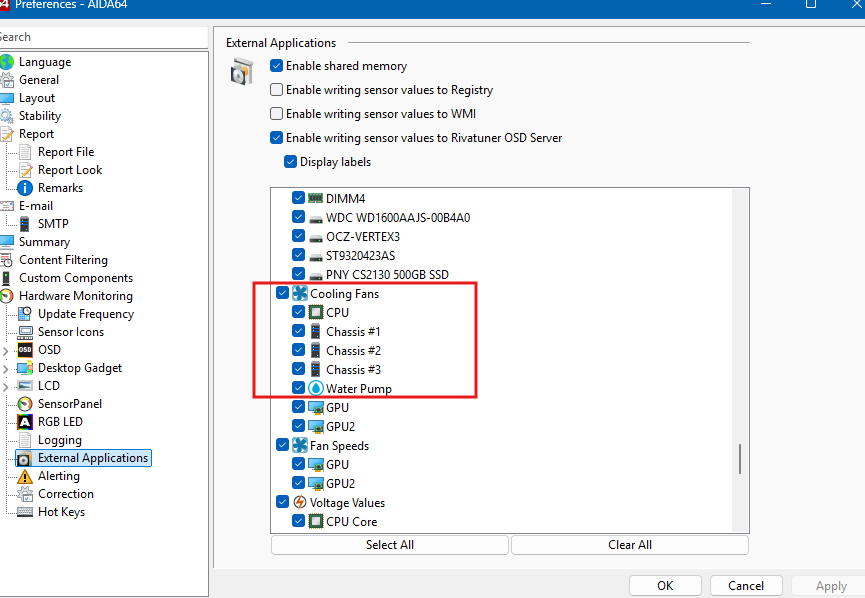
-
That’s completely fair, and I genuinely appreciate you taking the time to explain your perspective. You’re right - from a user’s point of view, rebuilding a complex layout from scratch is a real time investment, and not everyone has the hours (or patience) to do that again. I fully understand why, today, that makes sticking with InfoPanel the practical choice for you. On the UI similarity: yes, SynQPanel will feel familiar - and that’s intentional. The goal was zero learning friction for AIDA users, not to reinvent UI patterns just for the sake of looking different. Under the hood though, SynQPanel is being shaped around AIDA-only workflows, tighter control over gauges, labels, fonts, and long-term stability rather than broad multi-source support. You’re also absolutely right that layout import from other panel systems would lower the barrier to entry. It’s a valid request, and it’s on my radar - but I also want to be transparent: SynQPanel currently has a very small user base, and development is focused first on getting the AIDA experience rock-solid before expanding migration tooling. Right now my aim is to stabilize this application and it has lots known issues which we will definitely resolve together. That kind of feature only really becomes viable once there’s enough momentum and feedback to justify the complexity. If you decide to just keep an eye on things for now, that’s totally fine - I respect you, no pressure at all. But if at any point you do try SynQPanel, even casually, feedback from experienced users like you genuinely helps shape where it goes next. Early-stage projects live or die by that kind of input. I really mean it, it wasnt easy to build something like this and I hope you understand and trust me! Thank you again for being honest, and for keeping the conversation constructive. Hopefully SynQPanel earns another look from you down the road. Cheers 🍻
-
Hey, thank you for checking out SynQPanel - really appreciate it! 🙏 At the moment, this forum is the primary place for discussion and support. There isn’t a Discord server yet. That said, feedback like yours helps shape what comes next, so a Discord is definitely something I’m considering once the user base grows a bit more and things stabilize. At the moment, SynQPanel is intentionally focused only on AIDA64 users. The goal is to keep SynQPanel lean, trimmed, stable, and deeply integrated with AIDA. We did not aim big at this point Because of that: There is no direct other Panel template import SynQPanel does not read other Panel / Libre / HWiNFO formats The supported import path is AIDA sensorpanel files (.sp2 / .spzip / etc.) only If your other Panel setup is based on an AIDA sensorpanel (which many are), you can import that AIDA panel into SynQPanel and continue working from there. Once imported, SynQPanel will map with your AIDA sensors using AIDA64 amazing Shared Memory concept, lets you adjust layout, gauges, labels, fonts, and other properties in a more flexible way. Thank you again for the interest and for taking the time to ask. Feedback from experienced panel users is incredibly valuable and directly influences where SynQPanel goes next ❤️ 🙏 (we need you as we are just starting this journey!!) 🙏 Cheers!
-
@Loyd @BHSY Hi Everyone! I am excited to announce 🎤 that 🎉SynQPanel v1.0.2 is now available.🎉 This release focuses on stability fixes and improved gauge handling. Fixed - Font Bold/Italic not applying correctly - Close to Tray and Diagnostics settings not persisting after restart - UI showing internal .sp2 filename instead of the original .spzip name Improved - Additions - Gauge label, font family, size, bold and italic are now correctly imported from AIDA - Gauge label settings can now be fully adjusted inside SynQPanel 📢 Recommended update for all users. Thank you to the AIDA team and community for feedback and logs that helped refine this release. 🙏 The update is available on GitHub here: https://github.com/sursingh-hub/SynQPanel/releases/tag/v1.0.2 Feedback and suggestions are always welcome. 🙏 Thank you again for the support! 🙏
-
Thank you for testing and sharing feedback!! Currently, $LABEL values can’t be fetched directly via Shared Memory, as only sensor values are exposed. To ensure a smooth and reliable experience, I’ve implemented a safe workaround that fetches these values and converts each $LABEL into its corresponding readable text label. I’ve personally tested this on my system using the following available labels, and they’re working as expected: $CPUMODEL $GPU1MODEL $GPU2MODEL $CHIPSET $MOBOMODEL $OSPRODUCT $DXVER $HOSTNAME $DNSHOSTNAME $LOCALIP $USERNAME Since system configurations can vary, if you’re using or have any additional labels, please feel free to share them-I’ll be more than happy to incorporate and test those as well 😊 Also, do let me know if you notice any issues with the above displays. You’re absolutely right about the imported name showing as a date. That name actually comes from the .sp2 file stored inside the .spzip package. The .spzip file is essentially a container that includes all SensorPanel assets-such as images-along with the .sp2 file, which holds everything from layout and positioning to size and configuration details. The filename is used so changes can be written back to the correct file when you hit Save. That said, I’ll explore whether we can display the spzip name instead, to make this clearer and more intuitive 💡 Thank you for testing and sharing feedback!! 😍 Regarding the font issue, could you please let me know exactly where you’re facing the problem? I wasn’t able to reproduce it on my end-fonts appear to be working fine here. That said, something might still be off, and I’m absolutely here to track it down and fix it for you 🙂 I’m really glad to hear that the right-click actions and the close-to-tray feature are working perfectly and exactly as you expected 🎉 Thank you so much for adding this feature - it’s genuinely useful and a great enhancement! Your observation about $LABEL behavior is spot-on 👍 There are no issues with newly created panels; however, existing panels behave differently at the moment. At present, $LABELS are converted into hard-coded text labels inside SynQPanel. This approach was intentionally chosen as a first step-to verify compatibility across different systems and ensure values are fetched correctly. If this makes sense!! To answer your question honestly: If you switch to a new CPU (or similar hardware change), the $LABEL won’t automatically update right now, since it has already been converted into a static text label. But please don’t worry-I am here and I’ve got your back 😄 I will explore whether $LABELS can be stored as sensors instead, so they dynamically update whenever system hardware changes. That’s the ideal behavior, and I’ll definitely test and validate this for you to make sure it works seamlessly 💪 Let me know if there’s anything else you’d like me to check or improve-I’m always happy to help!
-
@BHSY @Loyd and Hi Everyone, I am excited to announce 🎤 that 🎉SynQPanel v1.0.1 is now available.🎉 This update fixes shared memory truncation issues, improves diagnostics, adds SensorPanel right-click actions, close-to-tray support (Enable in Settings), and implements AIDA-style $LABEL macro resolution (e.g. $CPUMODEL, $GPU1MODEL). Thank you to the AIDA team and community for feedback and logs that helped refine this release. 🙏 The update is available on GitHub here: https://github.com/sursingh-hub/SynQPanel/releases/tag/v1.0.1 Feedback and suggestions are always welcome. 🙏 Thank you again for the support! 🙏
-
Hi @Loyd, Thank you for flagging this. You’re absolutely right - during the code update, I accidentally impacted the Replace and Duplicate button logic. My sincere apologies for the inconvenience caused!! 😢 I’ve now reproduced and identified the issue and am already working on the fix. I’ll resolve this on priority and share the updated executable with you very shortly. Thank you for your patience and understanding! I really appreciate that you found this at an early stage 🙏🫡 Regarding Default Font Behavior: Let me check what we can safely include !!
-
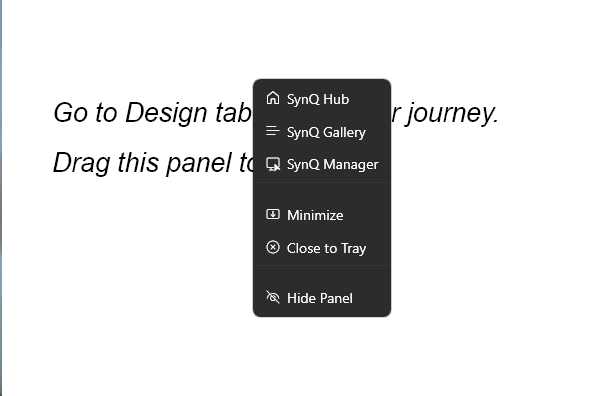
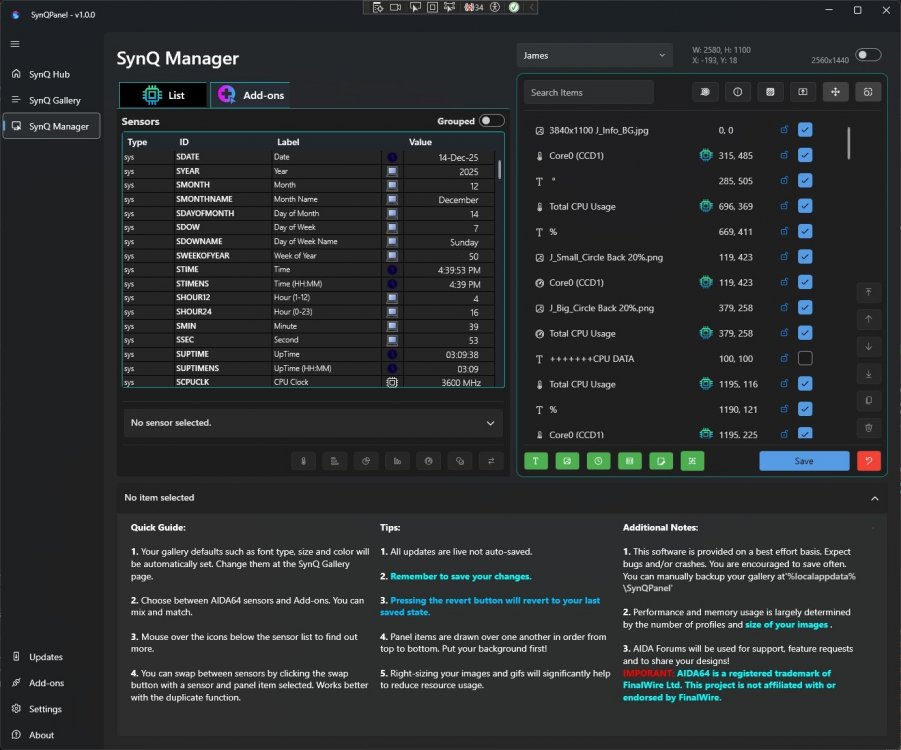
Hi @Loyd, Thank you for taking the time to share such thoughtful feedback. We’re really glad to hear you’re enjoying SynQPanel and exploring its features - insights like yours help us refine both usability and workflow. We completely understand the importance of minimizing repetitive steps when designing panels, and your observations are very valid. Default Font behavior In SynQ Gallery, once you select the panel you’re working on, the panel properties shown below allow you to set a Default Font Family and Default Font Size. These serve as global defaults for that specific panel. To help us improve this further, could you please clarify your expectation here? Would you prefer these defaults to automatically follow the last-used style, or should this behavior be more explicitly controlled by the user? Duplicating gauges / copy-paste Could you also let us know how you’re duplicating gauges? In SynQ Manager, just above the trash/delete icon, there is a “Duplicate selected item” option. We’ve tested this and confirmed that it properly clones the selected sensor/gauge. After duplicating, you can replace the sensor using the orange “Replace Selected Sensor” button. If this button appears disabled, please ensure: The cloned gauge is selected on the right, and The desired sensor is selected from the AIDA sensor list on the left. Once both are selected, the replacement should work as expected. If your experience differs, please let us know - we’ll be happy to investigate further. Side note: We’ve also fixed the issue you reported where system shortcuts in labels appeared as placeholders (e.g., $CPUModel, $GPU1Model). Thank you @BHSY for the following enhancements: - We have also added Right Click on Sensorpanels to show the ContextMenu - Close to Tray wen X button is pressed These fixes will be included in the next build. Thank you again for your feedback and encouragement. We truly appreciate your support and look forward to your thoughts.

-
Thank you so much for your kind words and for taking the time to try SynQPanel - it truly means a lot, especially coming from the AIDA64 Family/Team. 🙏 You’re absolutely right about the onboarding experience. SynQPanel is still growing, and while the core functionality is there, the workflow for creating and organizing panels needs clearer guidance. A step-by-step video tutorial and improved documentation are definitely next on my roadmap. I also want to sincerely thank a few people who’ve supported me throughout this journey: @Surjeet has been with me from day one - my Mentor, My coding partner - always encouraging me, brainstorming ideas, and helping me push through challenges. ❤️ @BHSY for testing and detailed logs were invaluable in improving shared memory handling. He shared a few panels with me for testing and those were mind blowing. 💓 @Loyd for the first one to test and sharing feedback to include a few updates we will see in the next build ❤️ And of course, the community’s feedback - including yours 😍 - keeps me motivated and moving forward. This project means a lot to me, and I’m genuinely grateful for the support and encouragement. I’m excited to keep improving SynQPanel together and continue enhancing the AIDA64 user's experience. SynQPanel is still early, but the momentum and community support are incredibly motivating. I’m looking forward to refining the experience and continuing to build something useful for the AIDA64 users. 🙏 Thank you again for the support and trust. 🙏
-
Wow, your panels and ideas are really OUT OF THE WORLD!! 🎉 You are the one to show the power of SynQPanel!! LOVE IT!!!! 😍 I really want such kind of encouragement to keep this project enhancing further and further. Thank you!!!!
-
Thank you for sharing the details. We have added this to known issues and will try to fix in the next build!
-
@Loyd: Thank you so much for sharing the details! I really appreciate it ! 🙏 1. Yes, the main image issue is resolved and we found that when any image is set as Background was skipped in the code. This happened as we had the code to skip "Preview" first image. Now its fixed and will be shipped in the next build 2. If you dont mind, please share the screenshot where the system shortcut is not loaded for labels. We will try to fix that too! Really appreciate your interest and support in this matter! 🙏 You guys are amazing 😍 as you all are helping me a lot to diagnose and make this application better! ❤️ Now, I dont feel alone here!! ❤️
-
Thank you so much for taking the time to test SynQPanel - I really appreciate it 🙏 Great to hear that the alignment and color chart worked well for you. To keep things organized, I’ve added detailed guidance in the main SynQPanel launch thread, which we’ll use to track issues, fixes, and usage notes going forward. The “Share your sensorpanel” forum should stay focused on panel designs and creator discussions 👍 About the images not loading That’s very useful feedback. Could you please let me know (or share an example) where some image items didn’t load? If you can mention: panel format (.sensorpanel, .spzip, .sqx) image type (static / GIF / web image) and whether they were existing items or newly added I’ll try to reproduce it and address it in the next update. About new items appearing at the bottom Yes - currently, when working with .sensorpanel or .spzip formats, newly added items are appended to the bottom of the list. This is a known limitation and is listed in the Known Issues section on the main thread. About saving changes Saving behavior is explained step-by-step in the main SynQPanel post, but in short: Clicking Save in SynQ Manager writes changes back to the original panel Export options are available for .spzip and .sqx More details are posted in the main thread - please feel free to ask if anything is unclear. Thank you again for testing and sharing feedback!
-
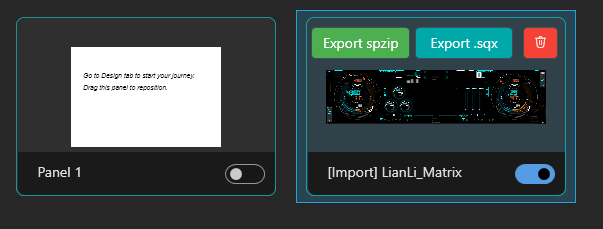
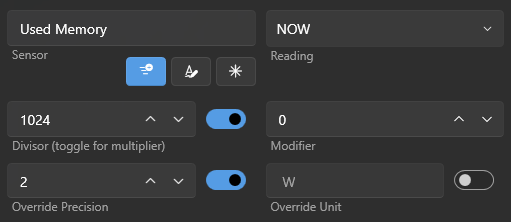
=============== Instructions: We will keep on updating this =========== 💾 Saving & Exporting Panels Currently supported formats: .sensorpanel .spzip .sqx Saving changes In SynQ Manager, clicking Save writes all changes back to the original imported file Exporting panels Open SynQ Gallery from the left pane Select the panel you want to export Use Export SPZIP or Export SQX Notes on animations GIFs, animations, and advanced visuals are only supported in .sqx If you add animations, export the panel as .sqx for full compatibility +++++++++++++++++++++++++++++++++++++++++++++++ Converting MB to GB or other conversions example:
-
=========This Section is reserved for Known Issues============ Known Issues (Public Preview) .rslcd panels are partially supported Some gauges may not render correctly Saving .rslcd panels is not supported at this time When adding new items to .sensorpanel or .spzip panels, new items are currently added to the bottom of the panel list Some .spzip or .sensorpanel files generated by newer AIDA64 versions or having MANY images may fail to import due to format differences. This will be addressed in upcoming updates [FIXED] System short cut in labels are not loaded and appear as $CPUModel, $GPU1Model These limitations are known and will be improved in future updates. =========FIXES============ Update – Fixed, will be available in the upcoming build v1.0.1 Two issues identified during testing have now been resolved: • Background images marked as “Set as background” in AIDA64 panels were not being detected correctly. SynQPanel now respects the BGIMG flag exactly as defined by AIDA64. • Image-based hour hands using the Time (STIME) sensor (including 360 / 720 image clocks) were not rendering correctly when the sensor returned formatted time values. SynQPanel now properly interprets STIME for image-state gauges. Thank you to everyone who tested and reported these - this helped improve compatibility with advanced AIDA64 panels. • Enhanced Shared Memory Reading SynQPanel no longer imposes any shared memory size limits. It dynamically maps and parses the full memory region provided by AIDA64, eliminating XML truncation and sensor-list instability.
-
As promised, we are live now:
-
As promised, we are live now:
-
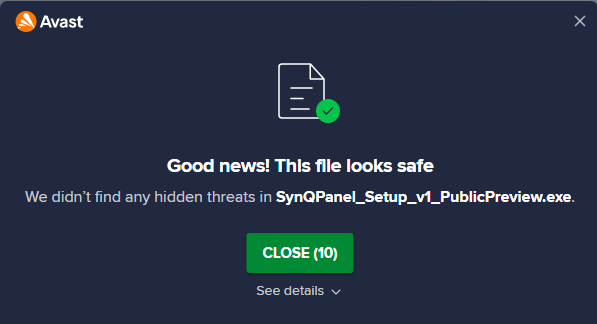
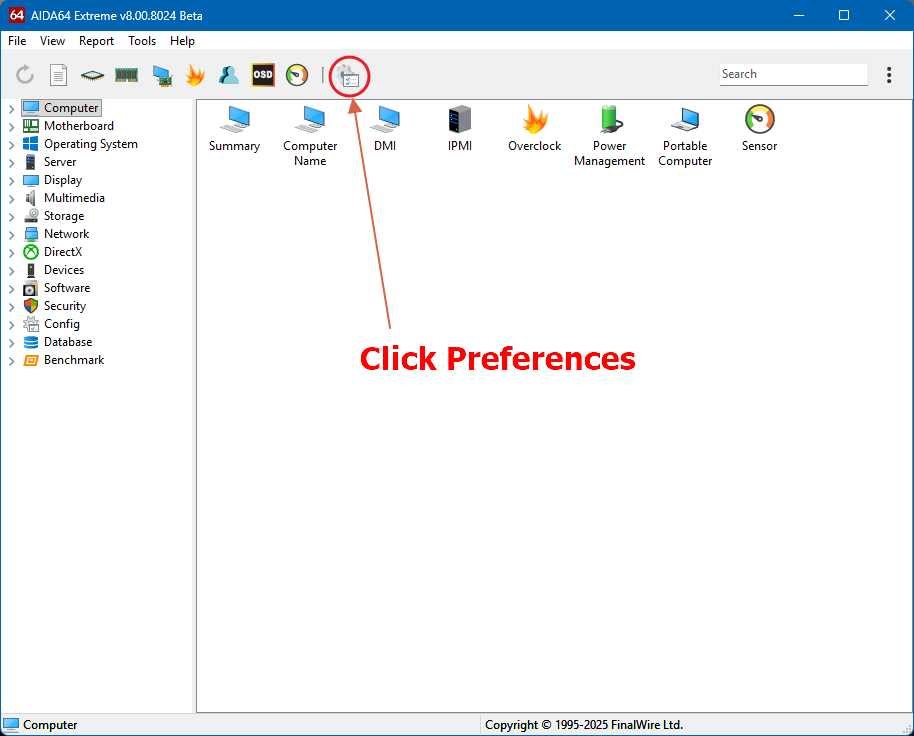
🚀 SynQPanel v1.0 – Public Preview Released Hello everyone, Following up on my earlier teaser, SynQPanel v1.0 (Public Preview) is now available. SynQPanel is a panel-based desktop visualization tool for AIDA64 users, focused on: clean layouts pixel-precise control secondary displays & always-on dashboards ✨ Highlights Uses AIDA64 Shared Memory Runs on Windows 10 / 11 Profile-based configurations Multiple visual elements (text, gauges, bars, tables) Small set of built-in add-ons for system & runtime context ⚖️ Licensing & Attribution Released under GNU GPL v3.0 or later Derived from an open-source project originally authored by Habib Rehman Since then significantly modified, extended, and independently maintained as SynQPanel AIDA64 is a registered trademark of FinalWire Ltd SynQPanel is not affiliated with or endorsed by FinalWire Ltd Source code & license details: 👉 https://github.com/sursingh-hub/SynQPanel ⬇️ Download Windows installer (Public Preview) Available under GitHub Releases 👉 https://github.com/sursingh-hub/SynQPanel/releases ⚠️ Security Notice (Please Read) SynQPanel is a new, unsigned application. Because of this, Windows SmartScreen or some antivirus tools may briefly scan the installer or display a warning during first launch. This is normal behavior for newly released software and does not indicate malware. Why this can happen SynQPanel legitimately accesses: Local configuration files AIDA64 shared memory System and hardware telemetry What to expect ✔ Installer completes successfully ✔ SynQPanel runs normally ✔ No warnings on subsequent launches Windows SmartScreen/Defender If Windows shows “Protected your PC”: Click More info → Run anyway to continue. Transparency: SynQPanel is fully open source, with complete source code available on GitHub. There are no hidden installers, background services, or bundled software. ⚙️ Enable AIDA64 Shared Memory (Required) SynQPanel requires AIDA64 Shared Memory. AIDA64 → Preferences → External Applications Enable: ✅ Shared Memory ✅ Writing sensor values to RivaTuner OSD ✅ Display labels Restart AIDA64 after applying changes. 🧪 Public Preview Notice This is a Public Preview release. Please: Keep backups of your original .sensorpanel, .spzip, or .sqx files Avoid editing your only copy of important panels Use test or duplicated panels when experimenting SynQPanel does not modify AIDA64 itself, but may save changes back to imported panel formats. Provided as-is, without warranty, as permitted under the GPL. 🙏 Final Words This project is shared in the spirit of learning, experimentation, and open-source collaboration. Feedback - positive or critical - is welcome. Thank you to the AIDA64 community for the inspiration over the years. __ SynQPanel contributors
-
Thank you for all your love and support, we are very close and its official now: 🙏 We will need your love and support to make this project successful 🙏
-
Thank you! Thank you! Thank you for all your love and support, we are very close and its official now: 🙏 We will need your love and support to make this project successful 🙏
-
Hello everyone, 🙏 We like to share a project we're working on with a lot of care and passion over the past months: SynQPanel. SynQPanel is a Windows desktop panel visualization application designed to present AIDA64 hardware telemetry in clean, compact, and highly customizable layouts - especially suited for secondary displays and dedicated monitoring screens. It will be available FREE OF COST!! This post is an early introduction and teaser ahead of a public release. We created this thread so that we can add the URL in the application UI and further, we will use it for discussions! What is SynQPanel? SynQPanel provides a visual layer on top of AIDA64 Shared Memory, allowing users to design information-dense dashboards composed of multiple visual elements. The focus is not on replacing AIDA64, but on presenting its data differently - with some different control over layout, density, and visual intent. The project is: Open-source Built with WPF (.NET ) Designed around clarity, precision, and long-term maintainability The purpose of the project is to act as an external visualization frontend for sensor data (for example, animated or stylized sensor panels). All rendering, UI, and animation logic are handled entirely within the external application; AIDA64 remains unchanged and is used solely as the data provider. To clarify the project’s scope: Uses only AIDA64’s documented shared memory interface Does not include or distribute any AIDA64 components Does not bypass licensing, UI limitations, or protections Clearly states non-affiliation: Does not use AIDA64 logos or branding Refers to AIDA64 only in a functional manner (e.g., “ensure AIDA64 shared memory is enabled”) What does it do? Presents CPU, GPU, memory, and system metrics using text, gauges, bars, tables, and charts Supports static and animated visual elements (for subtle motion, indicators, and themed panels) Allows pixel-precise layout control for compact or high-density panels Supports profile-based configurations for different layouts and resolutions Includes a small set of built-in Extra add-ons for runtime and system context All telemetry is read via AIDA64 Shared Memory - a compatible AIDA64 installation is required/must. Design Philosophy SynQPanel is designed to be: Minimal - Its simple and helps to what you choose to display Precise - exact positioning and controlled visuals Intentional - visuals serve information, not the other way around The goal is to give users the tools to design their own panels, whether simple or highly detailed. Project Origin & Status SynQPanel is derived from an open-source codebase originally authored by Habib Rehman, and has since been independently developed, refactored, and extended under the GNU GPL. Current status: Beta Core functionality is stable UI, add-ons, and internal APIs may continue to evolve 📅 Planned public release: 🎉First week of January 2026 🎉 We are Finalizing the Code, updating Free Licensing, Attributions, cutting things to make it as light as possible Open Source & Community Licensed under GNU General Public License v3.0 or later Source code will be available on GitHub Feedback, ideas, and discussion are very welcome and will continue in this thread Once released, we’ll share: GitHub repository link Screenshots / short animations Basic setup and usage guidance (Will need your help here too) Disclaimer AIDA64 is a registered trademark of FinalWire Ltd. SynQPanel is an independent project and is not affiliated with or endorsed by FinalWire Ltd. Thank you all for reading 🙏 We will need your love, support to make this project good 🙏 We're excited and looking forward to sharing more details soon and hearing your thoughts. __ SynQPanel contributors
-
We’re putting the final touches on everything to make sure this holiday season wraps up perfectly, and the launch goes off without a hitch! We’ll be sharing updates as soon as we’re ready - thank you so much for your excitement and support! 🤗 The launch is just around the corner! 🌟 Wishing you a joyful and peaceful Christmas holiday! 🎉
-
Hi @Loyd, What do you think?
-
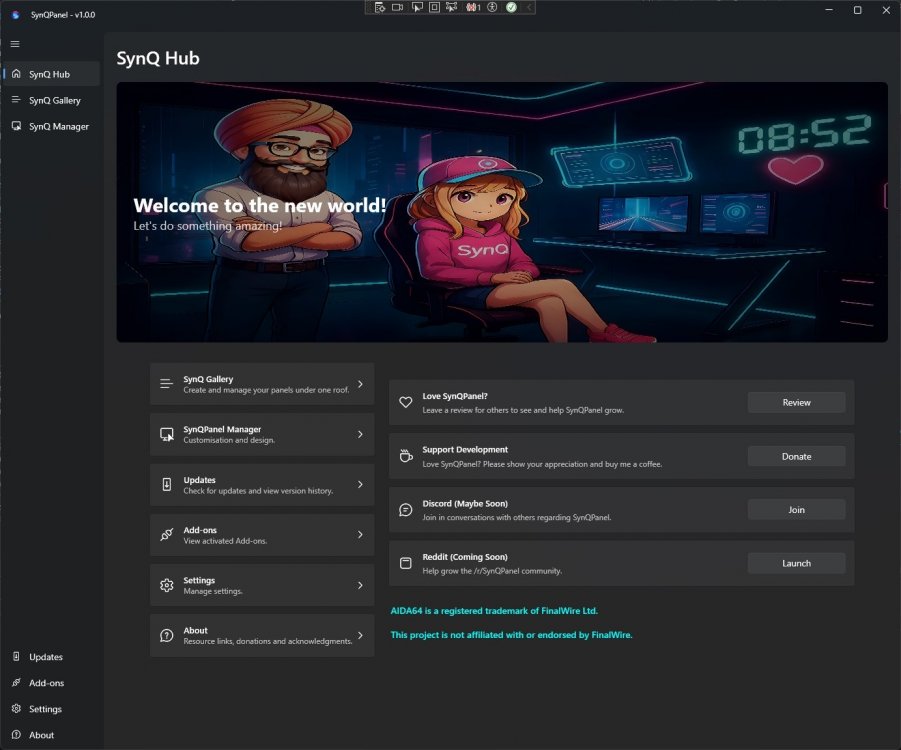
✨ Animated Panels in Action ✨ (Video was quick to keep it short and light weighted to be uploaded here!) Please note that all the panels showcased here are thoughtfully designed by their respective creators. Full credit and attribution belong to them. These examples are shared purely for demonstration purposes - we do not own these panels and will not distribute them in any form. These panels are purchased and owner gave the permissions for demo, display and testing only!! 🌟 Features at a Glance Multiple panels (even different resolutions) can be opened simultaneously Smooth and engaging animations are fully supported “AIDA64 is a registered trademark of FinalWire Ltd. This project is not affiliated with or endorsed by FinalWire.” Uses only AIDA64’s shared memory interface. Does not include or distribute any AIDA64 components. AIDA64 needs to be running in the background with a valid AIDA64 license. Teaser Video.mp4 💖 Your Voice Matters We would truly love to hear your thoughts and feedback. Your love and support mean everything to us -without you, we are NOTHING, and without your encouragement, we cannot move forward. Thank you for being a part of this journey with us. 🙏✨
-
Thank you @Surjeet @rinaldop: He's absolutely right! We're almost there - get ready, because SynQPanel is coming soon! SynQPanel (pronounced as "Sync Panel") is on its way to make things easier and more intuitive for you! What do you think? We can't wait to hear your love! We appreciate you all - your support means everything to us!