

Squall Leonhart
-
Posts
389 -
Joined
-
Last visited
-
Days Won
3
Squall Leonhart's Achievements






-
fixed: OpenAL info is missing in latest beta(s)
Squall Leonhart replied to FatBoyNL's topic in Bug reports
no surprise, they generated the install shield off of the flawed xfi infs. -
fixed: OpenAL info is missing in latest beta(s)
Squall Leonhart replied to FatBoyNL's topic in Bug reports
Creative uses the Creative OpenAL 1.1 installer on all products to place the OpenAL32 dlls, and this does not do what you claim, What you're recollecting is on XFI where the 64bit CT_OAL file is placed in both the 64 and 32bit system32 locations due to a flawed inf configuration. -
has stuff all to do with OSD, this issue has been reported countless times, even by yourself 6 years ago the only way to run 8.x on many 10 and 11 systems is by replacing the kernel driver with the 5.99.4800 one, 5.99.49xx and later affected instead of feeding it the driver files, give it the dump file as well
-
Not showing internal SSDs in section Storage
Squall Leonhart replied to Miroslav Tuhársky's topic in Bug reports
Does HwInfo show them? -
Not showing internal SSDs in section Storage
Squall Leonhart replied to Miroslav Tuhársky's topic in Bug reports
https://techcommunity.microsoft.com/blog/windowsservernewsandbestpractices/announcing-native-nvme-in-windows-server-2025-ushering-in-a-new-era-of-storage-p/4477353 NVME's will no longer be scsiport devices when this spec is enabled widely. @Fiery Home/Pro can turn it on with reg add HKEY_LOCAL_MACHINE\SYSTEM\CurrentControlSet\Policies\Microsoft\FeatureManagement\Overrides /v 1853569164 /t REG_DWORD /d 1 /f reg add HKEY_LOCAL_MACHINE\SYSTEM\CurrentControlSet\Policies\Microsoft\FeatureManagement\Overrides /v 156965516 /t REG_DWORD /d 1 /f reg add HKEY_LOCAL_MACHINE\SYSTEM\CurrentControlSet\Policies\Microsoft\FeatureManagement\Overrides /v 735209102 /t REG_DWORD /d 1 /f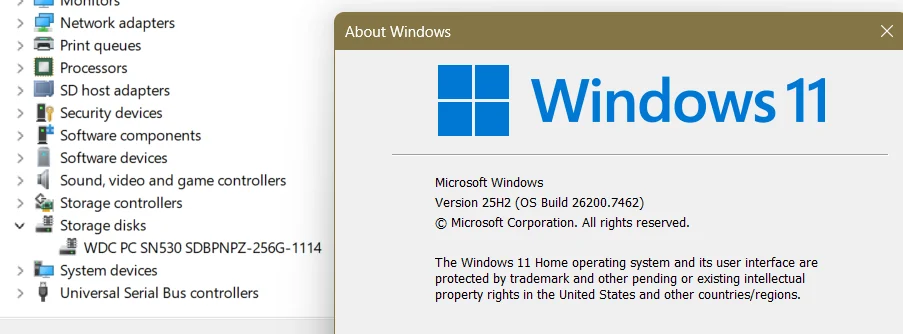
-
these bogus readings appear on Intel z690+ too, when EC reading is on.
-
AIDA64 crashes when shutting down
Squall Leonhart replied to Selim Gürsu's topic in General Discussion
when closing aida64? -
Time for AIDA64 to have Dark Mode [[ It's finally here! ]]
Squall Leonhart replied to Kodo28's topic in Brainstorming
https://github.com/ysc3839/win32-darkmode/tree/delayload Technically it works on 10 as well, but there are some things to be concerned about, such as scroll bars, and the menu bar. -
it doesn't stay closed because you turned on a plugin in an external application, such as MSI Afterburner which automatically starts aida64 so it can receive data.
-
Aida64 extreme causes fans to stop working
Squall Leonhart replied to StreetArt86's topic in Bug reports
update the asus ai suite software or remove it. -
Radeon 7900 - Missing VMem Free and VMem Utilization?
Squall Leonhart replied to Trayal's topic in Bug reports
These are supplied by Nvidia NVAPI, AMD has no equivalent api. -
Weird bug with Aida Extreme 6.70.6000 (stuttering in games)
Squall Leonhart replied to Lmame's topic in Bug reports
you may have a HDD that has a high latency for SMART polling. -
the cpu usage on the Performance tab is not consistent with utitilities or the usage shown on the Details tab, this is a known issue where the performance and processes tab takes boost clocks and core count awake and used into account when factoring usage, because it factors these into things, the usage on these tabs are usually higher than the Details tab. For the clock reading on task manager and aida64, you need a power profile that has the min cpu state set under 100% to report correct idle behavior having min cpu state in the power profile maxed out to 100 will show constant max clocks in aida64, task manager will show up to 200mhz range from max clock HWInfo will show max actual clock, and low effective clock.
-
fixed: Incorrect CPU usage since Windows 11 22H2
Squall Leonhart replied to Navadude805's topic in Bug reports
because it was win11s fault.- 107 replies
-
- 1
-

-
- cpu utilization
- windows 11
- (and 4 more)
-
fixed: Incorrect CPU usage since Windows 11 22H2
Squall Leonhart replied to Navadude805's topic in Bug reports
Fix is in 22621.900 (Optional Preview) 22621.1020/22623.1020 (Beta)