
Exhumed
-
Posts
271 -
Joined
-
Last visited
-
Days Won
92
Content Type
Profiles
Forums
Events
Everything posted by Exhumed
-
Yes. If you offer the panel for download you would have to name me as the author. If you want to sell the panel with the icon on it, you can't.
-
It doesn't matter where you got it from. The icon is mine and was released under License: CC 4.0. Click on the link. https://creativecommons.org/licenses/by-nc-nd/4.0/
-
https://iconarchive.com/show/call-of-duty-modern-warfare-3-icons-by-3xhumed.html
-
Du kannst die Suchfunktion oben nutzen. https://forums.aida64.com/search/?q=480x320&quick=1&type=forums_topic&nodes=9 einfach durchklicken, dürfte bestimmt etwas dabei sein.
-
To be honest, I don't know why people are getting upset about the fact that three or four users (including me) from the hundreds of users in the community are now selling their sensor panels instead of offering them for free as before. I have offered more than 10 different sensor panels including graphics here for free and they have been downloaded thousands of times. And some of them are still available for free here on the forum. I even uploaded new graphics here, free of charge for everyone. But that doesn't count anymore. Buuh, bad user, just wants to make money. I've been working with graphics since the 1990s. Almost all of it was shared by me for free on Deviantart with the community there. But even there my free work was stolen without asking me when it became known. My game icons have been downloaded hundreds of thousands of times and are still being downloaded today. Even professional print magazines printed my icons in their magazines without asking (GameStar, German). Enter Google: "game icons exhumed". Yes, the icons are all mine. But in the meantime it has been imitated dozens of times without asking me beforehand or my layout has simply been stolen. Looks like my icon but it's not. Only I have the original files and can edit and change them as I wish. I came to this forum to share my work with the community, for free. I'm really not a person who is materially adjusted, I've never been in my life. If someone needs help, no problem I help without payment. The reasons why this has changed have already been mentioned several times and explained plausibly. Deal with it. But free doesn't seem to be good enough or sufficient for some. Complain to those who don't even manage to do the simplest things, such as naming the author, if they continue to use and upload content that has been made available free of charge. Openly stealing content and reusing it or even offering third-party panels and graphics for sale on other sites. After a while, nobody knows who the actual creator of the sensor panel was, because nobody thinks it necessary to name the user in the newly created download. Even attached credits with license conditions as a text file are ignored. What is he talking about license, or what is Creative Commons 4.0? I have no idea, I just want the sensor panel and I do what I want with it, that often seems to be the motto here. The forum seems to be a kind of self-service shop for many when comparing reviews and downloads. Only a small number of users say thank you or vote. By the way, these users who can download have previously registered here. No download without registration! So where are the ratings, whether negative or positive, compared to the download numbers? I call it Leecher. Is it that hard to say thank you or to vote? Behind every sensor panel is a person who has put a lot of work into creating this panel. But regardless of that, the majority of users here continue to exchange their panels with the community and I will continue to offer one or the other for free. But some who complain here don't give anything but bang around loudly. If you click on the profiles and browse for sensor panels, mostly nothing.
-
The customer didn't want any pixel lines or squares, but a completely black background and that's what he got.
-
I like your Tron creation. Only the background doesn't fit at all. I mean wood as background? http://www.thx-trailer.com/replica/tron/grid/bilder/15.JPG https://cutewallpaper.org/21/tron-grid-background/Another-Tron-Type-Floor-by-Taz09-in-2019-Tron-legacy-.jpg
-
Download Aida64 software and install it (trial version is ok, you can buy a license later to unlock all sensors) Download a sensor panel what you like from this forum. Some are packed as archives (zip/rar/7zip), others are available directly as sensor files. Each sensor panel was created by a user for a specific resolution. The resolution should normally be applied automatically when importing. Open the archive and extract the folder inside or the included files (Sensor panels can have different file extensions (.axlcd, .sensorpanel, .oslcd)) Start Aida64 and open settings. General > "Load AIDA64 at Windows startup" SensorPanel > "Show SensorPanel" and "Enable context menu" (there is also the important "SensorPanel size" option you need later if you want to make your own panel) Hardware Monitoring > Enable these options if you need them Import a downloaded sensor panel in to Aida64. Taskbar > "64" icon > SensorPanel Manager Click on "Import" to import the downloaded sensor panel. If the file extension cannot be opened easily or is displayed as not loadable, click on "All files (*.*)" and thus import the sensor panel. In the sensor panel manager you edit the sensor panel and make any changes you want. All elements are at specific coordinates. The background image should always be at the top of the list if one is used. All objects in the sensorpanel manager are arranged in specific layers. At the top of the list is the lowest level in the sensor panel manager and in the sensor panel on the desktop. So exactly the opposite! The NSWE arrows (on the right under import/export) are used to fine-tune the selected objects in the sensor panel manager. "1 px" means move one pixel wide the marked object on the sensor panel you see on the desktop. By clicking on "1px" you can change the width to 1, 5, 10 and 20 pixels that a marked object should jump in the desired direction. Add a new object under "New". This can be a hardware sensor from your pc or a graphic that is in a folder. You can change objects that are already in the sensorpanel manager with "Modify". With "Hide" you can hide objects that you want to temporarily hide. Press the button again and it will reappear. If you have placed an object and want to adopt the set values such as color, font, font size but later only change the font color, for example, you do not have to completely reinstall the sensor with "New" but can simply clone an object with "Duplicate". This then sits in exactly the same position and only needs to be moved. To move an object up or down one level in the sensorpanel manager, you can use "Move up" and "Move down". On the one hand, this can be used for clarity and also be practical, because objects that are one below the other cannot be edited by right-clicking on the open panel on the desktop because another object covers it and instead is selected when you click on it. Add a new sensor. Select the "Item Type" and then select a pc sensor you want to see in the panel from the long list. Set the Font, Font Color, and Font Size, Show label (type something there for testing), if you want a name next to the sensor values and click "OK". The sensor is now displayed on the desktop on the top left of the previously imported sensor panel. With a right click on an object (yellow dotted line) and a left click on "Move ..." the object can roughly be moved with the mouse to a different position within the imported panel. All the rest of what you can do with the program would lead too far as instructions. Just experiment with the options that the program offers you. Try and fail motto. Edit: screenshot (complete guide) as backup https://postimg.cc/7f1zqmhK
-
Glad to hear you like this panel so much.
-
Custom panels for customers, some newly created and modified from existing panels. Interface 101 - yellow/orange version (1920x480px) Borderlands 3 - Version 1 (1920x480px) Simplify v2 red/yellow (1920x480px) Simplify v2 white/grey (1920x480px) Simplify v2 colorful (1920x480px) MSI - black/grey (600x1024px)
-
Right click on an open Sensor Panel > Sensor Panel Manager > Import / Export > give the file a meaningful name (or use the automatically generated date/time default) and save in a folder of your choice.
-
I see what you mean but each panel is designed exclusively for that person. It's unlikely that anyone would want to use the panel exactly as it is if I were to offer it. There will always be requests for changes or personal adjustments. Different resolution, different sensors, different color, graphics, etc. Same as the original MSI sensor panel of mine on which this one is based. It has been heavily modified and it is no longer the original panel. Made exclusively for someone doesn't mean I can't continue to use it or will use it in a modified form. If a customer insists that it remains exclusive, that's something completely different and is then of course reflected in the price if I can't or shouldn't continue to use the assets. But that is not the norm.
-
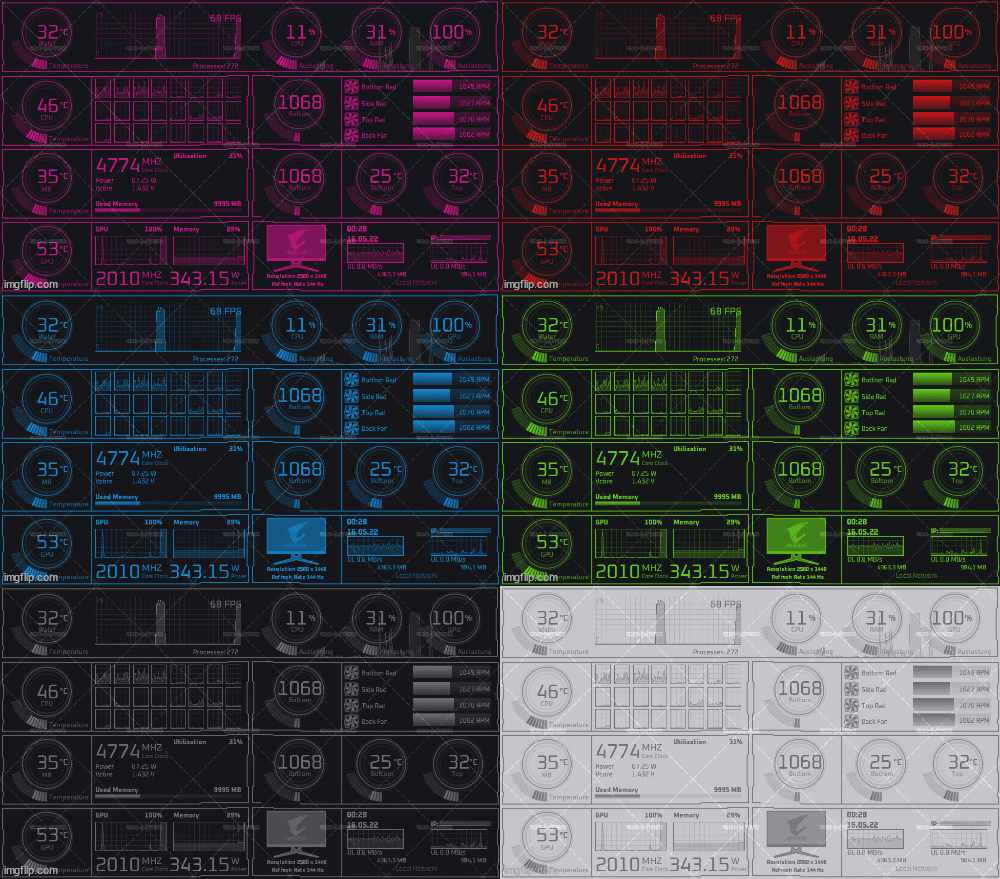
Another commissioned work. The basis was the MSI panel shown here recently but with a different arrangement. Water cooling is installed here, so a different layout. Sensorpanel size is 1024x600px. Gif animations shows possible color variations if someone wants a different color style. I also added custom fan icons and the Aorus monitor as a bonus.
-
https://easyupload.io/
-
Good. You fixed the problem. :)
-
All graphics cards have such sensors and can be queried in Aida64. You just have to choose the right sensor. Aida64. "Simple sensor item" -> Category "System" scroll down until (after the sensors for drives) GPU sensor shows up. There you should see an hourglass as a symbol for the sensor. FPS if set correctly only shows a value when a game is actively running in a window. MSI aferbruner included the RTSS. Just run RTSS in the background.
-
No. At the time, I had already created many graphics such as wallpapers, signatures and complete websites in CMS, but nothing for this game.
-
Nice to see that my free graphics are used in a new panel. I like the color composition.
-
I wrote to you that unfortunately I am currently busy and therefore cannot accept your order. If you have problems with a certain person here from the forum and you feel betrayed because they want to sell you panels from other users, you should also call this person by name. This allows the black sheep in the community to be sorted out if they are publicly mentioned. Ultimately, this harms everyone if such users are not named. I don't like body shaming, but it's probably appropriate here when you talk about "thieves" and "scalper".
-
Yeah, i know and i did that. I had uploaded a video, the thumbnail was the watermarked panel. Here in the forum the same thumbnail with watermark. He steals it anyway and edits it.
-
Hello community. I have to get rid of something here again. There are obviously people here (https://forums.aida64.com/profile/56072-notmental/) aka (https://www.bigbromonitor.com/home) who think they can steal graphics or even whole panels without asking and paste them into an Aida64-like sensor panel software to use for their own purposes (pushing to sell external displays). Some of my formerly free sensor panels were offered on this page, panels from other users can still be found there. He wrote me on Youtube that he would like to buy all my sensor panels, which I refused. He wrote me what he would like to use my panels for and gave me the link to his website. I declined again and wrote him to delete all downloads with my sensor panels as they are no longer offered for free. I also wrote him that anyone who has already downloaded these panels can continue to use them for private purposes. I thought that was unequivocally clear after my answer. Days later. 2 days ago I had an order for this MSI 1024x600px sensor panel that will be posted here later. In plain language, this means that a person has officially commissioned me to create an exclusive sensor panel for him, including new graphics. And today I find this panel almost unchanged (and after we talked about my sensor panel files on his page and that he has to remove them) on this site https://www.bigbromonitor.com/view/msi-7-inch-1024x600 as a free download. If you download it and look in the folders you will find my copyright text for the formerly free sensor panels. But that has no place in there at all, since this MSI panel is not a free panel, but someone paid me to create it like this and only I have the original files. And as if that weren't crazy enough, he wants to hire me as a designer after he stole the MSI panel. No, that's clear. It makes you wonder if he's out of his mind. So if you post pictures of your panels here, he'll steal them too and use them.
-
It's a trial version of Aida64, You need to buy a license.
-
This is a very unusual screen resolution. You won't find anything here in the forum.