


tistou77
-
Posts
486 -
Joined
-
Last visited
-
Days Won
3
Recent Profile Visitors
153095 profile views






tistou77's Achievements






-
It's good, thanks so much for your great work
-
@Fiery Unlike Aida64, the value does not disappear and drops to 0.0V much less frequently. Thanks
-
I'll record a video with GPU-Z. The only difference with GPU-Z is that the voltage drops to 0.0V about once per minute, then returns to the real voltage
-
Hi @Fiery Were you able to find the problem? I don't have this issue with any other monitoring software. And it's quite annoying when you're checking temperatures or other and the display shifts with the appearance and disappearance of this sensor. Thanks
-
Okay, thanks Fiery. The motherboard has special connectors for water pumps. I don't use the OSD, during benchmarks, I use the Sensor page. But I admit that I'm using it less at the moment. The display "jumps" with the GPU Core disappearing and reappearing, and it's annoying. And thanks for explanation for Flows difference
-
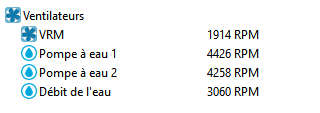
Hello It's odd to have the water pumps and the VRM fans in the same section (fans) I believe I've mentioned this before, but they don't go together. It would be better to have a separate WaterCooling section (below the temperature settings) for water pump, etc... And why not add the Flow Sensor with the water pumps and Water Flow too ? Thanks so much PS: By the way, what's the difference between a Flow Sensor and Water Flow ? They use the same sensor but different units ?
-
Hello @Fiery I recorded a video with my smartphone, if I use an app, the problem disappears. It seems this problem only occurs if no app is running.
-
I don't have this problem with GPU-Z or other monitoring software. I've noticed that when GPU-Z (or ScreenToGif for example) is open, the GPU Core in Aida64 doesn't disappear. Thanks for your help
-
Hi Fiery Files attached Thanks nvidiagpureg.txt nvidiasmbusdump.txt
-
In fact, it doesn't happen all the time. If I close Aida64 and restart it, sometimes it doesn't happen anymore.
-
Hello With this graphics card, the GPU core (Voltage values) appears, disappears, appears, disappears, etc... in the monitoring when the GPU is idle. No problem under load. If you could fix this problem Thanks
-
Hello Microsoft has rolled out (currently in the Insider program) a Native NVMe, which uses an improved native Windows driver. Can AIDA64 recognize this new NVMe driver ? Announcing Native NVMe in Windows Server 2025: Ushering in a New Era of Storage Performance | Microsoft Community Hub I'm currently testing on W11 25h2, and the NVMe drive is no longer detected by AIDA64. Thanks
-
Indeed, it is good after reinstalling the Nvidia drivers
-
Ok thanks, I'll test too with other Windows to be sure
-
Ok, thanks, I'll try it. I "clean" the NVidia drivers with the available software, but it always cleans the same way and never has any problems. Or maybe it's a Windows DLL ?