MAA
-
Posts
130 -
Joined
-
Last visited
-
Days Won
1
Content Type
Profiles
Forums
Events
Everything posted by MAA
-
Hello, Please add info about bus width and clock for each cache L1/L2/L3/L4, and info about type (exclusive, inclusive).
-
Hello, Why you don't benchmark the latest Intel processors? Your last tested processor is i7-8700K from Q4'17. P.S. And why 16x Ryzen9 3950X has a significantly lower result than 8x Ryzen7 1800X in PhotoWorxx?
-
Hello, Please add info about available timers and their clocks (RTC/ACPI/QPC/HPET)
-
Why did you remove benchmark for SHA1/SHA2?
MAA replied to MAA's topic in Benchmarking, system performance
>> As a hashing algorithm, SHA1 is obsolete. SHA1, but not SHA2. NIST does not currently plan to withdraw SHA2 or remove it from the revised Secure Hash Standard. -
Hello, why did you remove benchmark for SHA1/SHA2? this benchmark could be hardware accelerated https://en.wikipedia.org/wiki/Intel_SHA_extensions
-
DumpEDID shows not complete information? What simple utilities can show full info?
-
I used DumpEDID, but i do not see "Maximum Pixel Clock" or "Video Bandwidth" info. How do you get this information (170 MHz)? D:\Distr\nirsoft\dumpedid>DumpEDID.exe -a DumpEDID v1.07 Copyright (c) 2006 - 2018 Nir Sofer Web site: http://www.nirsoft.net ***************************************************************** Active : Yes Registry Key : DISPLAY\BNQ78DB\4&1a6469cc&1&UID52830976 Monitor Name : BenQ GW2270 Serial Number : A9J02231019 Manufacture Week : 37 / 2018 ManufacturerID : 53513 (0xD109) ProductID : 30939 (0x78DB) Serial Number (Numeric) : 21573 (0x00005445) EDID Version : 1.3 Display Gamma : 2.20 Vertical Frequency : 50 - 76 Hz Horizontal Frequency : 30 - 83 KHz Maximum Image Size : 48 X 27 cm (21.7 Inch) Maximum Resolution : 1920 X 1080 Support Standby Mode : No Support Suspend Mode : No Support Low-Power Mode : Yes Support Default GTF : No Digital : Yes Supported Display Modes : 720 X 400 70 Hz 640 X 480 60 Hz 640 X 480 75 Hz 800 X 600 60 Hz 800 X 600 75 Hz 832 X 624 75 Hz 1024 X 768 60 Hz 1024 X 768 75 Hz 1280 X 720 60 Hz 1280 X 800 60 Hz 1280 X 1024 60 Hz 1280 X 1024 75 Hz 1600 X 900 60 Hz 1680 X 1050 60 Hz 1920 X 1080 60 Hz ***************************************************************** D:\Distr\nirsoft\dumpedid>
-
How to see the current drawn by the device connected to the usb port?
MAA replied to MAA's topic in General Discussion
Yes, that's what i'm talking about. Why AIDA does not show this information? -
How to see the current drawn by the device connected to the usb port?
MAA replied to MAA's topic in General Discussion
But Windows can: https://support.hp.com/doc-images/953/c01906076.jpg -
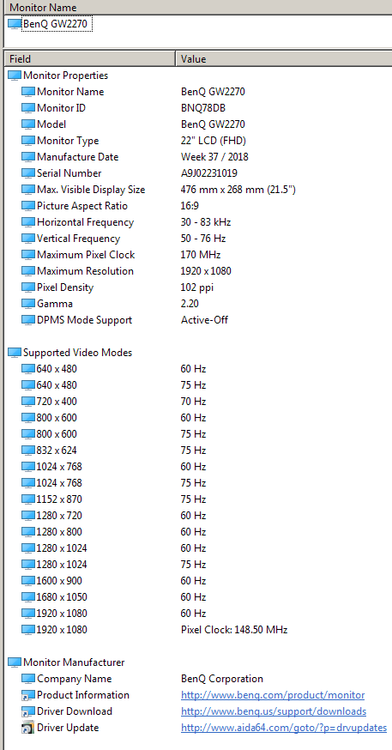
Hello, I have monitor BenQ GW2270HM As you can see in datasheet, Video Bandwidth = 205 MHz https://www.benq.eu/en-ee/support/downloads-faq/manuals/datasheet/monitor-datasheet-086.html and now i'm using mode 1920*1080@70Hz But, AIDA show incorrect info: Maximum Pixel Clock 170 MHz 1920 x 1080 Pixel Clock: 148.50 MHz
-
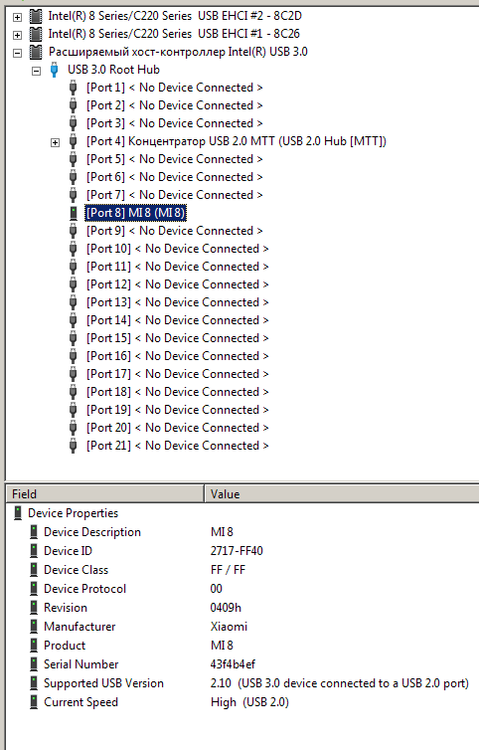
Hello, How to see the current drawn by the device connected to the usb port? I do not see this info in Devices\USB Devices:
-
Maybe you can use counters from Performance Monitor: VM Processor \ Effective VM Speed in MHz VM Processor \ % Processor Time
-
Hello, Please add realtime CPU frequency detection inside virtual machine (ESXi). Currently AIDA always show base frequency.
-
Hello, Please add HPL and HPCG benchmarks for direct comparison with supercomputers )) HPL https://www.top500.org/list/2017/11/ HPCG http://www.hpcg-benchmark.org/custom/index.html?lid=155&slid=293
-
AIDA64 Help (F1) Benchmark guide, SHA and AVX-512
MAA replied to MAA's topic in Benchmarking, system performance
AIDA64 5.97.4600 Help (F1) Benchmark guide still do not updated about using extensions AVX-512 -
Question about frenquencies displayed in benchmarks
MAA replied to frwho's topic in Benchmarking, system performance
Fiery Did I understand correctly that in the reference results you publish the base frequency, but the benchmark itself is performed at the turbo frequency? In my opinion this is an incorrect approach, which is misleading. Some processors have a very high turbo frequency (up to +200% to Base), but it works very short time: In my opinion, you should publish the Turbo frequency, or increase the benchmarks time to several minutes. -
Hello, Can AIDA64 measure performance of Tensor Cores?
-
1) Single-core benchmarks are very popular in reviews this year for comparing different microarchitectures (Sky lake vs. Kaby Lake vs. Coffee Lake and Ryzen vs. xxxLake). It will increase the reference benchmark results database only twice. 2) Maybe you'll write an additional benchmark specifically for "single-core mode"?
-
Hello, 1) CPU benchmarks have "Parameters" and we can select single-core mode (1 CPU). But Reference Results remain multi-core. Please add single-core Reference Results also. 2) Please add single-core mode also for Memory benchmarks.
-
AIDA64 Help (F1) Benchmark guide, SHA and AVX-512
MAA replied to MAA's topic in Benchmarking, system performance
AIDA64 v5.95 still does not support AVX-512? -
Hello, "FPU VP8" benchmark is very strange and do not scale on multi-core systems. May be replace it to a more common HEVC encoding?
-
AIDA64 Help (F1) Benchmark guide, SHA and AVX-512
MAA replied to MAA's topic in Benchmarking, system performance
I am disappointed. In my opinion, the benchmark should come out no later than the release of a new processor with new instructions (for this, there are engineering samples). Very bad news - all new reviews with AIDA64 show incorrect data and do not show the real potential of the processor: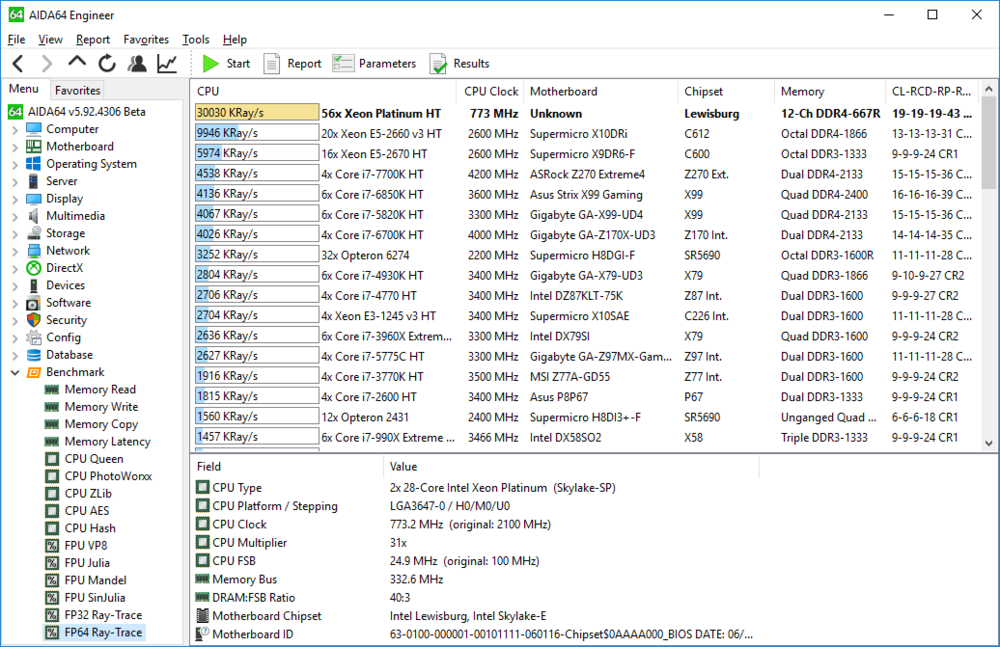
-
AIDA64 Help (F1) Benchmark guide, SHA and AVX-512
MAA replied to MAA's topic in Benchmarking, system performance
OMG! But why??? CPU with AVX-512 released a year ago. -
Hello, Why AIDA64 Help (F1) Benchmark guide do not updated about using extensions like SHA and AVX-512?
-
Why AIDA do not have Ryzen results anymore?