


tistou77
-
Posts
497 -
Joined
-
Last visited
-
Days Won
3
Content Type
Profiles
Forums
Events
Everything posted by tistou77
-
Monitoring and Asus Rampage V Edition 10
tistou77 replied to tistou77's topic in Hardware monitoring
Hello Still not planned ? Thanks -
Thanks for the explanation I do not know the values, hence my question This value is changed all the time, or until the next reboot ? Thanks
-
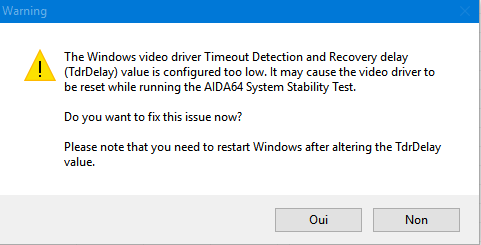
Hello When I check the box "Stress GPU (s), I have this popup (see screen) what is it exactly ? Thanks
-
Okay, thanks
-
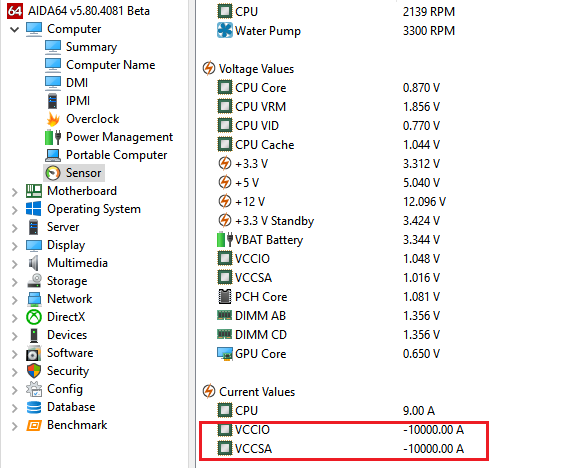
Hello I believe there is a bug with the last beta (Asus Rampage V Edition 10) Thanks
-
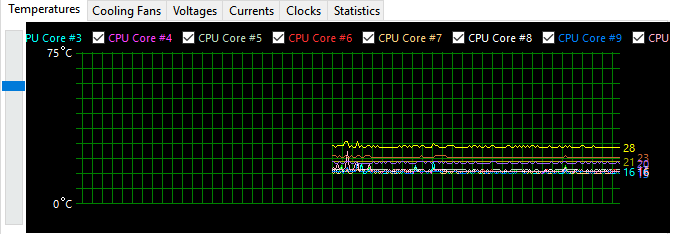
Hello I thought about the problem of colors and lines in the graph It will not be possible to add 2 lines, eg (for temperatures) in the "Statistics" tab but not to add them in the "Temperatures" tab ? Me, I never look at this tab, the lines are really too tight And all the screens that I can see on the forums, there are never tabs "Temperatures", etc ... Only "Statistics"
-
Monitoring and Asus Rampage V Edition 10
tistou77 replied to tistou77's topic in Hardware monitoring
Good news Thanks -
Monitoring and Asus Rampage V Edition 10
tistou77 replied to tistou77's topic in Hardware monitoring
Ah ok, I thought it was simple to implement Too bad, I'll leave like that. If one day you decide to add this option -
Monitoring and Asus Rampage V Edition 10
tistou77 replied to tistou77's topic in Hardware monitoring
Thanks so much, works very well And will there be any constraints to rename some sensor ? Because it must be "simple" to implant, no ? And those who want to rename, rename and those who do not want to, leave as it is Aida64 is really a great software, I only use this app, just this "renaming" that I find boring -
Monitoring and Asus Rampage V Edition 10
tistou77 replied to tistou77's topic in Hardware monitoring
Thanks for the explanation It is not possible to add this "source of the reading" if an Aquaero or other is "detected" ? I asked to rename because I do not use OSD Panel or other, but much the window of the "System Stability test" for test or windows of monitoring And in my configuration, this temperature # 1 corresponds to the temperature of the water, and it is true that I would have preferred to indicated "WATER" or something like this -
Hello Since some versions, the monitoring of the temperature #1 is indicated motherboard in parenthesis It can be confusing and think that the temperature of the motherboard I guess it's to differentiate with other temperatures on the external card (temperature #2, etc...), but maybe just the information for these latter would not suffice ? Or the ability to change the name of the temperature (very simple to add as an option) right click => rename, eg Thanks
-
You're welcome
-
It's better, I was forced to "Refresh" 1 time Same for the SPD
-
It's ok with the Refresh button Waiting for a possible resolution
-
Yes, made by Corsair Kit 4x4Gb 3733mhz at 3200mhz
-
Ok thanks For information, I never had a problem with a kit 4x4Gb, only with 4x8Gb
-
If you can not solve the problem, maybe the re "Detecting sensor information" will be redone by clicking the Refresh button
-
Here is the debug My memory is at 3200mhz (kit 3200mhz) I do not use other monitoring software running in the background like AI Suite smbusdump_full.txt
-
Bizarre, with ohter monitoring (HWinfo, etc...) no problem for the Sensor DIMM
-
Hi I downloaded the latest beta (4056), the new option work ? Refresh works for the SPD, etc ... But not for the Sensor and I'm still forced to close and re launch Aida64 Thanks
-
Ok thanks Fiery
-
Ok no problem, thanks It is not possible to have a button "refresh" for example, which will make a re reading of the data (instead of having to close and re launch Aida64) ?
-
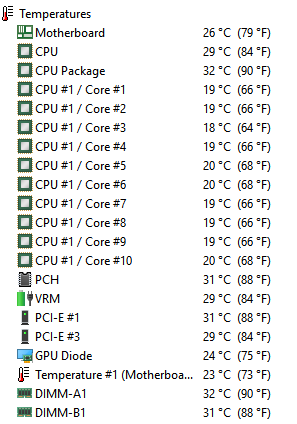
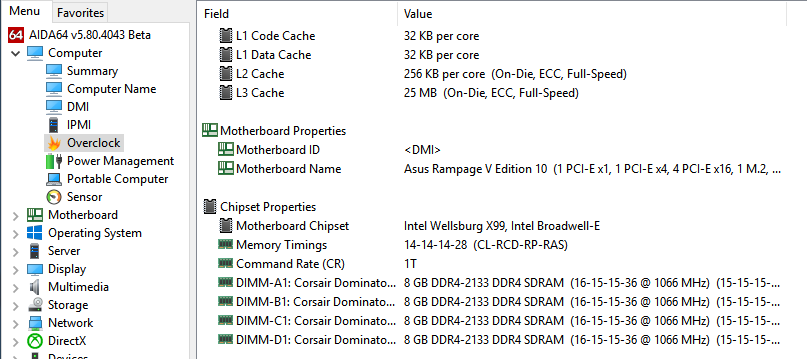
Hello Since I have 32GB memory (4x8Gb), sometimes Aida64 does not recognize the 4 sticks for monitoring, but all the sticks are recognized in "Overclock" Just close Aida64 and re-launch it and it's good Thanks
-
Ok, it is not serious
-
Hello Is possible to have lines more in "preferences - System Stability Test" ? With 6950X (10 cores) The lines are used quickly Thanks