
Loyd
-
Posts
223 -
Joined
-
Last visited
-
Days Won
13
Content Type
Profiles
Forums
Events
Everything posted by Loyd
-
PM Me, this is 1600x1200
-
you need all the fonts used in the sensor panel. try to find one in a .zip file most of the time it will have the fonts used. good luck
-

🚀 Introducing SynQPanel - A New Panel-Based Visualization Tool for AIDA64 Users
Loyd replied to GaHile's topic in SensorPanel
glad she is doing the best she can and really looking forward to the upgrade. -
It seems when you click on the link it takes you to photo bucket of some type. Then if you click on the photo I got one of those "your pc is locked and if you want it fixed call this number" Just rebooted that was that. By the way that is really good sensor panel would like it for my collection. like the background, nothing against you, you did a good job.
-
DO NOT go to the file, it is spam
-
got the latest Aida update and it seems to be working with all my sensor displays, 3 USB, 1 RSLCD, and an Ipad for sensorpanel.
-
Well, I did not get the update. It locked up when I tried to move the program window. all I get is the circle only Aida is affected. unplugged the screens no effect still "Not Responding" on that window. but the forum widow is working fine as I am typing on it now. I cled out and restarted Aida,updated to 8.25.8200. All seems fine with no USD devices plugged in. One turing display working no problem, another display connected again no problem, and now the third, no problem so far. i will let it run and see what happens
-
as a test I disconnected all USB displays (3), started Aida64, plugged in one at a time and they all worked on 8.20.8100. now I will update Aida64 and see what happens
-
as the title says. windows11 lockups Aida64 when I attempt to start turning LCD. It loaded the sensor panel, remotesensorLCD and OSD just fine
-
🚀 Introducing SynQPanel - A New Panel-Based Visualization Tool for AIDA64 Users
Loyd replied to GaHile's topic in SensorPanel
what's happening? Have not seen anything for almost a month. Hope all is going well and you are busy making new content. Loyd -
had both of those set but had to do a reboot of Aida and now they are back GREAT thanks
-
In fixing a connection problem somehow I turned off drive temperature sensors. So where do I go to fix this?
-
I don't know other than you cannot use custom gauges in RSLCD. It is used with LCD's connected via a serial port (USB) or thru a web browser. The addition of the turic displays which uses tulcd file extensions changed that. They can use the same files as sensorpanel just change the file extension. I have 4 small Turnz usb displays, one large RSLCD and an Ipad for sensorpanels all running different video.
-
aida view is for rslcd files not sensor panels. works great for those panels
-
site does not load
-
what program did you used to make the wonderful blue highlights. Share??
-
just need to know the resolution of your sensor monitor. It will use a HDMI port on your GPU unless you get a monitor that plug into an usb. get your size (in pixels), do a search on here. most likely there will some skins that will fit. Good luck and have fun
-
deal with Surjeet. He make it anyway you want. He has made quite a few for me 1600X1200, 4 drives, 8 fans, no gaming info (not a gamer) temps for CPU, GPU, drives just a good designer
-
check $ Promote your SensorPanel $ top of the sensor panel list
-
no, only one screen is allowed with the sensorpanel
-
🚀 Introducing SynQPanel - A New Panel-Based Visualization Tool for AIDA64 Users
Loyd replied to GaHile's topic in SensorPanel
Looks good cannot wait!!! -
do a search on your size. you should find quite a few
-
🚀 Introducing SynQPanel - A New Panel-Based Visualization Tool for AIDA64 Users
Loyd replied to GaHile's topic in SensorPanel
"implements AIDA-style $LABEL macro resolution (e.g. $CPUMODEL, $GPU1MODEL)." just how does this work? could not get it working. also the names of the imported files are some sort of date function taken from the file I guess. any way we could rename the file box? Loyd -
🚀 Introducing SynQPanel - A New Panel-Based Visualization Tool for AIDA64 Users
Loyd replied to GaHile's topic in SensorPanel
Default Font behavior Personally I prefer the last-used style but to be able to select last used or default would be best. The choice should stay until changed or a reload. Duplicating gauges / copy-paste Could you also let us know how you’re duplicating gauges? Highlight the gauge, duplicate, move dup in place, change source if needed. this did not connect to the new source but it does in AIDA64 In SynQ Manager, just above the trash/delete icon, there is a “Duplicate selected item” option. We’ve tested this and confirmed that it properly clones the selected sensor/gauge. After duplicating, you can replace the sensor using the orange “Replace Selected Sensor” button. If this button appears disabled, please ensure: The cloned gauge is selected on the right, and The desired sensor is selected from the AIDA sensor list on the left. I did this and the new sensor did not work I modify a lot of panels to fit my 1600X1200 display and use this cut and paste sensor frequently as I take a 1024X600 sensor, change to 1600X900. then add a 1600X300 panel to fill it out either by cutting part of the original image or adding the gauges. The image below was 1336X768 and now is 1600X1200. will fill-in the bottom with sensors Loyd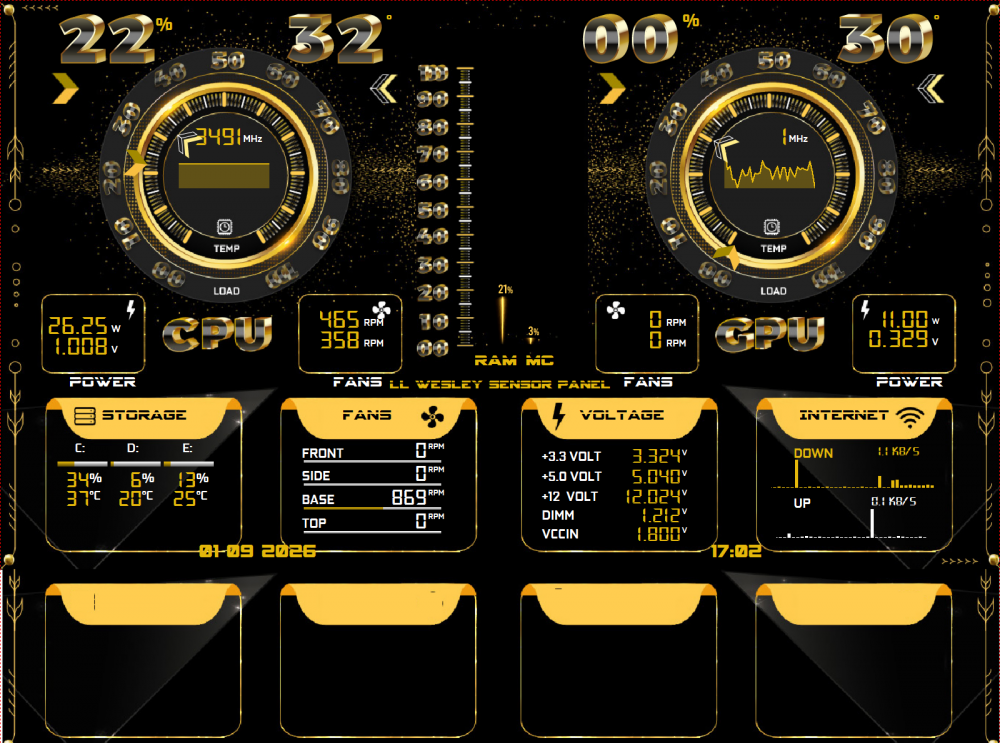
-
🚀 Introducing SynQPanel - A New Panel-Based Visualization Tool for AIDA64 Users
Loyd replied to GaHile's topic in SensorPanel
Working on a new panel just to try out this great program. couple of things...the selection area reverts to default when entering new items. I feel it should stay the same ie font type color size etc. That way you don't have to select all the info again and again and again. setting the defaults is a way around this but would be better to be able to select the way I want it to work. When entering gauges and I want more that one of the same gauge, I have to go thru the complete loading process instead of a copy paste. If I copy paste, change source the gauge does not work. problem? gifs work great, love the color gradient section. all in all a great add to AIDA64 Loyd