tistou77
-
Posts
497 -
Joined
-
Last visited
-
Days Won
3
Content Type
Profiles
Forums
Events
Everything posted by tistou77
-
Monitoring Asus Rampage VI Extreme Encore
tistou77 replied to tistou77's topic in Hardware monitoring
Not good Thanks -
Ok, thanks
-
Monitoring Asus Rampage VI Extreme Encore
tistou77 replied to tistou77's topic in Hardware monitoring
Not possible ? Thanks -
I guess it's not possible
-
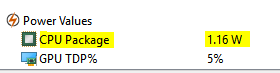
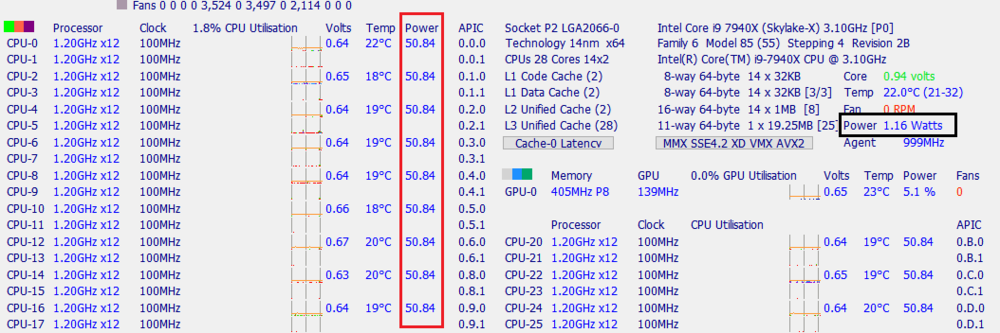
Hello is it possible to add the Power value of cores ? Just 1 line, the value of the cores is the same from what I tested with SIV If SVID is disabled in the bios, the Power value is distorted, but those of the cores are good See screen SIV and Aida64 Thanks
-
Bug with voltage probes (Asus Rampage VI Extreme)
tistou77 replied to tistou77's topic in Hardware monitoring
It's good thanks -
Bug with voltage probes (Asus Rampage VI Extreme)
tistou77 replied to tistou77's topic in Hardware monitoring
Need files or report ? -
Bug with voltage probes (Asus Rampage VI Extreme)
tistou77 replied to tistou77's topic in Hardware monitoring
Rampage VI Extreme, as indicated in title Thanks -
Bugs with probes reading (Asus Rampage VI Extreme)
tistou77 replied to tistou77's topic in Benchmarking, system performance
I had tested with SIV launched at the same time as the stress test of Aida64 (more information on consumptions, etc ...) and no weird temperature/voltage with SIV -
Bugs with probes reading (Asus Rampage VI Extreme)
tistou77 replied to tistou77's topic in Benchmarking, system performance
But with other monitoring software I do not have this problem This is related to Aida64's stress test and its monitoring ? -
Hello Small bug with voltage probes in Aida64 I thought it was a problem of Asus, but all other monitoring shows good values Aida64 HWInfo In HWInfo, I do not know which 3V corresponds at +3.3v Stanby Thanks


-
Bugs with probes reading (Asus Rampage VI Extreme)
tistou77 replied to tistou77's topic in Benchmarking, system performance
Ok for the version of Windows 10, I did not know Yes I enable EC bank switching Thanks -
Bugs with probes reading (Asus Rampage VI Extreme)
tistou77 replied to tistou77's topic in Benchmarking, system performance
Ok for the "bumpy" phase after the start of tests I never had this "problem" with the X99 (same amount of ram) For the probes problem, I have never used and therefore installed AI Suite or other Asus software During the test, only System Stability Test is open (no software in the background) Thanks -
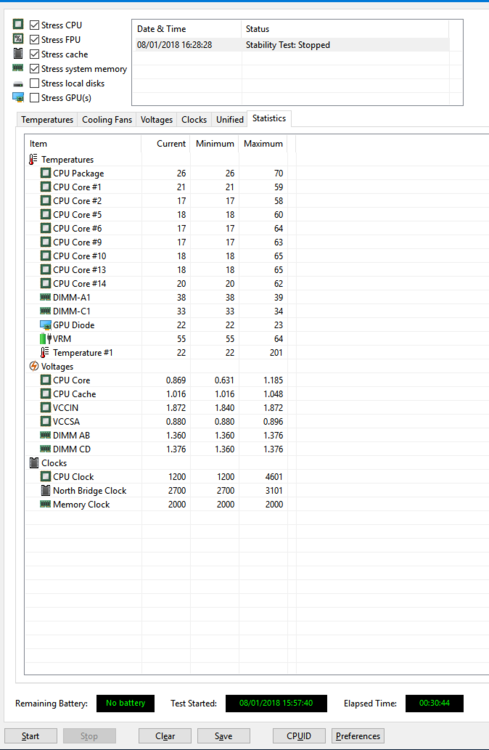
Hello With Rampage VI Extreme and System Stability Test, I have bugs with probes reading during the tests As on the Screen, the temperature 1 indicated 201°C, but it is 24°C in reality For VRM, I had the same thing, minimum temperature 1°C (not visible on this screen) And also, when I run the tests, Aida seems to be "blocked" after a few seconds and after 20 seconds to 1mn, it's good, the temperatures and voltages "vary" and the "Elapsed Time" goes Thanks
-
Monitoring Asus Rampage VI Extreme Encore
tistou77 replied to tistou77's topic in Hardware monitoring
Asrock software reads DIMMs correctly (A1, B1, etc ...) Maybe see to use the same method, if possible ? -
Monitoring Asus Rampage VI Extreme Encore
tistou77 replied to tistou77's topic in Hardware monitoring
Ok, if there are tests to do, I can do them -
Monitoring Asus Rampage VI Extreme Encore
tistou77 replied to tistou77's topic in Hardware monitoring
But for this motherboard, it's only Skylake-X, there is still a problem ? it will have to be like any Rampage Extreme , right ? -
Monitoring Asus Rampage VI Extreme Encore
tistou77 replied to tistou77's topic in Hardware monitoring
Okay, and an idea of when the probes (labels) can be "customize" ? And for DIMMs, no solution then ? -
Monitoring Asus Rampage VI Extreme Encore
tistou77 replied to tistou77's topic in Hardware monitoring
It will be good already an idea of when it will be done ? Although it's weird to have water pumps, etc ... in the fans EDIT: I had thought for the Watercooling section, so as not to overload the scan of the Sensor window, maybe add the option in the "Preferences" Those who do not have Watercooling probes, do not activate this option and the scan is not slowed down -
Monitoring Asus Rampage VI Extreme Encore
tistou77 replied to tistou77's topic in Hardware monitoring
But you planned to "customize" it, if I remember correctly ? -
Monitoring Asus Rampage VI Extreme Encore
tistou77 replied to tistou77's topic in Hardware monitoring
Yes, but I was talking in the Sensor window, of course -
Monitoring Asus Rampage VI Extreme Encore
tistou77 replied to tistou77's topic in Hardware monitoring
If it's not complicated, it may be better then Currently reading Water indicates Temperature N°1 (why not just Temperature, if not other temperature probes ?), T_Sensor 1, indicates Temperature N°2 (nothing consistent) I found it good, a section Watercooling, more serious, and defined each section If it's a little longer, even 1 second, nothing dramatic Or the best and simplest for everyone, be able to rename probes and sections, and very easy to integrate Thanks -
Monitoring Asus Rampage VI Extreme Encore
tistou77 replied to tistou77's topic in Hardware monitoring
Too bad, for once Asus put "probes" for Watercooling Too complicated to rename this probe in Water ? Read the information from the bios (indicated correctly in the bios) is not good ? Because Temperature N°1, it can be anything and everything And also, if it is possible to add a section "Watercooling" (not translated into French) in Sensor Currently, water pump, water flow are in Fans, not really the right place Thanks and happy new year too -
Monitoring Asus Rampage VI Extreme Encore
tistou77 replied to tistou77's topic in Hardware monitoring
If you need these informations smbusdump_full.txt -
Asus MAXIMUS IX APEX (Adding a monitoring option)
tistou77 replied to jjxaker's topic in Hardware monitoring
It's ok with M2 on DIMM2 and temperature