Mice007
-
Posts
197 -
Joined
-
Last visited
-
Days Won
24
Content Type
Profiles
Forums
Events
Everything posted by Mice007
-
Hi, Nope, but it is possible with the SensorPanel.
-
Is this error just pops up randomly after a while or it happens when your computer resumes from sleep or hibernation?
-
You should use the following command line parameter to start AIDA64 in a network /SAFE Using this option the most common hardware incompatibility issues can be avoided by disabling low-level PCI, SMBus and sensor scanning. In network audit this option should be used in all cases to make sure AIDA64 does not cause system instability.
-
Thanks for pointing that out, we have fixed that issue in the sample sensor panel and updated the file at:
-
Check this topic too, also I've posted a sample sensor panel there
-
You can download it from this topic:
-
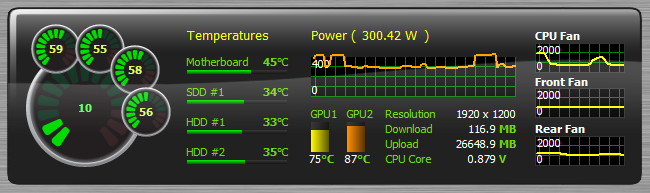
This is the sample SensorPanel used in AIDA64 2.50 what's new page. This utilizes the new gauges and graphs. 250release_sample.sensorpanel
-
Latest beta version is available: http://www.aida64.co...49h5q0sfmjptzip
-
Windows 8 CP (Sidebar gadget background color)
Mice007 replied to Spynx's topic in General Discussion
Latest beta version is available: http://www.aida64.com/downloads/aida64extremebuild1849h5q0sfmjptzip -
This issue is fixed in the latest beta version: http://www.aida64.com/downloads/aida64extremebuild1849h5q0sfmjptzip
-
Windows 8 CP (Sidebar gadget background color)
Mice007 replied to Spynx's topic in General Discussion
Next beta release will fix the reboot issue and also it will save the settings into the registry so this way removing the gadget from the desktop won't erase the settings. -
Did you try SensorPanel feature in AIDA64? With a little designing you can achieve such result or even more.
-
Ok I've sorted out the problem finally, it should work now, I've tested it again several times.
-
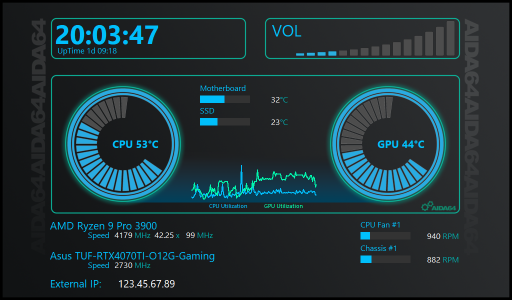
We've created this topic to give you a place to share your free SensorPanel themes. If you've designed a stunning layout and want to show it off, or if you're looking for inspiration and downloadable panels, you're in the right place. Please attach at least one screenshot along with your .sensorpanel file so others can preview the design before downloading. Let’s keep this space helpful, respectful, and inspiring for everyone. Rules: This topic is only for sharing free SensorPanel designs. If you want to promote a paid design, please use the "Promote your SensorPanel" topic. Do not advertise or link to paid content here. You may only upload your own work. The only exception is if you have clear permission from the original creator to share or modify their design. SensorPanelCore.sensorpanel
-
... without a windows server domain
Mice007 replied to tmnetwork's topic in Network audit, change tracking, SQL databases
You should extract AIDA64 Business Edition ZIP file to a shared folder on your server, then you can setup each client to launch AIDA64 from this location. You don't need to install AIDA64 on each client computer, AIDA64 doesn't require installation. -
Right-click on the panel, and launch SensorPanel Manager. With the Move Up / Move Down buttons you can change the order of the items. First item in the list is on the lowest depth on the panel.
-
Here is the ZIP file with the sample SensorPanel theme in it. Please read the "readme" file in the ZIP first. http://download.aida64.com/sensorpanel/sample_sensorpanel.zip
-
Here is the ZIP file with the sample SensorPanel theme in it. Please read the "readme" file in the ZIP first. http://download.aida64.com/sensorpanel/sample_sensorpanel.zip
-
Here is the ZIP file with the sample SensorPanel theme in it. Please read the "readme" file in the ZIP first. http://download.aida64.com/sensorpanel/sample_sensorpanel.zip
-
We are sorry, but it seems our current product line and licensing options are not covering such usage of AIDA64.
-
Currently Remote Control cannot handle UAC dialogs
-
Thank you for letting us now the problem about the ticket, we'll check our support system to find out what happened with your e-mail. About the question with AIDA64. For such usage we recommend Extreme Engineer license as it does exactly what you need, a quick solution to get a report of a computer without installing or configuring the network. Engineer license also supports this kind of usage as this product is bound to an engineer and can be used on an unlimited number of computers. However I'm not sure what kind of post process you want to do with these snapshots as Engineer version only able to produce TXT or HTML based reports. This version also cannot be launched with command line parameters.
-
We are working on an automated way to handle renewals and license extensions, it will be published on our website soon. Until that about renewals please send an e-mail to sales AT aida64.com
-
AIDA 64 Engineer's Licence Expired
Mice007 replied to Colehill Computers's topic in General Discussion
Please send an e-mail to sales AT aida64.com with your actual product key in order to get this sorted out asap. -
Service Setup - Remote + Screenshots don'twork
Mice007 replied to Vulkan's topic in General Discussion
Services running in a different "layer" in Windows Vista and Windows 7 and currently AIDA64 cannot access the user's desktop when forced to run as a service. This problem will be solved in a future version.