

Mice007
-
Posts
204 -
Joined
-
Last visited
-
Days Won
25
Content Type
Profiles
Forums
Events
Everything posted by Mice007
-
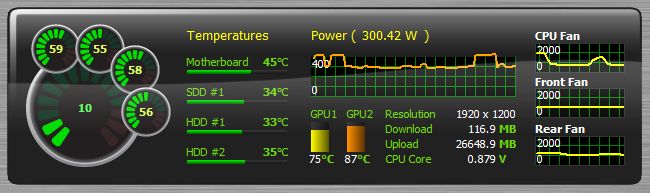
Here is the updated SensorPanel sample to the AIDA64 v3.20 release to show you the new area graph and histogram in action. Please note that if you want to use this graph as is, you need a CPU that is capable of measuring and reporting its power draw. 320release_sample.sensorpanel
-
There is no specific number of votes needed to pass this process. They monitoring the statistics and when a game or app getting enough attention from users (votes) or sitting on the top charts for a while they will contact with the developers about the details of getting into Steam. The good news is that AIDA64 progressing well so if you guys keep voting, and sharing we may proceed to the next level in Steam sooner or later.
-
It's weekend again, the perfect time to build a new SensorPanel using AIDA64 Extreme Edition! Here is a video tutorial to help making the first steps.
-
AIDA64 is submitted into Steam Greenlight. You can visit the page here: http://steamcommunity.com/sharedfiles/filedetails/?id=123950863 Please share this page with friends so we can get enough votes to move forward and pass the Greenlight state.
-
The new AIDA64 update offers optimized benchmarks for Intel Atom Z2760, implements support for OpenCL 1.2 Update and OpenGL ES 3.0, and provides GPU details for the latest AMD Radeon and nVIDIA GeForce graphics accelerators. New features & improvements Optimized benchmarks for Intel Atom Z2760 “Cloverview†SoC Preliminary support for AMD “Richland†APU and Intel “Valleyview†SoC Improved support for Intel “Haswell†APU and Intel “Lynx Point†PCH APP SDK 2.8, OpenCL 1.2 Update, OpenGL ES 3.0, Simple Firmware Interface support OCZ Vector SSD and Indilinx Barefoot 3 SSD controller support GPU details for AMD Radeon HD 7470, AMD Radeon HD 7870 “Tahiti LEâ€, nVIDIA GeForce GT 635M, nVIDIA GeForce GTX 680MX What’s new since AIDA64 v2.00 Microsoft Windows 8 RTM and Windows Server 2012 RTM support OpenCL GPGPU Stress Test Enhanced UPS support SensorPanel graphs and gauges Revamped Desktop Gadget Optimized 64-bit benchmarks for AMD A-Series “Trinity†APU and FX-Series “Vishera†CPU Revamped PhotoWorxx digital photo processing benchmark with AVX, SSE4.1 and XOP optimizations Rewritten AES data encryption benchmark with AESNI, SSE4.1 and VIA PadLock optimizations Support for Intel Atom “Cedarview†processors Support for Intel Core “Ivy Bridge†APUs and Intel 7-Series chipsets Preliminary support for AMD “Kabini†APU Preliminary support for Intel “Haswell†APU and Intel “Lynx Point†PCH Preliminary support for Intel “Penwell†SoC VIA VX11 platform, Nano X2 and QuadCore CPU support Socket FM2 motherboards support Speech API information Support for VirtualBox v4.2 and VMware Workstation v9 ACPI 5.0, APP SDK 2.7, CUDA 5.0, OpenCL 1.2, OpenGL 4.3 support Intel 330, Intel 520, Intel 710, OCZ Vertex 4, Samsung 830, Samsung 840, Samsung 840 Pro SSD support GPU details for AMD Radeon HD 7000, nVIDIA GeForce 600 Series, nVIDIA Quadro K-Series Visit us at CeBIT AIDA64 will be present at this year's CeBIT in Hannover, Germany. At the world's largest ICT fair, held from March 5 to 9, 2013, we will be showcasing the latest edition of our software at the booth of our distribution partner SICONTACT IT-Solutions GmbH (Hall 12, Stand D34). Our IT experts will be available at the booth to provide information about our flagship business product: AIDA64 Business Edition. Visit us at Hall 12, Stand D34! [ Press Release ] [ What's new in AIDA64 v2.80 ] [ Download ]
-
Copy/Paste commands work only on plain text selections like the URL content from the web browser. To receive or send files open the Tools menu on the client side, and select Send file or Receive file option.
-
Hi, Nope, but it is possible with the SensorPanel.
-
Is this error just pops up randomly after a while or it happens when your computer resumes from sleep or hibernation?
-
You should use the following command line parameter to start AIDA64 in a network /SAFE Using this option the most common hardware incompatibility issues can be avoided by disabling low-level PCI, SMBus and sensor scanning. In network audit this option should be used in all cases to make sure AIDA64 does not cause system instability.
-
Thanks for pointing that out, we have fixed that issue in the sample sensor panel and updated the file at:
-
Check this topic too, also I've posted a sample sensor panel there
-
You can download it from this topic:
-
This is the sample SensorPanel used in AIDA64 2.50 what's new page. This utilizes the new gauges and graphs. 250release_sample.sensorpanel
-
Latest beta version is available: http://www.aida64.co...49h5q0sfmjptzip
-
Windows 8 CP (Sidebar gadget background color)
Mice007 replied to Spynx's topic in General Discussion
Latest beta version is available: http://www.aida64.com/downloads/aida64extremebuild1849h5q0sfmjptzip -
This issue is fixed in the latest beta version: http://www.aida64.com/downloads/aida64extremebuild1849h5q0sfmjptzip
-
Windows 8 CP (Sidebar gadget background color)
Mice007 replied to Spynx's topic in General Discussion
Next beta release will fix the reboot issue and also it will save the settings into the registry so this way removing the gadget from the desktop won't erase the settings. -
Did you try SensorPanel feature in AIDA64? With a little designing you can achieve such result or even more.
-
Ok I've sorted out the problem finally, it should work now, I've tested it again several times.
-
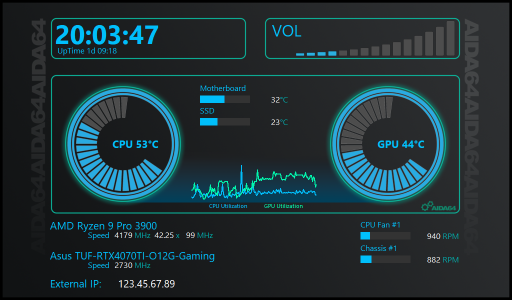
We've created this topic to give you a place to share your free SensorPanel themes. If you've designed a stunning layout and want to show it off, or if you're looking for inspiration and downloadable panels, you're in the right place. Please attach at least one screenshot along with your .sensorpanel file so others can preview the design before downloading. Let’s keep this space helpful, respectful, and inspiring for everyone. Rules: This topic is only for sharing free SensorPanel designs. If you want to promote a paid design, please use the "Promote your SensorPanel" topic. Do not advertise or link to paid content here. You may only upload your own work. The only exception is if you have clear permission from the original creator to share or modify their design. SensorPanelCore.sensorpanel
-
... without a windows server domain
Mice007 replied to tmnetwork's topic in Network audit, change tracking, SQL databases
You should extract AIDA64 Business Edition ZIP file to a shared folder on your server, then you can setup each client to launch AIDA64 from this location. You don't need to install AIDA64 on each client computer, AIDA64 doesn't require installation. -
Right-click on the panel, and launch SensorPanel Manager. With the Move Up / Move Down buttons you can change the order of the items. First item in the list is on the lowest depth on the panel.
-
Here is the ZIP file with the sample SensorPanel theme in it. Please read the "readme" file in the ZIP first. http://download.aida64.com/sensorpanel/sample_sensorpanel.zip
-
Here is the ZIP file with the sample SensorPanel theme in it. Please read the "readme" file in the ZIP first. http://download.aida64.com/sensorpanel/sample_sensorpanel.zip